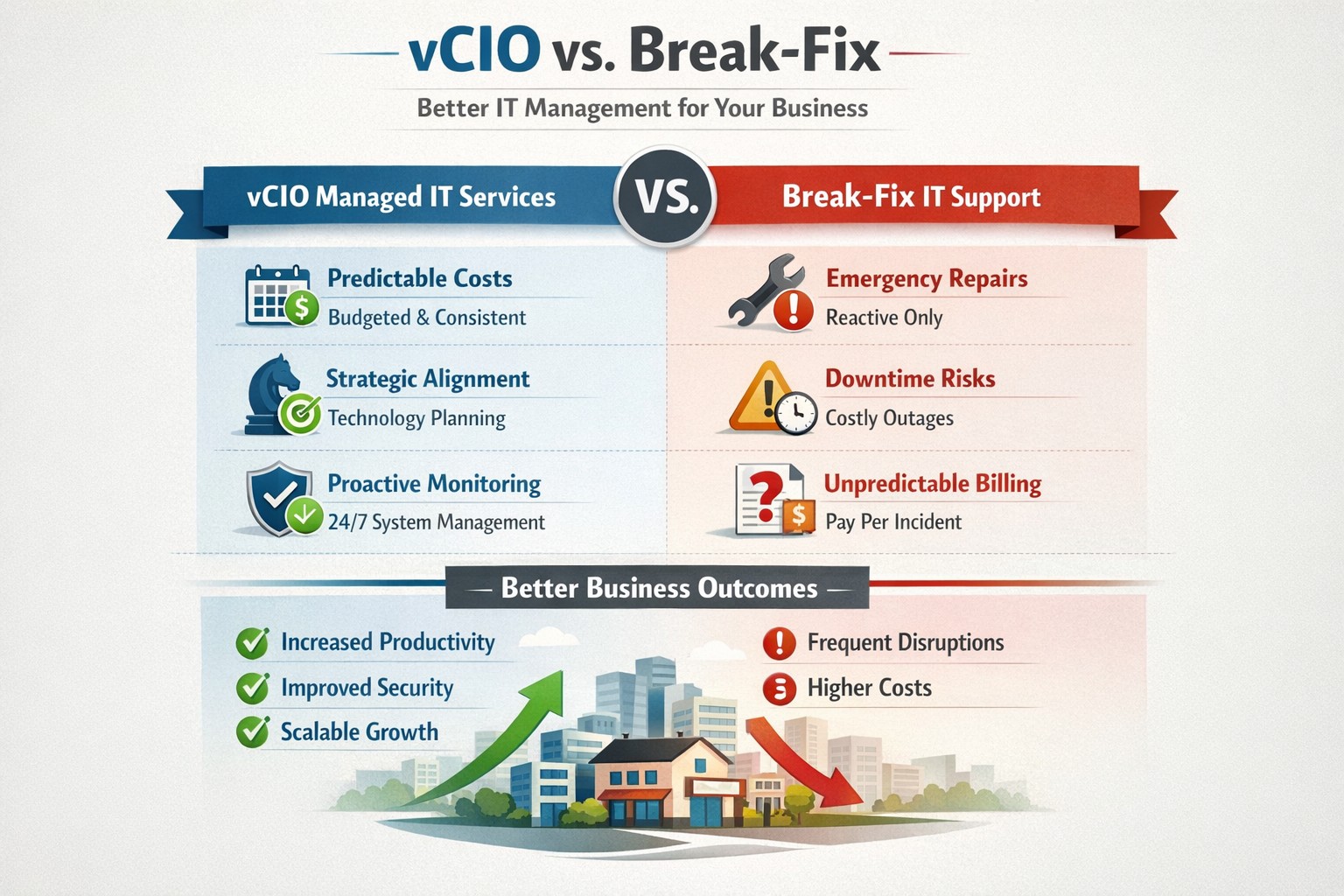
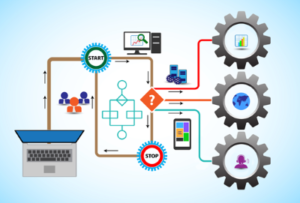
vCIO strategic services vs break-fix reactive IT model performance comparison.
In the ever-evolving world of IT support, two strategic approaches have emerged to address the needs of businesses – vCIO (Virtual CIO) services and break-fix services. Each of these approaches has its own merits and drawbacks, making it crucial for businesses to carefully consider which option best aligns with their goals and IT requirements. So, let’s dive into the comparison between vCIO services and break-fix services and find out which one takes the crown!
vCIO Services: Unleashing the Power of Proactive IT Management
The vCIO model offers businesses a cost-effective and strategic solution to IT management, delivering benefits far beyond simple problem-solving. Here’s a breakdown of what vCIO services bring to the table:
Strategic Technology Planning: A vCIO provides a long-term roadmap for your IT infrastructure, aligning it with your business objectives. They assess your current technology landscape, analyze potential risks, and develop a comprehensive IT strategy to ensure your technology infrastructure drives success.
Proactive IT Monitoring and Management: By constantly monitoring your systems, a vCIO can detect and address issues before they turn into full-blown disasters. They implement proactive measures, such as 24/7 system monitoring, patch management, and security audits to keep your IT environment optimized and secure.
IT Budgeting and Procurement: A vCIO helps you streamline your IT budget by aligning your investment with your business goals. They provide insights into cost-effective technology solutions, negotiate contracts with vendors, and manage IT procurement to help you make informed decisions while optimizing your spending.
Technology Vendor Management: Collaborating with multiple technology vendors can be time-consuming and complex. A vCIO acts as a single point of contact for all your technology vendors, managing relationships and ensuring smooth coordination between various stakeholders.
Break-Fix Services: The Traditional Firefighter Approach
Break-fix services have long been the go-to approach for businesses seeking IT support on an as-needed basis. Here’s a closer look at what break-fix services bring to the table:
Issue-Specific Support: Break-fix services are designed to address specific IT issues as and when they arise. This approach involves fixing problems after they occur, reacting to incidents rather than proactively managing your systems.
Limited Scope of Support: Break-fix services typically focus solely on resolving immediate technical issues. While they can provide quick fixes, they do not offer strategic planning or ongoing support to help prevent future issues or optimize your IT infrastructure.
Variable Costs: Break-fix service costs can be unpredictable, as you are billed per incident or hourly basis. This makes budgeting and financial planning more challenging, especially if you encounter frequent or recurring IT issues.
Less Focus on Prevention: With break-fix services, the emphasis is on remedying existing problems, leaving behind the potential for other underlying issues to remain undetected, ultimately leading to more costly and time-consuming problems down the line.
The Verdict: vCIO Takes the Throne!
While break-fix services may have their place in certain scenarios, vCIO services offer a more comprehensive approach to IT management, aligning your technology with your business goals and providing ongoing support. The proactive nature, strategic planning, and cost optimization provided by vCIO services make it the winning solution for businesses looking to stay ahead of the ever-changing technology landscape. So, without a doubt, the crown firmly sits on the head of vCIO services!
If your company is tired of just calling your IT service company when things are broken, then contact us for vCIO services.
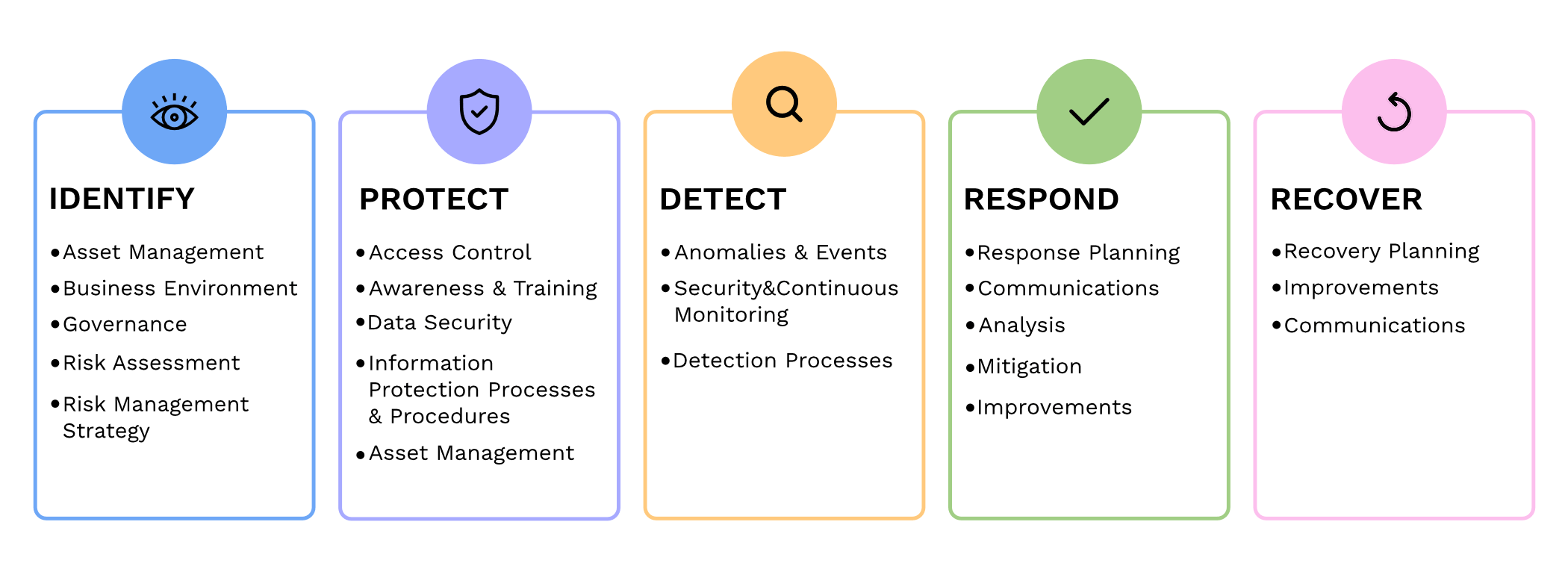
Small and medium-sized businesses (SMBs) are the backbone of the economy, but they are often the primary targets for cyberattacks. In fact, according to recent reports, nearly half of all cyberattacks are aimed at SMBs. To protect themselves from these threats and ensure the security of their critical assets, SMBs should consider following the guidelines provided by the National Institute of Standards and Technology (NIST) in their Special Publication 800 series.
Comprehensive Cybersecurity Framework
NIST 800 series provides a comprehensive framework that helps SMBs establish and maintain effective cybersecurity measures. By implementing the NIST guidelines, SMBs can enhance their cybersecurity posture and reduce the risk of potential data breaches, financial losses, and reputational damage.
Improved Risk Management
NIST 800 guidelines focus on risk management, helping SMBs identify and mitigate potential vulnerabilities and threats. Following the guidelines allows SMBs to proactively assess their cybersecurity risks and develop effective strategies to safeguard their sensitive data, intellectual property, and customer information.
Industry-Recognized Standards
NIST 800 series is widely recognized and adopted by both the public and private sectors. By adhering to these guidelines, SMBs demonstrate their commitment to meeting industry standards and best practices. This not only helps build trust with customers and partners but also increases their chances of securing lucrative business contracts and partnerships.
Cost-Effective Approach
Implementing NIST 800 guidelines can be a cost-effective approach for SMBs. These guidelines offer scalable solutions that can be tailored according to the organization’s size, budget, and specific requirements. SMBs can leverage the NIST framework to prioritize their cybersecurity investments, ensuring that they maximize their security efforts within their available resources.
In today’s digitally connected world, SMBs cannot afford to neglect cybersecurity. Following the NIST 800 guidelines provides SMBs with a comprehensive framework to enhance their cybersecurity posture, improve risk management, establish industry-recognized standards, and reduce costs, By working with a managed IT service provider to implementing these guidelines, SMBs can protect their assets, maintain their reputation, and thrive in an increasingly cyber-threatened landscape.
If your company is looking to implement stronger security through an standards based framework, then contact us for assistance.
Business password manager vault with shared folders, password strength indicators, and audit log activity.
Today’s cybersecurity threats are constantly evolving, so it’s crucial for businesses to protect their sensitive data. One of the simplest yet most effective ways to enhance your company’s security is by using a company-wide password manager. In this blog post, we will explore the top reasons why businesses should adopt password managers.
Simplify Password Management
With the average person having to remember dozens of passwords for various accounts, it’s no wonder that weak passwords and password reuse are prevalent. A password manager simplifies this process by securely storing all passwords in one encrypted location. Employees can then access their passwords with a single master password or use biometric authentication.
Generate Strong and Unique Passwords
One of the primary reasons for data breaches is weak passwords. Many people still rely on easily guessable passwords, such as “monkey” or “123456” or “password.” A password manager helps eliminate this risk by generating and storing strong, unique passwords for each account. (Most even have an auto-fill feature to work with internet browsers to make website login fast and secure.) This ensures that even if one account is compromised, the rest remain secure.
Enhance Security and Privacy
By using a company-wide password manager, businesses can significantly improve their security posture. These tools employ strong encryption algorithms to protect sensitive information from unauthorized access. Moreover, most password managers offer additional security features like two-factor authentication and secure password sharing, further enhancing your company’s security.
Boost Productivity and Efficiency
Lost or forgotten passwords can cause significant downtime and productivity loss for individuals and businesses. With a password manager, employees no longer need to waste time recovering or resetting passwords. They can easily retrieve their credentials whenever needed, freeing up valuable time to focus on their primary tasks.
Centralize Access Control
In a business setting, it’s crucial to have centralized control over employee access to various systems and accounts. A password manager allows administrators to manage user access and permissions, ensuring that the right people have access to the right resources. It also facilitates revoke access promptly when an employee leaves the organization, minimizing the risk of unauthorized access.
Simplify Onboarding and Offboarding
Managing employee onboarding and offboarding can be a complex process. A password manager streamlines this by providing a centralized platform for creating and distributing passwords. When an employee leaves, their access can be promptly revoked, eliminating any potential security vulnerabilities associated with ex-employee accounts.
If your company is looking to implement the ease and security of a password manager, then contact us for assistance.
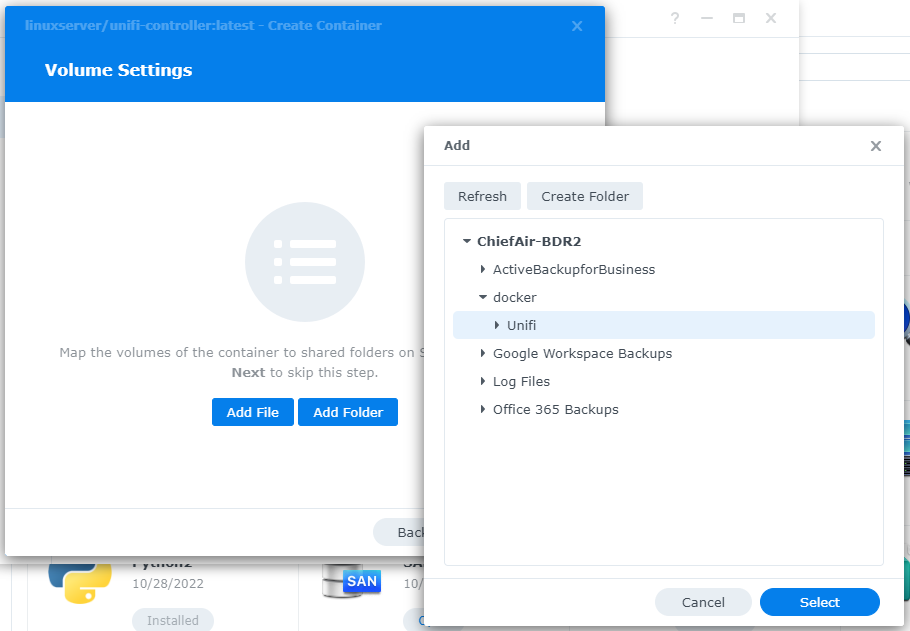
This is the fifth in a series that documents the Tier 3 / Co-Managed IT work we did to setup a wireless test bed for a Linux based scientific device. The testing environment included two different wireless network hardware types (Ubiquiti and Cisco). There was also a Synology device used for various purposes including hosting the Ubiquiti controller inside a Kubernetes container, providing certificate services, providing LDAP authentication, and providing RADIUS authentication. Each article will detail a separate piece of the project. This article shows the setup Synology RADIUS server & certificates.
Setup RADIUS Server
Login to Synology
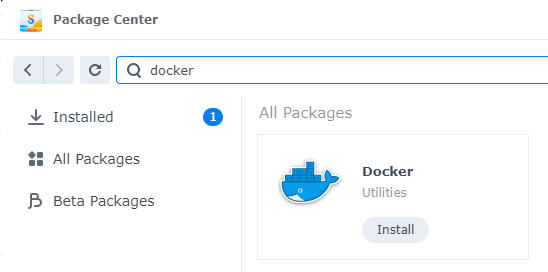
Open Package Center
Install RADIUS Server app
Open RADIUS Server package
Uncheck local users
Check LDAP users
Click Apply
Click on Clients on left hand side
Click on Add
Create Name
Create Shared Secret
Enter IP address of Cisco WLAN controller
Click on Add
Create Name
Create Shared Secret
Enter IP address of Ubiquiti Controller
Configure RADIUS Certificates
Open Control Panel
Click on External Access
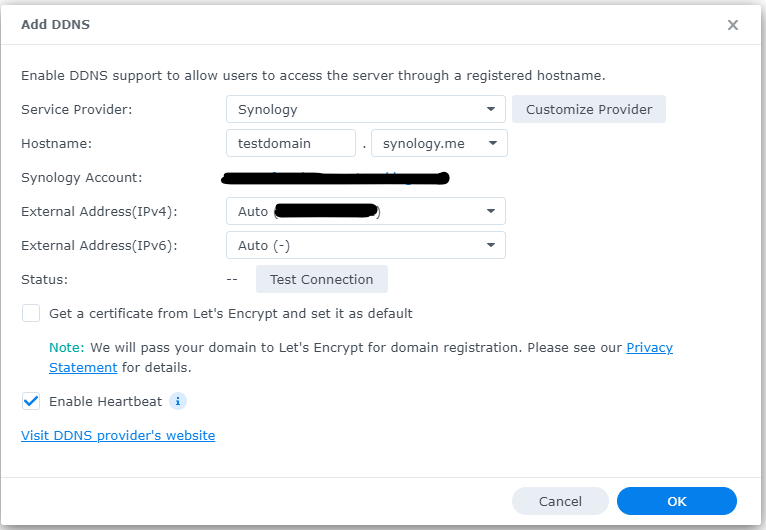
Click on DDNS tab
Click Add
Choose Synology as service provider
Add hostname
Click Test Connection
Click OK
Click on Security on left hand side
Click on the Certificate tab
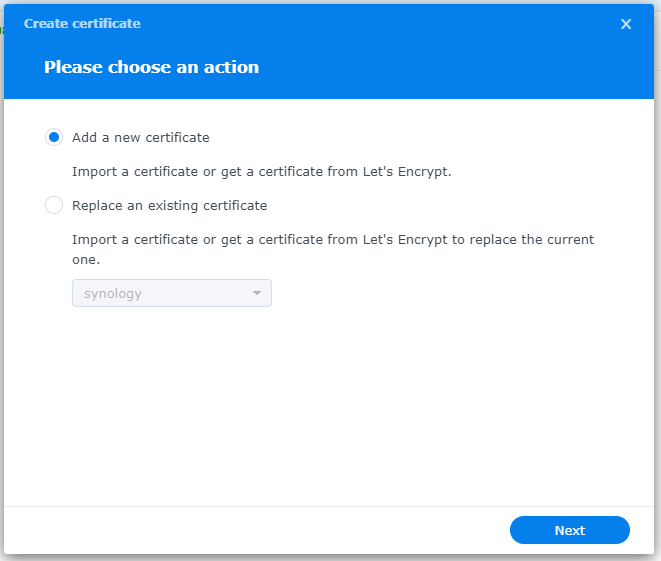
Click on Add
Add new certificate
Click Next
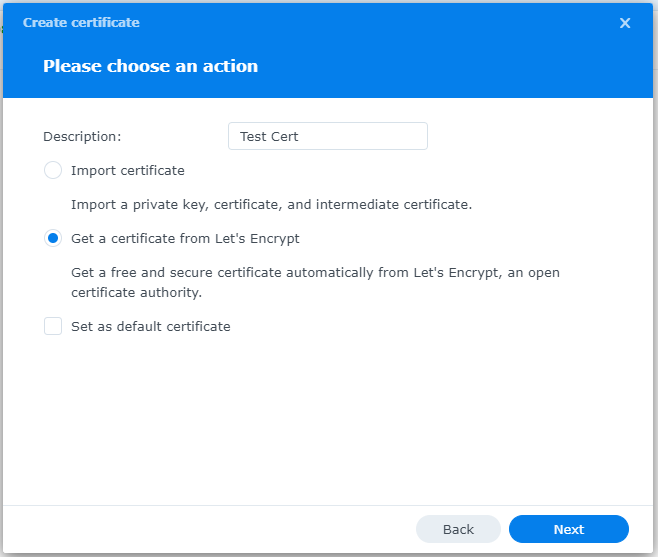
Create description
Get a certificate from Let’s Encrypt
Click Next
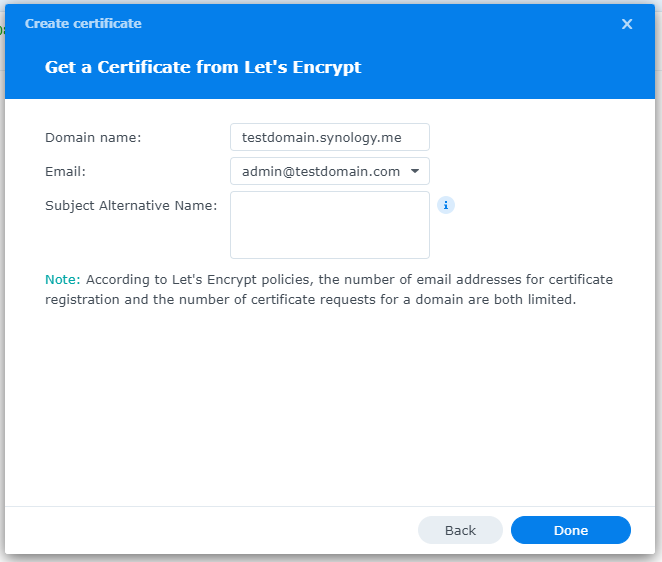
Add needed certificate information
Click Done
Click Settings button and choose appropriate RADIUS server certificate
If your company has highly customized setup requirements that you need consulting for, then contact us for assistance.
PwC study: MSP strategic users gain 43-point performance premium over cost-focused peers.
A report from PricewaterhouseCoopers based on a survey of over 2,000 business leaders and took it as confirmation of our recent blog post about Why SMBs Need Managed Service Providers (MSPs). Here are some takeaways from the article:
Takeaways:
“Companies that use MSPs for strategic advantage are 1.6 times and 2.4 times more likely to be faster to market as well as more innovative than those focused solely on cost savings, according to the report.”
“Organizations utilizing managed services at a mature level use them to respond more adroitly to changing conditions and potential threats.”
“Most business and IT leaders recognize the pace of innovation is occurring faster than their internal IT teams can absorb. There is always going to be some type of skills shortage. Those skill shortages are ones that MSPs are in the best position to fill.”
If your company is looking to outperform in the marketplace, then contact us to start a partnership.
IT lifecycle dashboard tracking device age, refresh cycles, and replacement planning for SMB hardware.
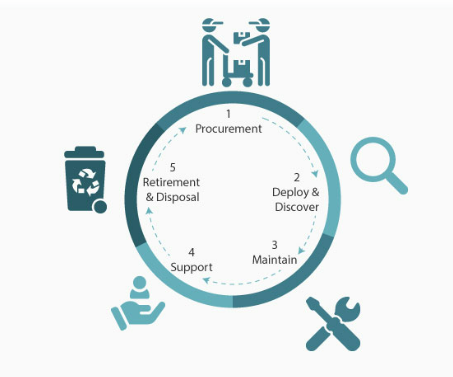
In today’s fast-paced business environment, effectively managing IT equipment throughout its lifecycle has become essential. Equipment Lifecycle Management (ELM) refers to the systematic approach of acquiring, operating, maintaining, and disposing of equipment. By implementing an ELM strategy, businesses can maximize the lifespan and productivity of their equipment, while also minimizing costs and downtime. Let’s explore some of the secret benefits of equipment lifecycle management.
Cost Optimization
IT equipment can represent a significant investment for businesses. Through ELM, companies can optimize costs by planning IT equipment updates and replacements in a strategic manner. With a clear understanding of the IT equipment’s lifespan and maintenance requirements, businesses can budget for these costs well in advance, avoiding unexpected expenses that could negatively impacting their finances.
Increased Equipment Efficiency
One of the primary goals of ELM is to maximize equipment efficiency and productivity. By conducting regular inspections, maintenance, and repairs, businesses can identify and address performance issues before they become major problems. Proactively managing IT equipment ensures that it operates at optimal levels, reducing downtime and improving overall operational efficiency.
Enhanced Asset Tracking and Planning
ELM provides businesses with a comprehensive understanding of their equipment inventory. Through proper record-keeping and asset tracking systems, companies can easily identify the location, condition, and maintenance history of each piece of IT equipment. This information enables businesses to plan for IT equipment updates, replacements, or adjustments based on their lifecycle and performance, ensuring that resources are allocated efficiently.
Sustainable and Environmentally Responsible Practices
Efficient IT equipment management is not only beneficial for businesses but also for the environment. By properly maintaining and disposing of equipment, companies can significantly reduce waste generation and minimize their carbon footprint. Implementing ELM strategies, such as equipment reuse or recycling programs, aligns with sustainable business practices and demonstrates a commitment to environmental responsibility.
Effective equipment lifecycle management is crucial for businesses looking to optimize costs, improve productivity, and minimize their environmental impact. By proactively managing IT equipment throughout its lifecycle, companies can maximize its efficiency, extend its lifespan, and ensure smooth operations. Investing in IT equipment lifecycle management ultimately leads to long-term benefits and a competitive advantage in today’s business landscape.
If you haven’t already, contact us to implement an ELM strategy for your business.
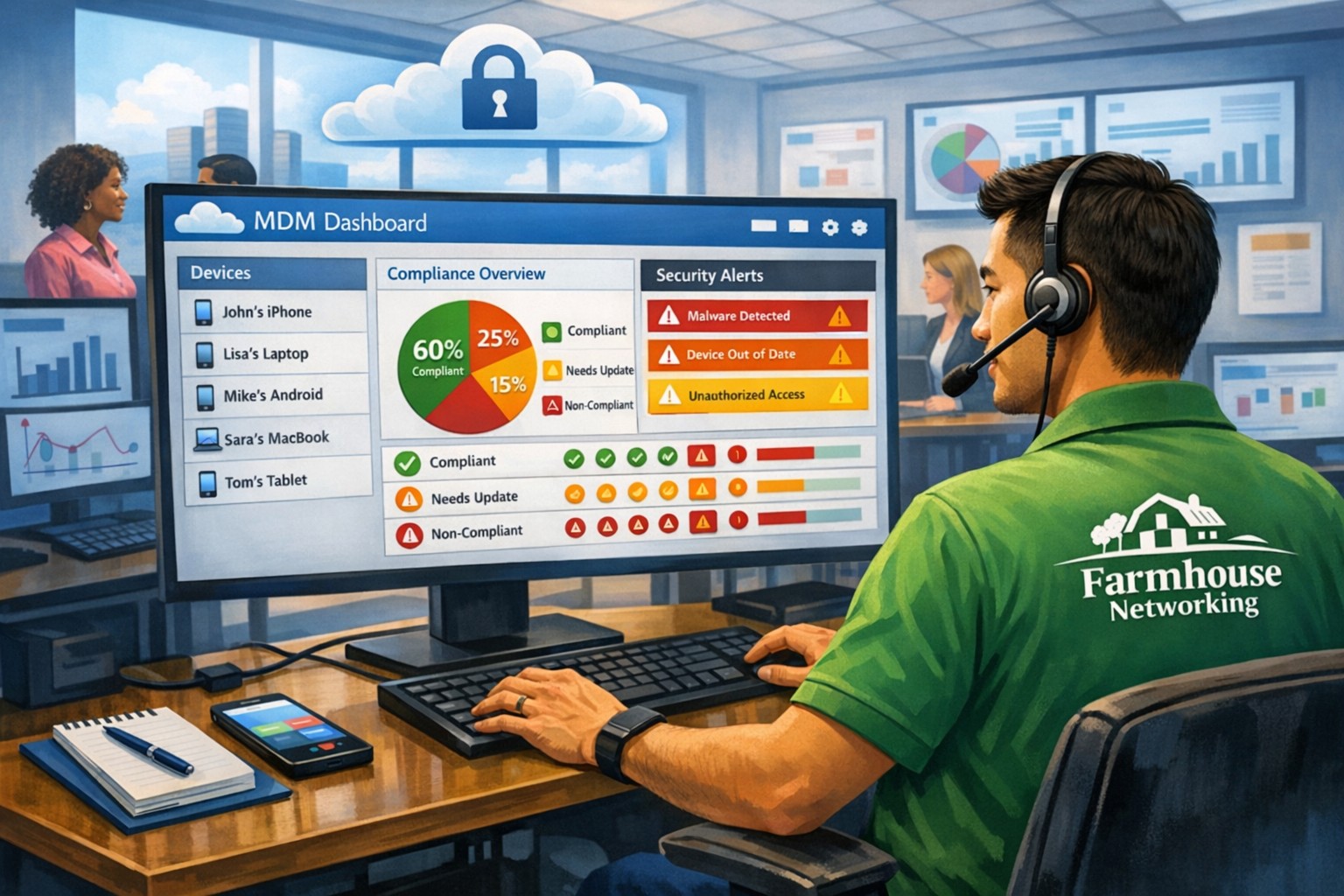
MSP console managing SMB BYOD smartphones and laptops with centralized MDM and security policies.
Small and medium-sized businesses (SMBs) face numerous challenges when it comes to managing their IT. Limited resources (both human and money), lack of expertise, and the need to focus on core business operations often make it difficult for SMBs to understand and manage technology needs. This is where Managed Service Providers (MSPs) come in. In this blog article, we will explore the reasons why SMBs should consider partnering with MSPs to enhance their IT capabilities and drive business growth.
Cost-Effective IT Solutions:
One of the primary reasons why SMBs need MSPs is the cost-effectiveness they offer. By outsourcing their IT needs to MSPs, SMBs can avoid the high costs associated with hiring and training an in-house IT team. MSPs provide a range of services, including network monitoring, data backup and recovery, cybersecurity, and software updates, all at a predictable monthly cost. This allows SMBs to allocate their resources more efficiently and focus on their core business.
Access to Expertise and Advanced Technology:
MSPs are experts in providing IT services and have a team of highly skilled professionals with expertise in variety of technology. By partnering with MSPs, SMBs gain access to the depth of knowledge and experience from IT experts who can handle complex tasks and provide strategic guidance. Additionally, MSPs stay up-to-date with the latest technology trends and can recommend and implement solutions that can help SMBs stay competitive in the market and safe from hackers.
Proactive IT Support and Maintenance:
MSPs offer proactive IT support and maintenance, which is crucial for SMBs. They monitor networks, identify potential issues, and take preventive measures to avoid downtime and disruptions. MSPs also provide regular software updates, security patches, and system maintenance, ensuring that SMBs’ IT remains secure and up-to-date. This proactive approach helps SMBs minimize the risk of costly IT failures and ensures smooth business operations.
Enhanced Data Security:
Data breaches and cyberattacks pose a significant threat to SMBs. MSPs play a vital role in safeguarding SMBs’ sensitive data and protecting them from potential security breaches. They implement robust cybersecurity measures, such as firewalls, antivirus software, and encryption, to ensure data confidentiality and integrity. MSPs can also conduct regular security audits and vulnerability assessments to identify and address any potential weaknesses in the IT infrastructure.
Scalability and Flexibility:
As SMBs grow, their IT needs evolve. MSPs offer scalable solutions that can adapt to changing business requirements. Whether it’s adding new users, expanding storage capacity, or integrating new software, MSPs can quickly and efficiently accommodate these changes. This scalability and flexibility allow SMBs to focus on their growth without worrying about the limitations of their IT infrastructure.
If your company could use the cost-effective solutions, access to expertise, proactive support, enhanced data security, and scalability that come from using a MSP, then contact us for assistance.
2FA dashboard displaying account protection compliance metrics and phishing defenses.
Businesses are face an increasing number of cyber threats. To protect sensitive data and prevent hackers from gaining access, implementing stronger security measures is crucial. One such measure is 2-factor authentication (2FA). Let’s look at the importance and security benefits of 2FA for businesses.
Enhanced Account Security:
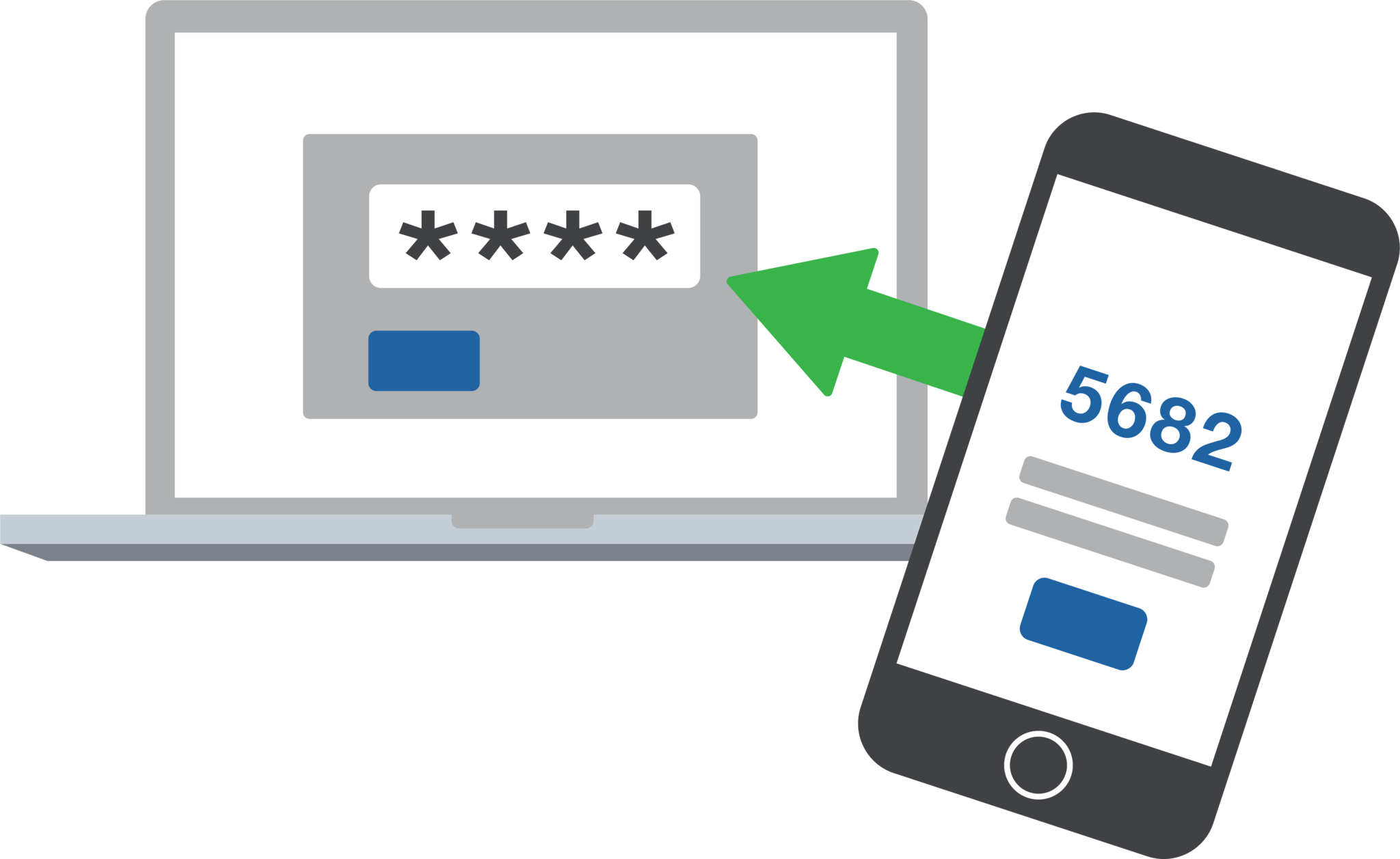
2FA adds an extra layer of security to the traditional username and password login process. By requiring users to provide a second form of authentication, such as a unique code sent to their mobile device, it significantly reduces the risk of hackers from gaining access. Even if a hacker manages to obtain a user’s password, they would still need the second factor to gain access.
Mitigation of Password-related Risks:
Passwords are often the weakest link in security systems. Many users tend to reuse passwords across multiple accounts or choose weak and easily guessable ones or re-use the same password while incrementally changing a digit or two. With 2FA, even if a password is compromised, the additional authentication factor acts as a safeguard, making it significantly harder for attackers to gain access.
Protection Against Phishing Attacks:
Phishing attacks, where attackers trick users into revealing their login credentials, are a common threat to businesses. 2FA provides an additional layer of defense against such attacks. Even if a user unknowingly falls victim to a phishing attempt and enters their credentials on a fake website, the second authentication factor would prevent the attacker from accessing the account.
Compliance with Industry Regulations:
Many industries, such as finance, healthcare, government contractors, and e-commerce, are subject to strict data protection regulations. Implementing 2FA helps businesses meet compliance requirements and avoid potential penalties. It demonstrates a commitment to safeguarding sensitive customer information and builds trust with clients.
Cost-Effective Security Measure:
Implementing 2FA does not require significant financial investment. Many 2FA solutions are readily available and can be easily integrated into existing systems. Considering the potential financial and brand reputation damage caused by a security breach, the cost of implementing 2FA is minimal compared to the benefits it provides.
In an era where cyber threats are constantly evolving, businesses must prioritize security measures to protect their valuable data. 2-factor authentication offers a simple yet effective way to do so.
If your company is interested in implementing 2FA across the entire organization, then contact us for assistance.
This is the forth in a series that documents the Tier 3 / Co-Managed IT work we did to setup a wireless test bed for a Linux based scientific device. The testing environment included two different wireless network hardware types (Ubiquiti and Cisco). There was also a Synology device used for various purposes including hosting the Ubiquiti controller inside a Kubernetes container, providing certificate services, providing LDAP authentication, and providing RADIUS authentication. Each article will detail a separate piece of the project. This article shows the setup Synology LDAP server & certificates.
Setup LDAP Server
Login to Synology
Open Package Center
Install LDAP Server app
Open LDAP Server package
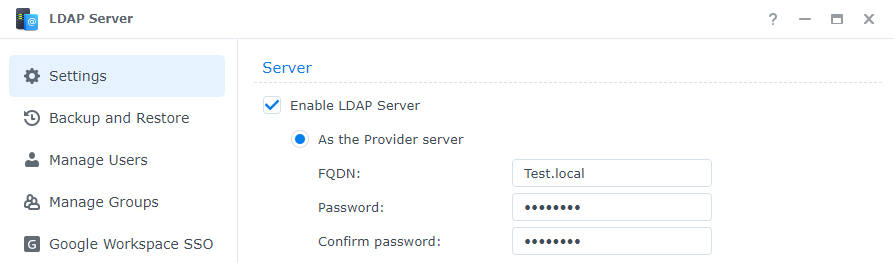
Enable LDAP Server
Create FQDN (something like Test.local)
Create password
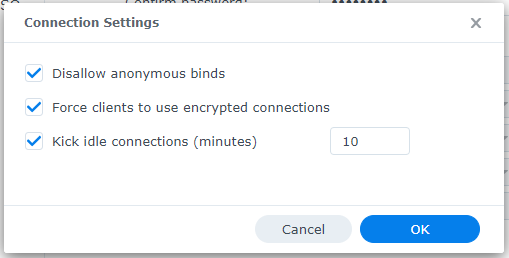
Change Connection Settings
Disallow anonymous binds
Force clients to use encrypted connections
Change timeout to 10 minutes
Click OK
Click Apply
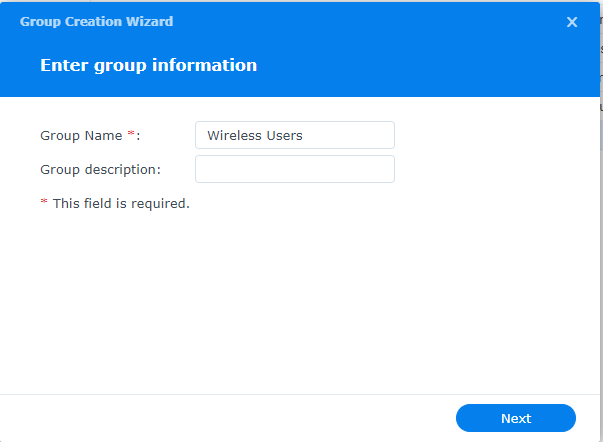
Click on Manage Groups
Click on Create
Give the Group a name
Click Next
Click Done
Click on Manage Users
Click on Create
Give the User a name
Add user email if appropriate
Create password
Click Next
Check mark next to new group previously created
Click Next x2
Click Done
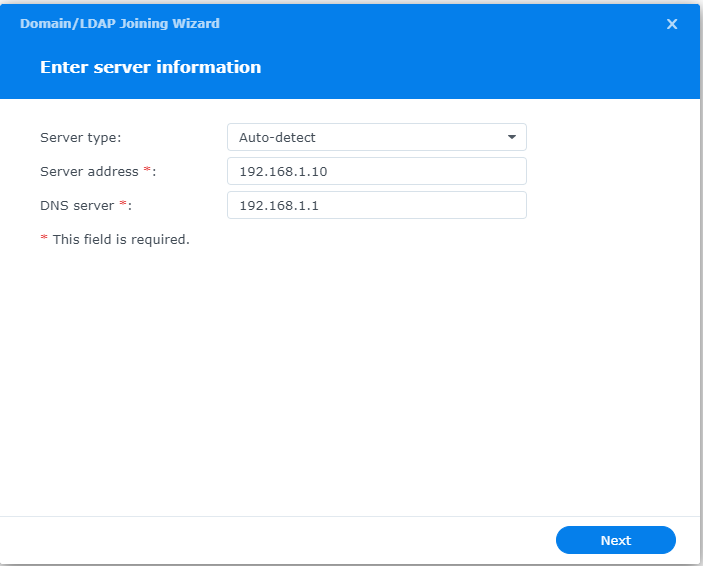
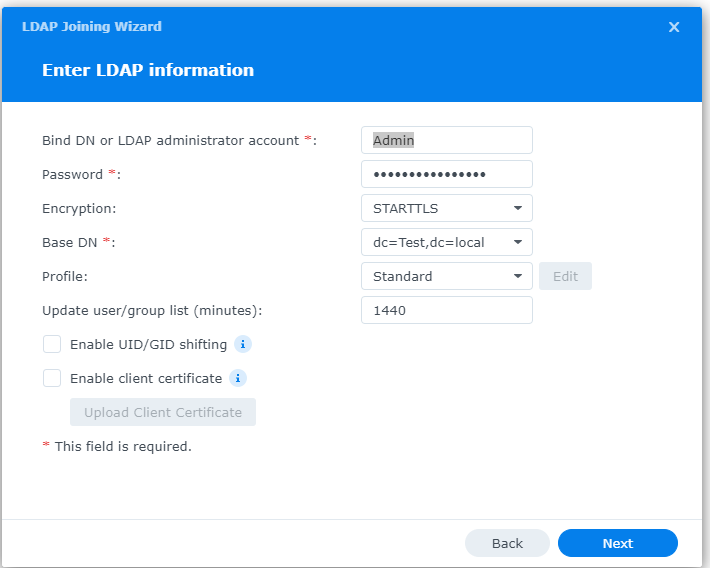
Connect Synology to LDAP Server
Open Control Panel
Click on Domain / LDAP on left hand side
Click Join
Enter IP address of Synology
Enter Admin username / password
Choose STARTTLS encryption
Copy Base DN from LDAP Server app Settings tab
Click Next
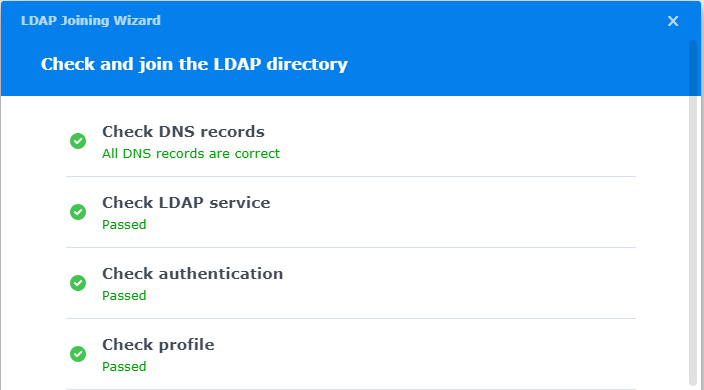
Connection parameters will be check (fix any issues)
Configure LDAP Certificates
Open Control Panel
Click on External Access
Click on DDNS tab
Click Add
Choose Synology as service provider
Add hostname
Click Test Connection
Click OK
Click on Security on left hand side
Click on the Certificate tab
Click on Add
Add new certificate
Click Next
Create description
Get a certificate from Let’s Encrypt
Click Next
Add needed certificate information
Click Done
Click Settings button and choose appropriate LDAP server certificate
If your company has highly customized setup requirements that you need consulting for, then contact us for assistance.
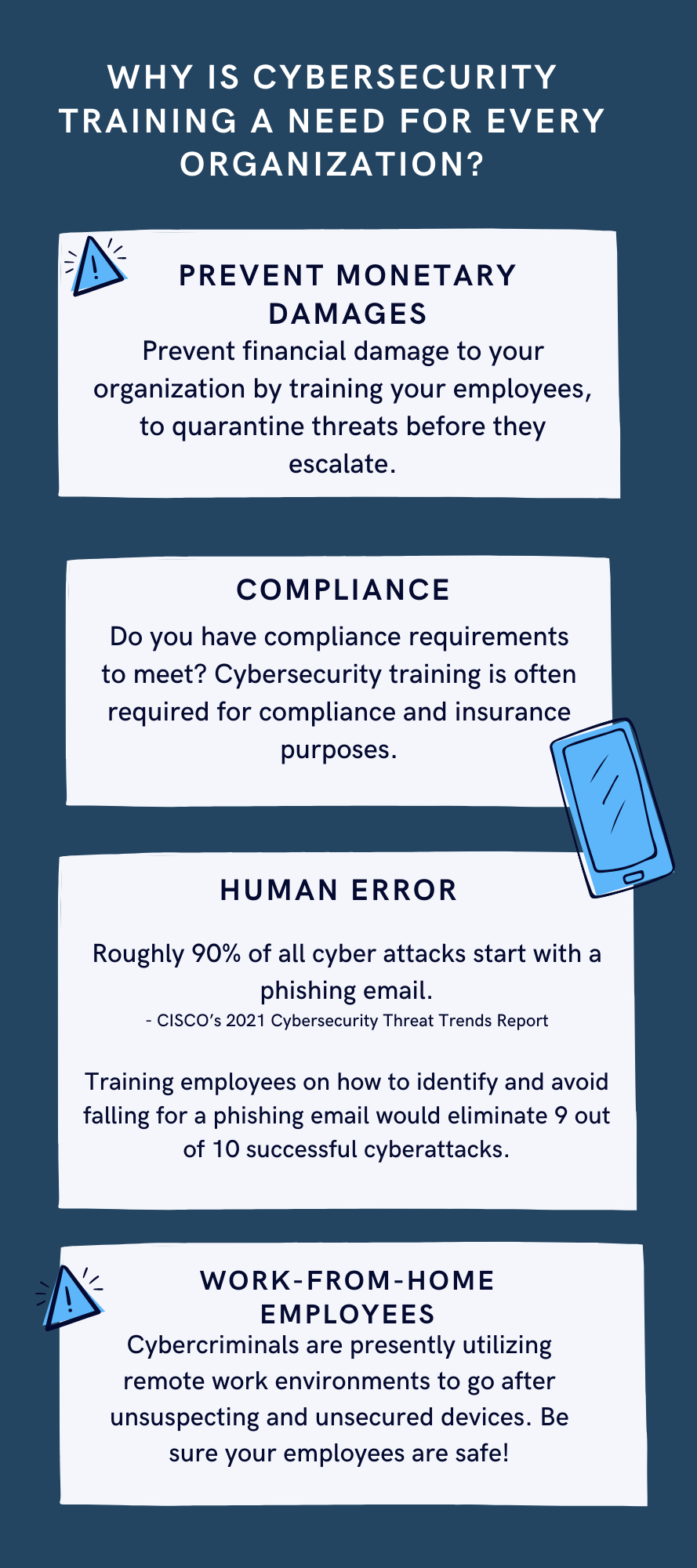
In today’s digital age, where technology has become an essential part of our lives, ensuring the security of our online information has become more crucial than ever before. With cyber threats and attacks on the rise, it is vital for individuals and organizations to invest in comprehensive cyber security training. In this blog article, we will explore the importance of cyber security training and why it should be a top priority for everyone.
Protecting Confidential Information
One of the main reasons why cyber security training is essential is to protect confidential information. In our increasingly connected world, we store sensitive data, such as financial information, personal details, and business data, online. Without proper training, individuals become vulnerable to malicious attacks, such as phishing scams, data breaches, and identity theft. Cyber security training equips individuals with the knowledge and skills necessary to identify and prevent such threats, ensuring the protection of confidential information.
Mitigating Financial Losses
Cyber attacks can have devastating financial consequences for individuals and organizations. The cost of recovering from a cyber attack, including restoring compromised systems, investigating the breach, and compensating affected parties, can be significant. By investing in cyber security training, individuals and organizations can minimize the risk of falling victim to cyber attacks, thereby avoiding potentially crippling financial losses.
Safeguarding Reputations
In today’s hyper-connected world, reputation is everything. A cyber attack not only compromises the security of your information but also tarnishes your reputation. News of a data breach or cyber attack can spread like wildfire, damaging the trust that customers, clients, and partners have in you. By taking proactive measures and investing in cyber security training, individuals and organizations can safeguard their reputations and maintain the trust of those they interact with.
Staying Ahead of Evolving Threats
Cyber threats are constantly evolving, with hackers employing new techniques and strategies to breach systems and access sensitive information. Cyber security training ensures that individuals and organizations stay up to date with the latest cyber security practices, emerging trends, and new vulnerabilities. By staying ahead of evolving threats, individuals can better defend themselves against attacks and organizations can maintain a robust cyber security posture.
Building a Culture of Cyber Awareness
Cyber security is not just the responsibility of IT professionals; it is everyone’s responsibility. By promoting cyber security training, organizations can build a culture of cyber awareness among their employees. Ensuring that employees are equipped with the necessary knowledge and skills to identify and report potential threats reduces the attack surface and strengthens the overall security posture of the organization.
Conclusion
In a world increasingly reliant on technology and interconnectedness, the importance of cyber security training cannot be overstated. From protecting confidential information to mitigating financial losses and safeguarding reputations, cyber security training is crucial for individuals and organizations alike. By investing in comprehensive training programs, we can enhance our ability to identify and prevent cyber threats, ultimately creating a safer digital environment for all.
If your company is one of the 47% of companies that plan to add or change their cybersecurity solution this year, then contact us for assistance.
Farmhouse Networking was recently approached by the Portland Tribune for comment on the hack of the DMV. We were quoted in their article published yesterday. Here is our full advice:
What to do post DMV hack?
The breach that effected the Oregon DMV was part of a larger hack of the software known as MOVEit. The exploit of the vulnerability in this software was used to gain access to over 3.5 million Oregonians information including:
Name
Home and mailing address
License or ID number
Last four digits of Social Security number
This information can be used by hackers and other darkweb criminals to assume the identity of those whose information has been compromised and perform identitiy theft activities like applying for credit cards or tax fraud. Anyone with an active Oregon ID card or driver’s license should begin monitoring their credit report and look for any suspicious activity. If suspicious activity is found they should immediately call the following to freeze their credit and take actions to reverse the damages done:
Equifax: equifax.com/personal/credit-report-services or 1-800-685-1111 Experian: experian.com/help or 1-888-397-3742 TransUnion: transunion.com/credit-help or 1-888-909-8872
If your company is concerned about the possibility of a similar breach, then contact us for assistance.
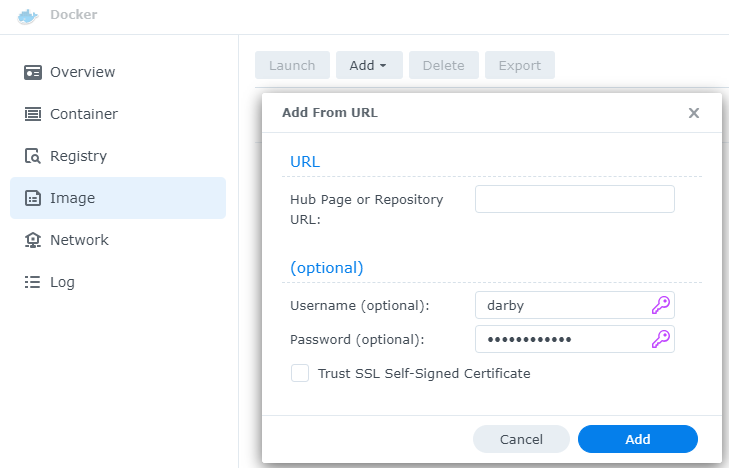
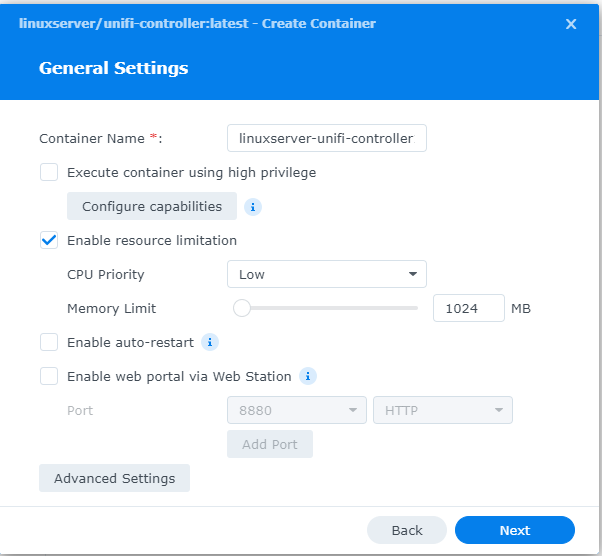
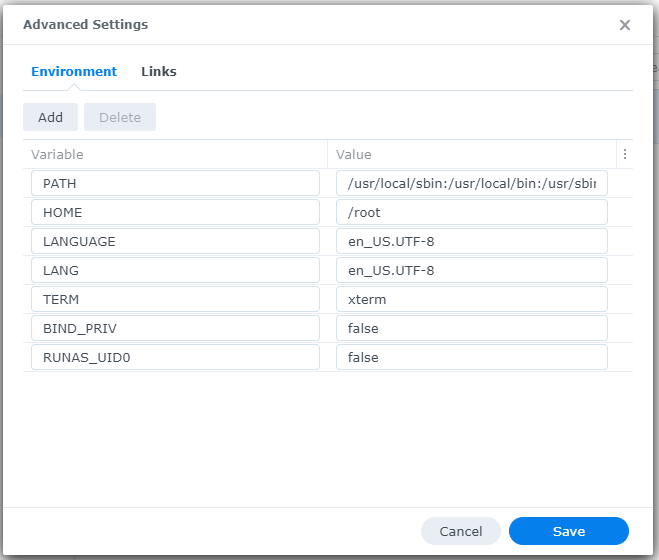
This is the third in a series that documents the Tier 3 / Co-Managed IT work we did to setup a wireless test bed for a Linux based scientific device. The testing environment included two different wireless network hardware types (Ubiquiti and Cisco). There was also a Synology device used for various purposes including hosting the Ubiquiti controller inside a Kubernetes container, providing certificate services, providing LDAP authentication, and providing RADIUS authentication. Each article will detail a separate piece of the project. This article shows the basic setup of Ubiquiti Wireless Controller as a Docker instance on the Synology.
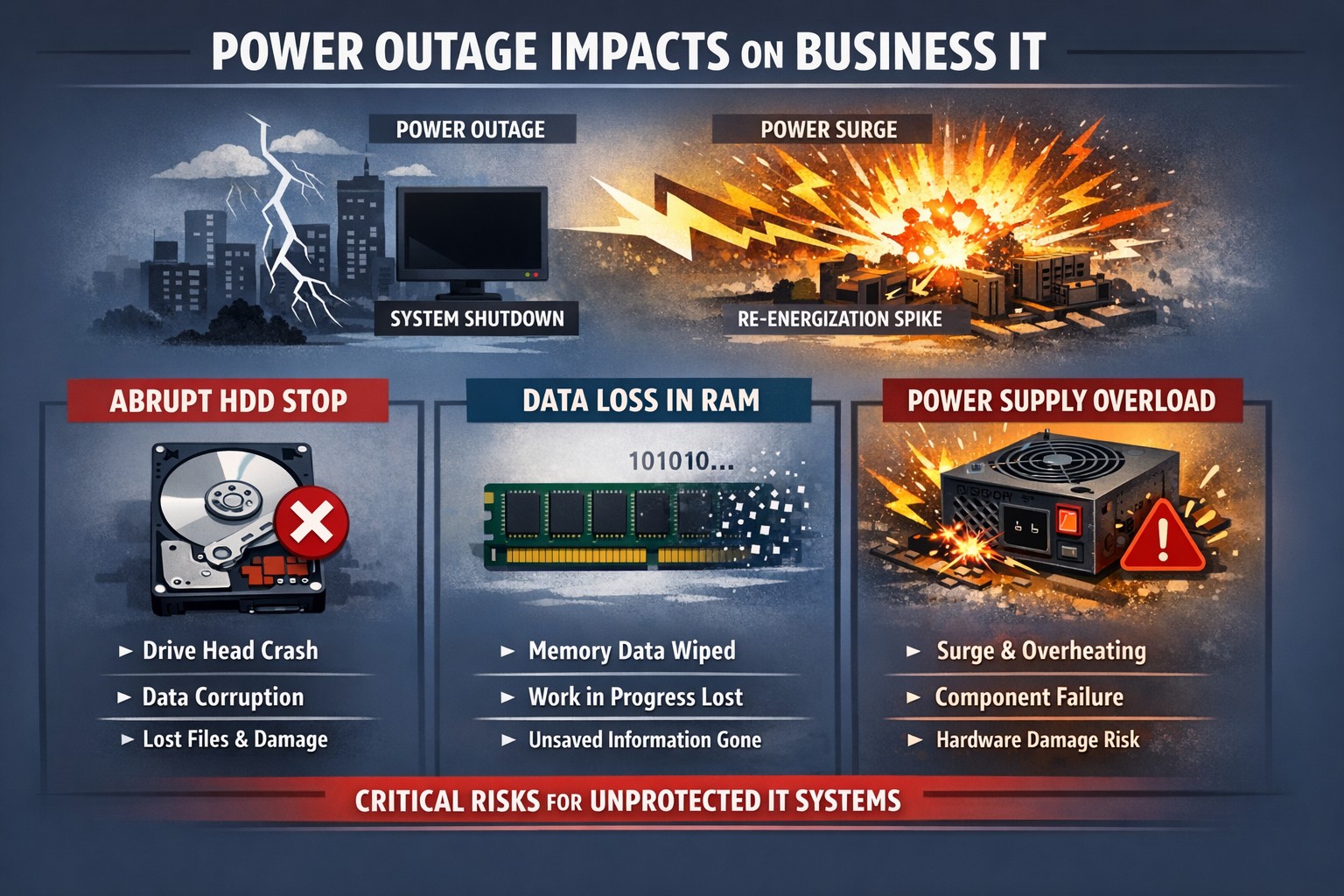
Power outage impacts: hard drive head crash data corruption PSU surge damage.
Power outages are a common occurrence in our area. While they may seem like a minor inconvenience, they can actually have a significant impact on your computer hardware. In this article, we will explore the negative effects of repeated power outages on computer hardware.
Hard Drive Failure
One of the most common negative effects of power outages on computer hardware is hard drive failure. When the power goes out, it can cause the hard drive to stop spinning abruptly. This sudden stop can cause the read/write head to crash into the disk platter, resulting in physical damage to the hard drive. In some cases, the hard drive may become completely unusable, leading to data loss.
Data Corruption
Power outages can also lead to data corruption. When the power goes out, any unsaved data in your computer’s memory is lost. This can cause files to become corrupted or damaged. In some cases, the entire operating system may become corrupted, making it impossible to boot up your computer.
Power Supply Damage
Finally, power outages can cause damage to your computer’s power supply. When the power goes out, it can cause a surge when the power comes back on. This surge can overload your computer’s power supply, causing it to fail. In some cases, the power supply may even catch fire, leading to a potentially dangerous situation.
Conclusion
In conclusion, power outages can have a significant negative impact on your computer hardware. From hard drive failure to data corruption, and power supply damage, there are many potential consequences of repeated power outages. To protect your computer from these negative effects, it’s important to invest in a high-quality uninterruptible power supply (UPS). These devices can help protect your computer from power surges and other electrical disturbances, ensuring that your hardware remains safe and functional.
If your company is not protecting its computers from the damaging effects of power outages , then contact us for assistance.
Mimecast KnowBe4 phishing simulation risk scoring employee training dashboard
As you know, we take cybersecurity and the protection of your accounts and data very seriously. That’s why we are always striving to provide you with tools and resources to help keep you and your employees safe from cybercrime.
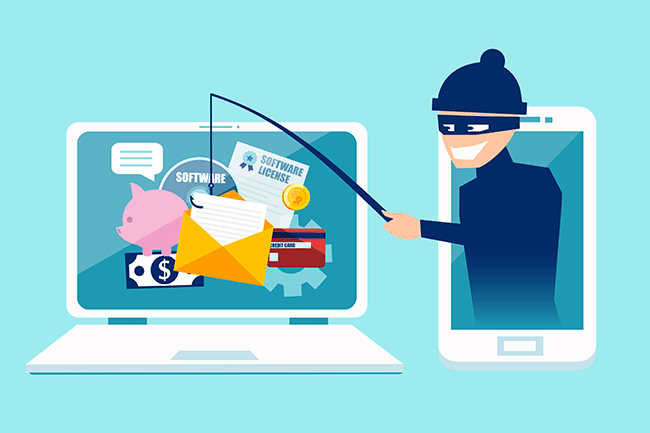
The most common threat we are seeing is phishing messages delivering malware or stealing credentials. Even though your company might be protected with spam filtering, there are instances where these malicious messages could still appear in your employee’s inboxes. And it’s important we both arm them with as much education and resources as possible to understand and identify these phishes.
We have a new tool that we’d love to demonstrate for your or talk more about. It’s called Catch Phish, and it’s an email analysis and training tool. It connects right to your employee’s Outlook as a clickable application on every message. When clicked, the tool quickly, but safely, scans the important details of the message to find potential threats such as suspicious links or attachments, sender details, or message details such as threatening language or deactivation scares.
This tool is included in our cybersecurity training packages and can help provide the much needed cybersecurity education to all levels of staff.
Do you have 30 minutes to talk about reducing your risks with Catch Phish and our other cybersecurity awareness training tools, then contact us for assistance.
Synology NAS DSM wizard for storage pool volume and initial configuration.
This is the second in a series that documents the Tier 3 / Co-Managed IT work we did to setup a wireless test bed for a Linux based scientific device. The testing environment included two different wireless network hardware types (Ubiquiti and Cisco). There was also a Synology device used for various purposes including hosting the Ubiquiti controller inside a Kubernetes container, providing certificate services, providing LDAP authentication, and providing RADIUS authentication. Each article will detail a separate piece of the project. This article shows the basic setup of Cisco Wireless Controller.
Setup of Synology NAS
Physically install hard drives into bays
Plug into network
Plug into power
Find IP address by pinging ‘Diskstation’ on network
Start web browser and connect to IP address
Run Setup Wizard
Install Synology OS on drives
Wait for reboot
Start setup
Give it a name
Create admin account / password
Install only important updates automatically
Sign-In to or Create Synology Account
Create quickconnect ID
Enable DSM backups
Create storage pool
If it states that no drives are available – check under HDD/SSD to see if there are required firmware updates. Install all available.
Use SHR-2 RAID
Choose all drives to be in the RAID (not m.2 cache drive)
Use Max Allocated size
Use Btrfs file system
Click Apply
Click OK to erase all drives
Open Package Center App
Accept terms of service
Update any Installed
Install LDAP Server and RADIUS Server
Close Package Manager
If your company has highly customized setup requirements that you need consulting for, then contact us for assistance.
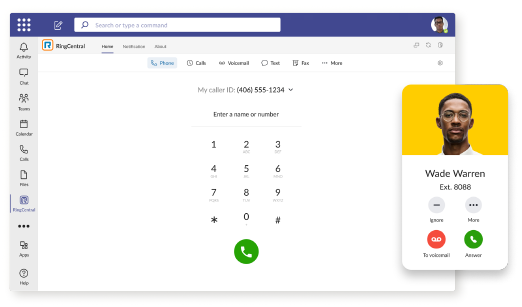
RingCentral VoIP app within Teams interface with call messaging and video features.
We have decided to make a business change that includes no longer directly selling phone services, but instead we are moving our clients to RingCentral. They are the industry leaders in this type of service and their rates are very competitive. One of their killer features is the Teams integration
RingCentral for Teams – Embedded App
RingCentral for Teams embedded app enables calling from the Teams app to both internal extensions and external numbers. It’s the simplest way to supercharge the phone experience for both end users and IT admins without having to deploy a new app to end users. Most importantly, there’s no need for an added Microsoft calling or E5 license to capture this value. This solution is ideal for organizations that want to:
leverage RingCentral’s superior telephony while maximizing the value of their Teams investment
avoid the added cost of Microsoft’s calling license
With the RingCentral for Teams embedded app, users access an icon presented in Microsoft Teams. They can then place and receive calls, access voicemails and voicemail transcriptions, and send or receive an SMS or fax. These tools fill critical gaps in Microsoft Teams, transforming it from messaging and video meeting tool to a communications powerhouse. This approach is also a money saver, as it doesn’t require the added cost of a Teams Phone or E5 license.
If your company is currently using Microsoft Teams for communications and want to add the incredible functionality that RingCentral brings, then contact us for assistance.
Cisco wireless controller setup wizard with SSID and management VLAN configuration.
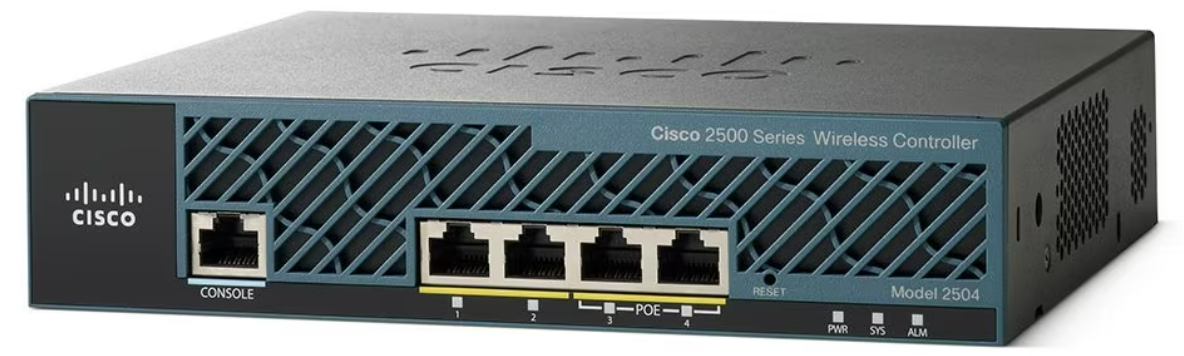
This is the first in a series that document the Tier 3 / Co-Managed IT work we did to setup a wireless test bed for a Linux based scientific device. The testing environment included two different wireless network hardware types (Ubiquiti and Cisco). There was also a Synology device used for various purposes including hosting the Ubiquiti controller inside a Kubernetes container, providing certificate services, providing LDAP authentication, and providing RADIUS authentication. Each article will detail a separate piece of the project. This article shows the basic setup of Cisco Wireless Controller.
Setup of Cisco Wireless Controller
Plug -in ethernet of Computer to port 2 on controller
Boot controller and wait for SYS light to go solid
Open web browser to http://192.168.1.1
Create admin username
Create password
Fill in the needed information:
System nameManagement IP Subnet MaskDefault Gateway
Click Next
Fill in temporary information for wireless
Network BSSIDCreate PassphraseEnter local DHCP server address
Click Next
Click Apply and wait for reboot
Click on Commands tab
Click on Set Time on the left-hand menu
Change needed values
Click Set Date and Time
Click Save Configuration at the top
If your company has highly customized setup requirements that you need consulting for, then contact us for assistance.
Compliance penetration test report mapping findings to HIPAA SOC 2 PCI DSS controls.
Compliance is and always has been a complicated matter. Here are the quotes from the three types of compliance – CMMC, HIPAA, and PCI:
“CMMC – Risk AssessmentL2-3.11.2 – VULNERABILITY SCAN: Scan for vulnerabilities in organizational systems and applications periodically and when new vulnerabilities affecting those systems and applications are identified.”
“HIPAA – § 164.308 Administrative safeguards. (a)(1)(ii)(A) –Risk analysis (Required). Conduct an accurate and thorough assessment of the potential risks and vulnerabilities to the confidentiality, integrity, and availability of electronic protected health information held by the covered entity or business associate.”
“PCI – 11.3: External and internal vulnerabilities are regularly identified, prioritized, and addressed”
To summarize what this all mean – compliance requires penetration testing and vulnerability scanning. Networks have to be tested regularly to make sure that there has been nothing missed which would allow a hacker to breach the network and steal the treasure of information. Our recommendation is to scan at least quarterly, if not monthly, to find these vulnerabilities and address them before the hackers find them.
If your company has compliance requirements that you need consulting for, then contact us for assistance.
Today we tell the story of a medical office’s journey to the cloud. This particular client was facing their server operating system reaching end of support (a HIPAA violation) in the near future. They had begun by looking at their electronic medical records software company’s online offering, which didn’t have all the functionality of their on-premises software and was very expensive (this is typical).
They next decided to look into moving their current on-premises software into the cloud and we were asked to help with the testing. We determined that it would be best to move the file portion of the server to SharePoint / OneDrive to increase their mobility and flexibility. We also determined that it would be best to move them away from on premises Active Directory into Azure Active Directory / Intune to allow authentication and security policies. Finally we began testing the on-premises software hosted on a server in Azure with a VPN connection to their office.
The SharePoint / OneDrive and Azure Active Directory portions went through with little issues. The server, however, was not as we had hoped. The Azure VPN connection was expensive due to it always being on and no way of turning it off outside of business hours. The performance of the SQL database that the on-premises software used was basically unusable. The other option would be to create virtual desktops on Azure for this purpose but the cost and functionality was not what the customer was hoping for.
This has lead them back to searching for an online EMR software that will meet all their requirements. This will be tough because most companies are good at some things, but not all things and compromises usually have to be made. Our hope is that this story is a lesson to other companies. The cloud may sound like the newest and best way to work, but the costs and functionality are often worse than expected.
If your company is going to use full disk encryption or has compliance requirements that you need consulting for, then contact us for assistance.
Farmhouse Networking cloud automation eliminates manual IT tasks for Oregon SMBs using Power Automate and PowerShell workflows.
Worked with a client lately to help them Automate a workflow, but you may be wondering what does that even mean. Let me explain. We all have tasks in our workday that are repetitive and consume little bite size pieces of our time. Depending on the steps needed to accomplish these tasks, they can be “delegated” to a computer process via scripting aka we automate them. In the case of the client we helped, they received emails from an eFax service which included attachments. These attachments had to be manually saved into a shared folder for the rest of the staff to access as needed. This process probably took about 30 to 60 seconds each, but multiply this by the 30+ faxes they received each day you have 15 to 30 minutes of wasted time each day (65-130 hours per year). This does not take into account the time taken to stop doing one thing, accomplish this task, and restart the original thing they were doing.
Automate to Freedom
What if we could automate this little task and keep them employee free to do other more important things? We did. They customer uses Office 365 which includes a service called Power Automate. We scripted this tool to look at incoming messages, find ones from the eFax vendor, strip out the attachment, and save it to a SharePoint folder. This can then be shared with other employees and even synced via OneDrive to their Desktops for viewing, etc. That is just the tip of the iceberg as there is so much more that can be done with this technology.
If your company wasting little bite size pieces of time in repetitive taks, then contact us for assistance.
And God will generously provide all you need. Then you will always have everything you need and plenty left over to share with others. As the Scriptures say, “They share freely and give generously to the poor. Their good deeds will be remembered forever.” For God is the one who provides seed for the farmer and then bread to eat. In the same way, he will provide and increase your resources and then produce a great harvest of generosity in you. - 2 Corinthians 9:8-10
We use cookies to ensure that we give you the best experience on our website. If you continue to use this site we will assume that you are happy with it.