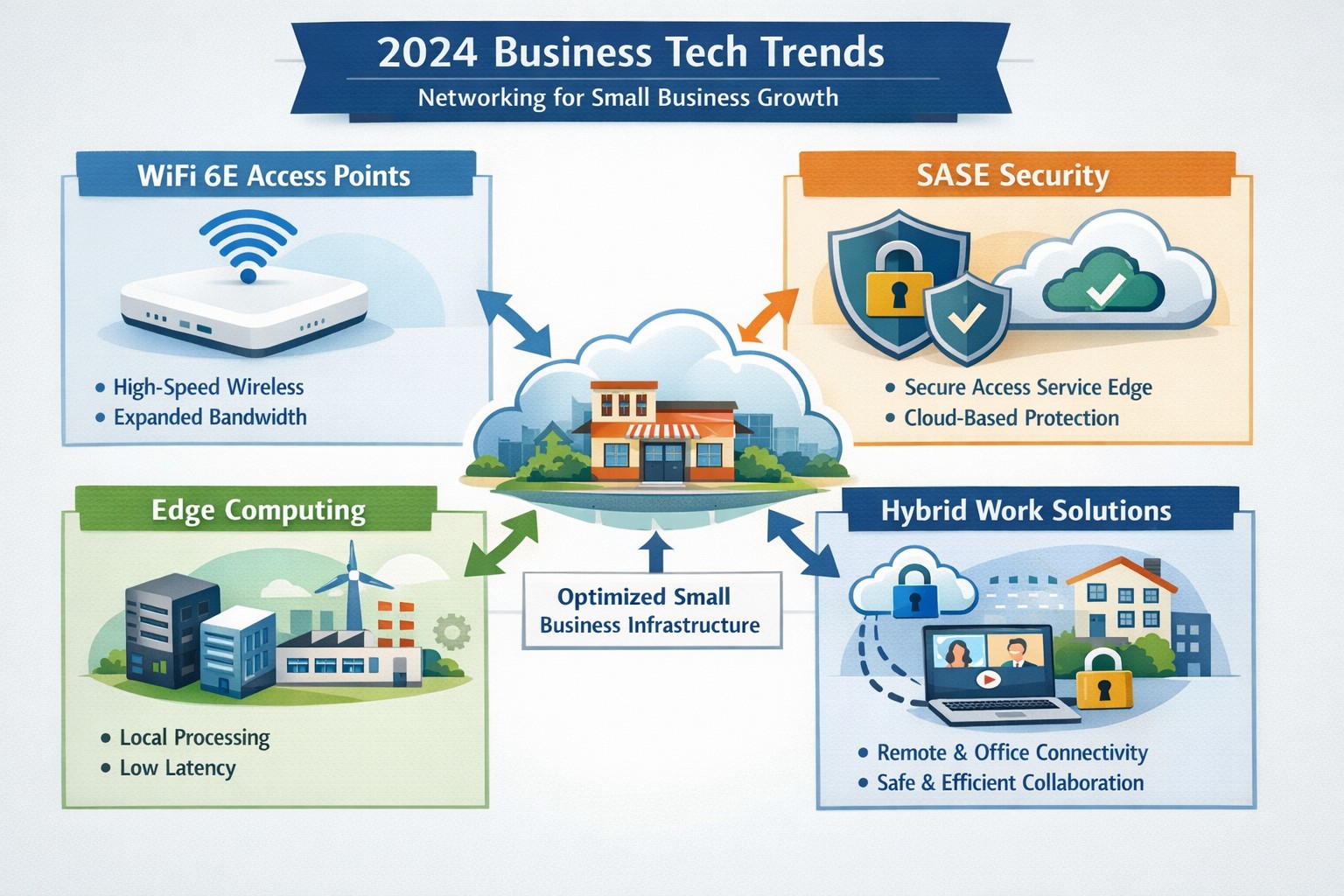
2024 networking trends like WiFi 6E and zero trust architecture prepare small businesses for hybrid work and cybersecurity demands.
As we enter 2024, the U.S. Chamber of Commerce reports that 64% of business owners believe their businesses are in good health, showing confidence in navigating the future. Technology has emerged as a key driver of success, enabling businesses to thrive in uncertain times. Farmhouse Networking has identified four essential technology trends that will empower businesses in 2024, propelling them towards growth and success.
1. Harnessing the Power of Artificial Intelligence
Artificial intelligence (AI) has moved beyond the realm of technology discussions and is now at the forefront of business success. Businesses utilizing AI credit it for increased success, as it offers game changing assistance in various areas of operations. AI tools can automate tasks, saving time and resources for businesses.
AI for Operational Efficiency
Businesses can leverage AI to automate expense management, correlate data from multiple sources to create meaningful reports, create sales presentations that address customer needs, and tackle tasks that were previously time-consuming. By harnessing AI, manufactures can optimize inventory, align staffing with peak hours, and identify opportunities for targeted promotions. Although implementing AI may require an initial investment, the positive impact it can have on businesses in 2024 is promising.
AI for Enhanced Customer Experiences
Customer experience plays a pivotal role in business success, with 34% of business leaders recognizing the pivotal role of technology in delivering exceptional experiences. Upgrading systems to ditch outdated tech and manual methods is a priority for many businesses in 2024. Chatbots, for instance, are invaluable for front-line customer service agents, providing round-the-clock support. Automated assistants and Unified Communications tools enhance customer interactions and employee productivity. These digital processes not only enhance retention and satisfaction but also create opportunities for cross-selling and upselling efforts.
2. Delivering Exceptional Digital Customer Experiences
Businesses understand the importance of delivering exceptional digital customer experiences in 2024. Upgrading systems and embracing efficient digital processes will be key to achieving this goal.
Upgrading Systems for Efficiency
Outdated technology and manual methods hinder efficiency. Businesses are expected to upgrade their systems by adopting AI, automating repetitive tasks, and migrating to the cloud. These solutions make information easily accessible, guide customers interactions, and improve employee productivity.
Embracing Cloud-based Solutions
A robust technology infrastructure is crucial for businesses to keep up with competition and exceed customer expectations. Automation software can save time and cut down on expenses by managing data and completing routine tasks. Mobile technology ensures network connectivity anywhere, anytime, allowing for collaboration on the go. Cloud based systems enables efficient management of IT costs plus offer flexibility and scalability, especially for businesses, as the workforce continues to move away from traditional office setups.
3. The Backbone of Business Operations: Fast and Reliable Connectivity
Fast and reliable connectivity is the backbone of efficient operations, seamless communication, and scalable expansion. Businesses across different sectors can benefit from investing in connectivity solutions.
Optimizing Inventory and Collaboration
Manufactures can leverage fast and reliable a to optimize inventory management. By having real-time visibility into inventory levels, manufactures can prevent stockouts and ensure they have the right products available when customers need them. Accountants can collaborate effectively without being limited by physical office spaces. Cloud connectivity allows them to access customer files, share updates, and communicate with team members regardless of their location.
Enhancing Healthcare Services
Connectivity plays a vital role in enhancing healthcare services. From telemedicine to remote patient monitoring, healthcare providers can offer more accessible and efficient care. Fast and reliable connectivity enables seamless communication between healthcare professionals and patients, facilitates the sharing of medical records, and supports the use of emerging technologies like artificial intelligence and Internet of Things (IoT) devices.
Safeguarding Customer and Company Devices
Investments in network connectivity not only benefit customers but also help safeguard customer and company devices. By adopting a complete network connectivity solution that includes reliable internet, network security measures, and disaster recovery solutions, businesses can protect sensitive data and ensure the smooth operation of their technology infrastructure.
4. Embracing the Future: Expanding Technology Spending
In 2024, CEOs are planning to expand their technology spending to stay competitive and meet evolving customer expectations. However, to fully leverage the benefits of technological investments, businesses need to partner with reputable companies that can provide robust network infrastructure.
Strengthening Technological Investments with Robust Networks
Businesses should partner with companies like Farmhouse Networking to reinforce their critical technological investments. Robust networks ensure reliable network connectivity, data security, and seamless integration of technology solutions. By partnering with trusted providers, businesses can enhance their technology infrastructure and drive growth.
Weathering Uncertainties with Tech Transformation
By staying ahead of technology trends, business owners can not only weather uncertainties but also emerge stronger and more resilient. Embracing the power of artificial intelligence, delivering exceptional digital customer experiences, building a strong technology infrastructure, and investing in fast and reliable network connectivity will position businesses for success in 2024 and beyond.
Embracing these tech trends and partnering with trusted providers will enable businesses to thrive in an ever-evolving business landscape.
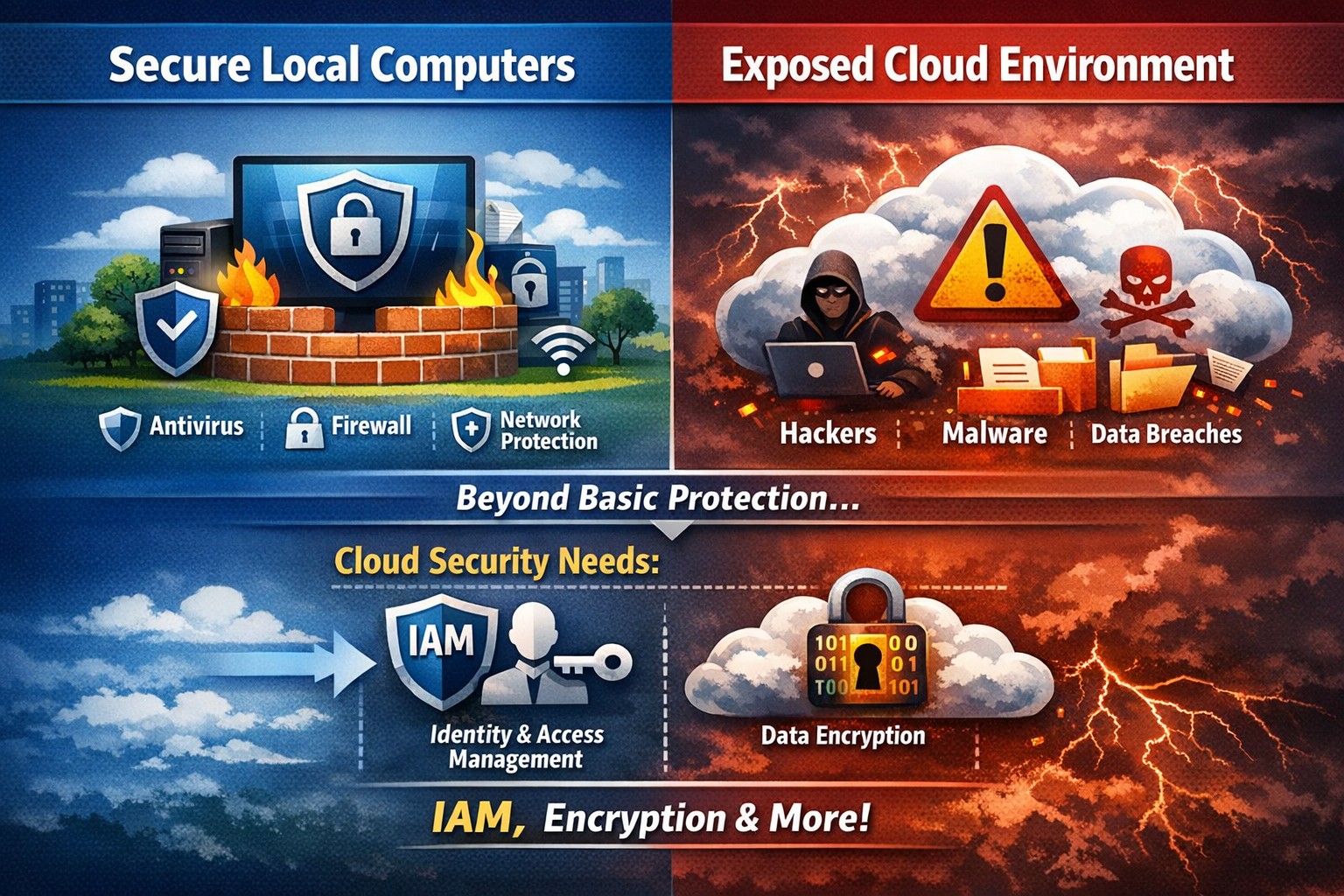
Secure endpoints don’t guarantee cloud safety—address cloud-specific risks now
The ability to store and access data remotely in the cloud has revolutionized the way organizations operate, providing flexibility, scalability, and cost-efficiency. However, with this convenience comes the need for robust security measures to protect sensitive information from cyber threats. This article explores the importance of cloud security and provides strategies to safeguard your company’s data in the cloud.
Understanding Cloud Security
Cloud security encompasses a set of controls, processes, technologies, and policies designed to protect cloud-based systems, infrastructure, and data. It is one part of computer security and information security, aiming to safeguard businesses from financial, legal, and reputational repercussions of data breaches and loss.
Cloud security involves various strategies and best practices to ensure the confidentiality, integrity, and availability of cloud resources. It includes measures such as real-time monitoring, multi-factor authentication (MFA), identity and access management (IAM), cloud-to-cloud backup solutions, systematic off-boarding processes, and anti-phishing training.
Real-time Monitoring
Real-time monitoring is a crucial strategy to detect and respond to suspicious threats promptly. By implementing real-time monitoring tools, businesses can gain visibility into their employee activity and cloud systems to proactively identify any potential cyber attacks. This allows for immediate action to mitigate risks and minimize the impact of data breaches. According to IBM, the global average total cost of a data breach in 2023 was $4.45 million, highlighting the financial implications of inadequate security measures.
Multi-Factor Authentication (MFA)
Traditional username and password combinations are no longer sufficient to protect user accounts from hackers. MFA adds an extra layer of security by requiring users to provide multiple pieces of evidence to verify their identities. This could include a combination of something they know (password), something they have (a mobile device or security key), or something they are (biometric data like a fingerprint or facial recognition). By implementing MFA, businesses can significantly reduce the risk of account compromise attacks and prevent unauthorized access to cloud applications.
Identity and Access Management (IAM)
Identity and access management (IAM) is a critical component of cloud security. It involves assigning proper levels of authorization and access controls to ensure that employees only have access to the information and resources necessary for their roles. IAM not only prevents accidental data breaches but also protects businesses from external threats by limiting the potential attack surface. By implementing IAM solutions, organizations can enforce strict access controls, reduce the risk of unauthorized data access, and maintain data privacy.
Cloud-to-Cloud Backup Solutions
While cloud providers typically have robust data protection measures in place, businesses should not solely rely on them for data backup. Cloud-to-cloud backup solutions provide an additional layer of protection by replicating data from one cloud service to another. This helps mitigate the risk of data loss due to cloud provider mistakes or system failures. Organizations using software-as-a-service (SaaS) applications can benefit from cloud-to-cloud backup solutions, ensuring advanced data protection beyond the basic safeguards provided by the applications themselves.
Systematic Off-boarding Process
When employees leave a company, it is crucial to have a systematic off-boarding process in place to revoke their access rights immediately. According to a survey conducted by Cyberark, “88% of IT workers would take sensitive data with them or abscond with company passwords if they were fired.” Additionally, 50% of ex-employees can still access corporate apps. To prevent unauthorized access and protect sensitive data, organizations should ensure that departing employees’ access rights are promptly revoked. This includes revoking access to systems, data, cloud storage, intellectual property, and consumer information.
Offering Anti-Phishing Training
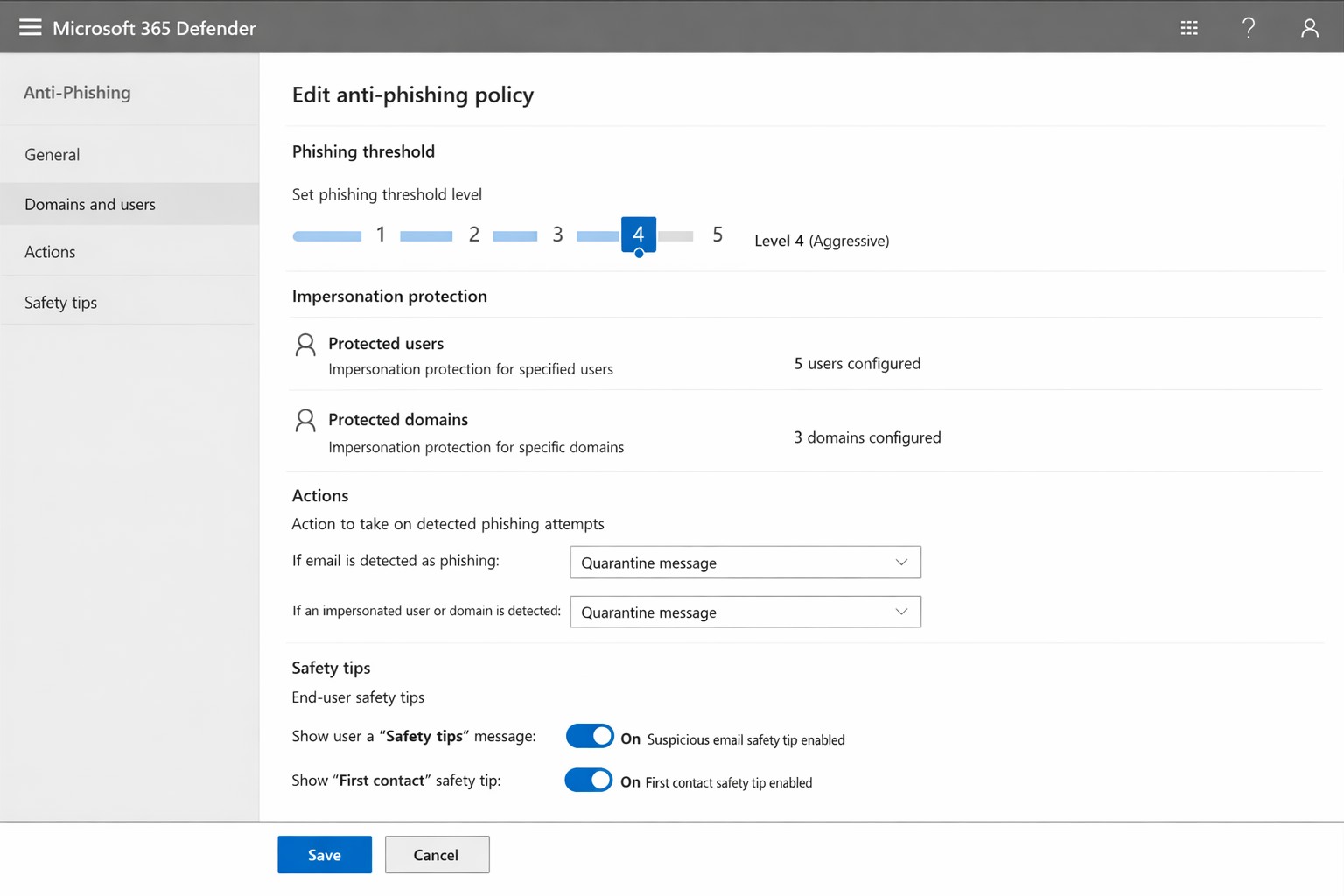
Phishing remains a prevalent threat in the cybersecurity landscape. Hackers often gain access to secure information by stealing employees’ login credentials or utilizing social engineering techniques. Offering anti-phishing training to employees can help raise awareness about these scams and prevent them from falling victim to phishing attacks. By educating employees on how to identify and report phishing attempts, organizations can safeguard their sensitive data without compromising productivity.
Strengthening Cloud Security Measures
While the above strategies are crucial for securing cloud operations, it is essential to adopt a comprehensive approach to cloud security. Here are additional best practices to strengthen your cloud security measures:
Enforce reliable passwords: Implement password policies that require complex, unique passwords and regular password updates. Encourage the use of password managers to reduce the risk of weak passwords.
Use encryption: Encrypting sensitive data helps protect it from unauthorized access. Implement encryption measures for data at rest and in transit.
Test security continuously: Regularly conduct vulnerability assessments and penetration testing to identify and address security weaknesses in your cloud infrastructure. This proactive approach ensures that potential vulnerabilities are discovered and remediated before they can be exploited.
Ensure local backup: In addition to cloud-to-cloud backup solutions, consider implementing local backups of critical data. This provides an extra layer of protection in case of cloud provider outages or data loss incidents.
Implement additional security measures: Explore additional security solutions such as intrusion detection systems (IDS), firewalls, and data loss prevention (DLP) tools to enhance your overall cloud security posture.
Avoid storage of sensitive data: Minimize the storage of sensitive data in the cloud. Identify and classify data based on its sensitivity and apply appropriate security controls accordingly. This reduces the risk of data breaches and ensures compliance with data protection regulations.
Why Is Cloud Security Important?
Cloud security is crucial for organizations migrating their sensitive data and applications to the cloud. By adopting secure cloud practices, businesses can protect highly sensitive data from hackers and ensure compliance with regulatory requirements. Here are a few reasons why cloud security is important:
Control Access
Cloud security enables organizations to monitor and regulate access to their data. By formulating policies and implementing access controls, businesses can prevent unauthorized users from accessing sensitive information. Cloud management tools provide visibility into user behavior and help maintain strong access controls.
Encrypting Sensitive Data
Encryption plays a vital role in securing data in the cloud. By encrypting data at rest and in transit, organizations can protect it from unauthorized access. Implementing encryption with strong access and control policies minimizes the impact of compromised keys and ensures data confidentiality.
Using Automation
Automation helps minimize human errors and misconfigurations in cloud environments. By automating routine tasks and configurations, organizations can ensure that their infrastructure is deployed and maintained correctly. Cloud automation tools streamline everyday configuration items and provisioning, reducing the risk of security vulnerabilities.
Extend Vulnerability Management Tools
Vulnerability management tools scan networks to identify potential threats or weaknesses that attackers can exploit. These tools help manage and mitigate attacks on the network by suggesting remedies and actions to reduce the prospect of network breaches. Regular scanning and remediation of vulnerabilities are essential to maintain a secure cloud environment.
Implementing Enhancements
Continuous improvement is crucial for maintaining cloud security. Organizations should continuously enhance their security measures throughout the entire lifecycle of their operations. As new threats emerge, businesses must adapt and implement necessary enhancements to safeguard against potential risks.
Deploying Multi-Factor Authentication (MFA)
Deploying MFA increases security and authentication for enterprise applications. Weak or reused passwords are a significant cause of data breaches. By implementing MFA, businesses can protect their cloud applications from unauthorized access attempts. Authorized personnel are granted access, minimizing the risk of data breaches.
Local businesses rely on Farmhouse Networking to simplify their cloud security management and enhance overall security posture. Click here to get started.
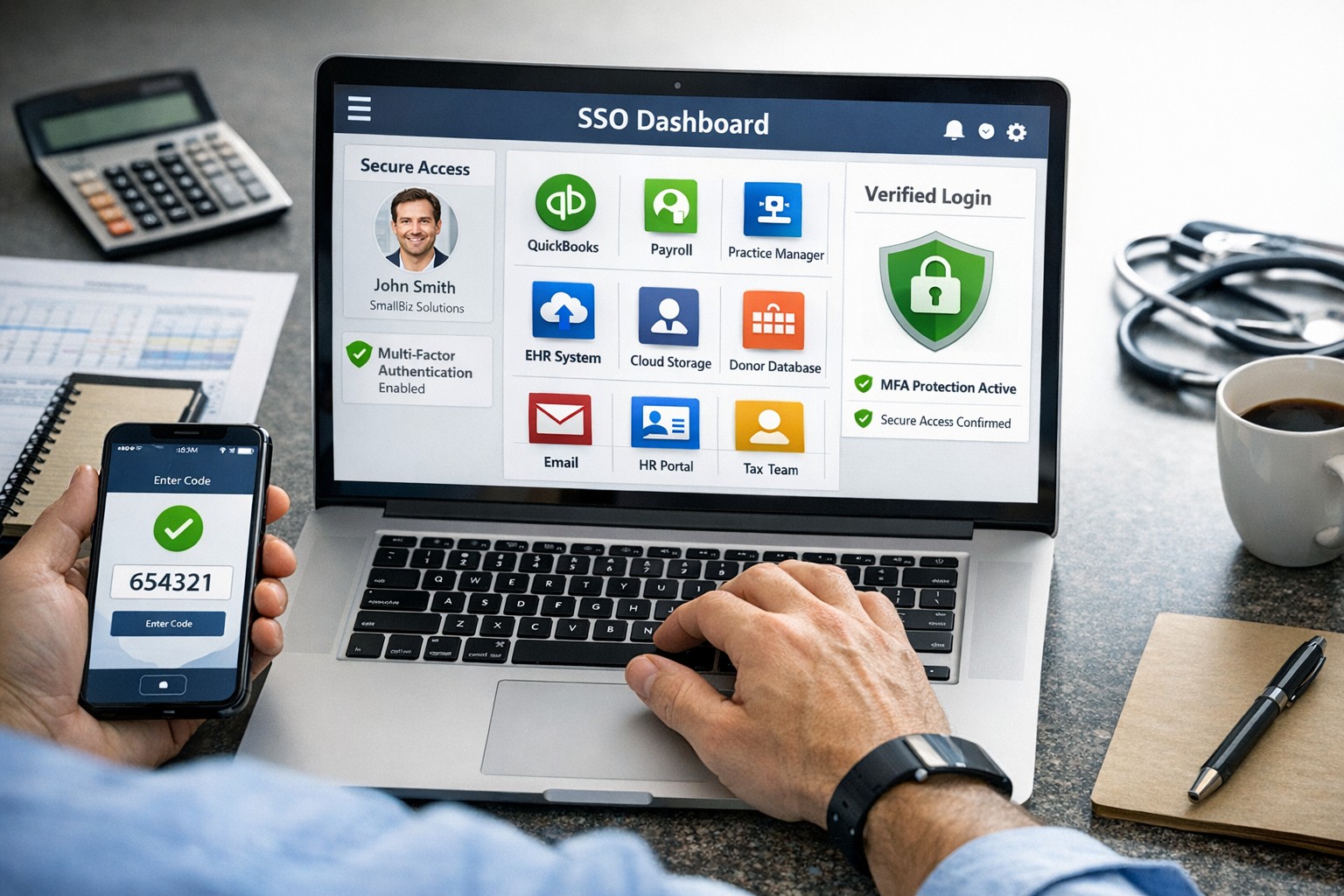
SSO for BYOD provides secure, convenient single sign-on access across apps on personal devices for small business teams.
Individuals and organizations rely heavily on various online platforms and services, the need for a secure and convenient way to access these resources is paramount. This is where SSO Single Sign-On comes into play. SSO Single Sign-On is a powerful authentication method that allows users to securely sign in to multiple applications and platforms using just one set of credentials. In this article, we will explore the benefits of SSO Single Sign-On, its implementation, and how it enhances security while streamlining the user experience.
Understanding SSO Single Sign-On
What is SSO Single Sign-On? SSO Single Sign-On is an authentication process that enables users to access multiple applications and platforms using a single set of login credentials. With SSO Single Sign-On, users only need to remember one username and password, eliminating the hassle of managing multiple credentials for different services. This not only saves time but also enhances convenience for users.
How does SSO Single Sign-On work? SSO Single Sign-On works by establishing a trust relationship between an identity provider (IdP) and the various service providers (SPs). When a user attempts to access a service, the IdP verifies the user’s identity and provides a token to the SP, which grants the user access without requiring additional authentication. This seamless process simplifies the login experience and eliminates the need for users to repeatedly enter their credentials.
Benefits of SSO Single Sign-On
Enhanced Security: One of the key advantages of SSO Single Sign-On is its ability to enhance security. By consolidating login credentials into a single set, users are less likely to resort to weak passwords or reuse passwords across multiple platforms. This reduces the risk of password-related security breaches. Additionally, SSO Single Sign-On allows for stronger authentication methods, such as two-factor authentication, further bolstering security without requiring multiple accounts.
Streamlined User Experience: With SSO Single Sign-On, users no longer have to remember and enter multiple sets of login credentials. This significantly reduces the login friction and streamlines the user experience. Users can seamlessly navigate between different applications and platforms without the need for repetitive logins. This convenience not only saves time but also improves productivity.
Centralized Access Management: SSO Single Sign-On provides organizations with centralized access management capabilities. Administrators can easily control user access to various applications and platforms from a centralized dashboard. This simplifies user provisioning and deprovisioning, ensuring that employees have timely access to the resources they need while maintaining security and compliance.
Cost and Time Savings: Implementing SSO Single Sign-On can lead to cost and time savings for organizations. By reducing the number of password-related support requests, IT teams can focus on more strategic initiatives. Additionally, the streamlined login experience reduces the time spent by employees on authentication, leading to increased productivity and efficiency.
Implementing SSO Single Sign-On
To implement SSO Single Sign-On, organizations need to follow a few key steps:
Evaluate SSO Solutions: Begin by evaluating various SSO solutions available in the market. Consider factors such as compatibility with existing systems, scalability, security features, and ease of integration.
Choose an Identity Provider: Select an identity provider that aligns with your organization’s requirements. The identity provider will be responsible for authenticating users and issuing tokens for accessing service providers. Office 365 and Google Workspace are usually the best, most prolific IdP sources to use.
Configure Service Providers: Configure the service providers that you want to integrate with SSO Single Sign-On. This involves establishing trust relationships between the identity provider and the service providers.
User Provisioning and Deprovisioning: Implement a user provisioning and deprovisioning process to ensure that users have the necessary access to the applications and platforms they require. This process should be integrated with the SSO Single Sign-On solution to maintain centralized access management.
Test and Monitor: Thoroughly test the SSO Single Sign-On implementation to ensure its functionality and security. Regularly monitor the system to identify and address any potential issues or vulnerabilities.
Best Practices for SSO Single Sign-On Implementation
When implementing SSO Single Sign-On, it is essential to follow best practices to maximize security and usability:
Strong Authentication: Implement strong authentication methods such as two-factor authentication or biometric authentication to enhance security.
Regular Auditing: Conduct regular audits of user access rights and permissions to ensure compliance and detect any unauthorized access.
User Education: Educate users about the benefits of SSO Single Sign-On and best practices for password management to promote secure behavior.
Continuous Monitoring: Implement a robust monitoring system to detect and respond to any suspicious activities or potential security threats.
Regular Updates: Keep the SSO Single Sign-On solution and all integrated applications up to date with the latest security patches and updates.
Remember, security should never be compromised, and SSO Single Sign-On provides a robust solution to protect user identities and streamline access to applications and platforms. Embrace the power of SSO Single Sign-On and enjoy the benefits of enhanced security and convenience.
Implement zero trust to safeguard mobile workforce from cyber threats anywhere
Remote work and mobile devices have become the norm, so ensuring the security of your workforce and sensitive data is paramount. Traditional security measures based on perimeter defense are no longer sufficient to protect against the sophisticated cyber threats that target mobile devices and exploit vulnerabilities in the network. This is where the concept of zero trust comes into play. Zero trust is a security framework that challenges the notion of “trust but verify” and instead adopts a “never trust, always verify” approach. By implementing a zero trust model, organizations can establish a security infrastructure that provides continuous authentication, authorization, and monitoring to safeguard their mobile workforce and sensitive data.
Understanding the Concept of Zero Trust
The concept of zero trust is rooted in the recognition that a one-time authentication and authorization process is not enough to ensure security in today’s dynamic threat landscape. Changes in user behavior, location, and other factors should radically impact access decisions. Zero trust takes a proactive approach to security by enforcing minimal access to resources, requiring continuous security monitoring, risk-based access control, and real-time authentication and authorization based on up-to-date information. Unlike traditional security models that rely on perimeter defense and trust users and devices within the network, zero trust challenges the idea of inherent trust and verifies the authenticity and integrity of every user and device, regardless of their location or network connection.
The Evolution of Zero Trust
The concept of zero trust has evolved over time in response to the increasing risks and challenges posed by mobile devices and remote work. The rapid adoption of mobile devices and the proliferation of internet-connected devices have expanded the attack surface, making traditional perimeter-based security measures inadequate.
Key Security Technologies for Mobile Devices
To enhance the security of mobile devices and implement zero trust, organizations should leverage key security technologies designed specifically for the mobile environment. These technologies include:
Enterprise Mobility Management (EMM): EMM ensures that mobile devices have the necessary policies and configurations in place, including mobile device management for security settings and configurations, as well as remote user access policy implementation. EMM provides a foundation for enforcing security controls and managing mobile devices within the organization.
Mobile Application Vetting (MAV): MAV ensures that applications comply with enterprise policies and do not contain known exploitable vulnerabilities. By vetting applications, organizations can reduce the risk of malicious applications compromising the security of mobile devices and accessing sensitive data.
Mobile Application Management (MAM): MAM focuses on ensuring compliance in deployed applications. It enables organizations to enforce security policies and manage the lifecycle of mobile applications, including app distribution, updates, and revocation. MAM helps organizations maintain control over the applications used by their mobile workforce.
Mobile Threat Defense (MTD): MTD solutions detect and mitigate threats from suspicious user behavior, network activity, and malicious attacks. These solutions leverage advanced analytics and threat intelligence to identify and respond to potential security threats in real time, providing an additional layer of protection for mobile devices.
Secure Containers: Secure containers provide isolation techniques to prevent organizational and personal data from commingling. By creating separate containers for different types of data, organizations can ensure that sensitive information remains secure, even if the device itself is compromised.
The Role of Intelligent Authentication
Intelligent authentication, powered by advanced rule sets and artificial intelligence, can significantly enhance the security of mobile devices in a zero trust environment. By combining biometrics with user behavior analysis, intelligent authentication systems can provide adaptive authentication that adapts to each user interaction, ensuring precise security measures. Integration between EMM, mobile threat defense, and existing logging, monitoring, diagnostic, and mitigation systems further enhances security capabilities.
Developing a Mobile Zero Trust Strategy
Implementing zero trust in the mobile environment requires a tailored approach that aligns with an organization’s specific goals, risks, and infrastructure. Businesses should develop their strategies based on a comprehensive assessment of the risks they face, with granular policies to mitigate those risks. The granularity of continuous authentication should be carefully determined to strike the right balance between security and usability. It’s important to note that technology is only one part of the solution; organizations must also review their mobile use policies and ensure that processes and human factors align with zero trust principles
With an intelligent authentication approach and a tailored mobile zero trust strategy, organizations can safeguard their mobile workforce and data from advanced cyber threats. Farmhouse Networking can make this a reality for your organization.
Streamlining Your Company’s Technology Infrastructure
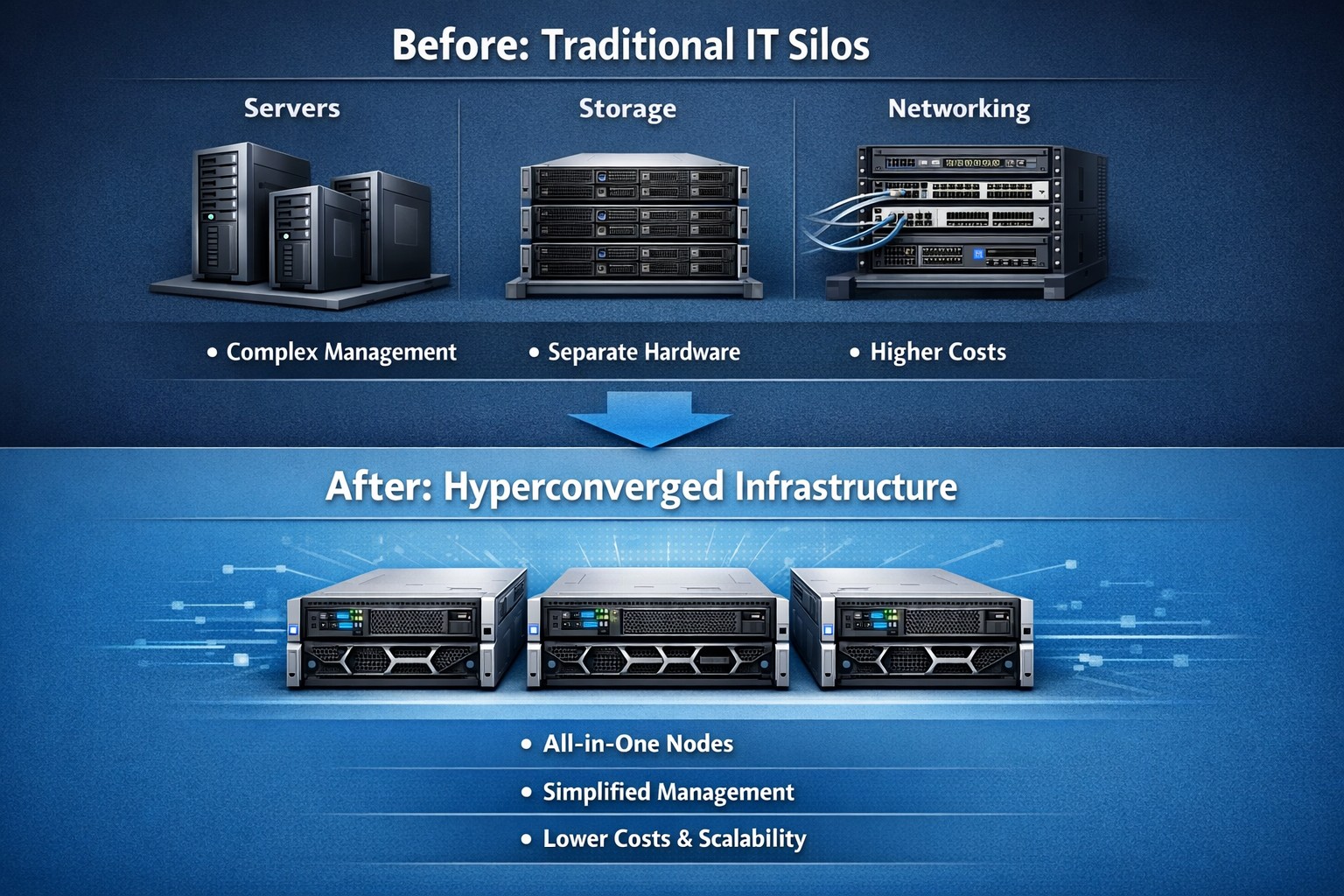
Hyperconvergence consolidates servers, storage, and networking into scalable HCI infrastructure, streamlining small business IT operations.
Modern businesses rely heavily on their IT infrastructure to operate efficiently and effectively. As companies grow, they often accumulate a hodgepodge of hardware and software systems that were never designed to work together. This lack of integration can lead to inefficiencies, increased costs, and a lack of agility in responding to changing business needs. To address these challenges, many businesses are turning to IT consolidation as a solution.
Understanding IT Consolidation
IT consolidation refers to the process of streamlining and centralizing a company’s technology infrastructure by combining multiple hardware and software systems into a cohesive and integrated environment. This consolidation can be done in various ways, such as merging separate hardware systems into a single platform or migrating to a hyperconverged infrastructure.
What is Hyperconvergence? Hyperconvergence is an emerging technology trend that combines storage, computing, and networking resources into a single, integrated system. It eliminates the need for separate hardware components and simplifies management. This approach offers several advantages, including increased efficiency, cost savings, improved business agility, and enhanced ability to support it.
The Benefits of IT Consolidation
Consolidating your technology infrastructure offers numerous benefits to businesses of all sizes. Let’s explore some of the key advantages:
Increased Efficiency: When businesses have multiple vendors for various technology services, resolving issues becomes a time-consuming and disjointed process. With consolidation, businesses can rely on a single managed service provider (MSP) who understands their entire system and can provide comprehensive support. This streamlines troubleshooting and reduces downtime, ultimately improving overall operational efficiency.
Cost Savings: Consolidating your technology with a single provider can also lead to significant cost savings. With a holistic view of your technology infrastructure, an MSP can identify redundancies, eliminate unnecessary services, and recommend more cost-effective solutions. Additionally, by bundling services under a single monthly fee, businesses can simplify their billing process and gain better visibility into their technology expenses.
Improved Business Agility: IT consolidation enables businesses to respond quickly to changing market conditions by simplifying processes and reducing the complexity of their technology environment. With a consolidated infrastructure, businesses can easily scale their operations, adopt new technologies, and implement changes without disruption.
Enhanced Support and Expertise: Working with an MSP for IT consolidation provides businesses with a supportive partner who understands their unique needs and goals. Unlike individual vendors who focus on selling their specific services, an MSP takes a holistic approach to ensure that all technology components work together seamlessly. They offer expert guidance, make better purchasing decisions, and provide ongoing support to optimize performance and security.
Implementing IT Consolidation
Implementing an IT consolidation strategy requires careful planning and execution. Here is a three-step process to guide you:
Step 1: Assess Your Technology Landscape: Before embarking on IT consolidation, it’s essential to assess your current technology landscape. Conduct a thorough audit of your hardware and software systems, identifying any gaps or redundancies. Consider your business needs and goals, as well as feedback from your employees and clients. This assessment will serve as a foundation for identifying areas where consolidation can bring the most significant benefits.
Step 2: Explore Hyperconvergence Solutions: As mentioned earlier, hyperconvergence is an increasingly popular approach to IT consolidation. Research and explore hyperconverged infrastructure solutions that align with your business requirements. Look for platforms that offer seamless integration of storage, computing, and networking resources while providing scalability, performance, and ease of management.
Step 3: Execute a Phased Consolidation Plan: To minimize disruption and ensure a smooth transition, it’s recommended to execute the consolidation plan in phases. Start by implementing the selected hyperconverged infrastructure platform alongside your existing systems. This allows for gradual adoption, training, and adjustment to the new technology. Once the new platform is fully integrated and employees are familiar with its features, you can begin eliminating redundant systems and optimizing your technology environment.
Let Farmhouse Networking evaluate your technology landscape, explore appropriate solutions, and execute a phased consolidation plan to streamline your company’s technology infrastructure and propel your business forward.
Regular IT budget discussions prevent cost overruns and align spending with business goals
Technology plays a crucial role in the success of businesses across all industries. From small startups to large corporations, having a well-planned and properly allocated IT budget is essential. In this article, we will explore the significance of IT budgeting and how it can drive success in your business.
Why IT Budgeting Matters
IT budgeting is more than just crunching numbers and allocating funds. It is a strategic process that helps you align your IT goals with your overall business objectives. By creating a well-defined IT budget, you can effectively plan and allocate resources to support your business operations and drive growth. Here are some key reasons why IT budgeting matters:Financial Planning and Control: Creating an IT budget allows you to have a clear understanding of your financial resources and how they will be utilized. It helps you identify the costs associated with your IT infrastructure, software licenses, hardware upgrades, and maintenance. With a well-planned budget, you can effectively manage your IT expenses, monitor costs, and make informed financial decisions.
Goal Setting and Performance Evaluation: An IT budget provides a roadmap for your business by setting realistic goals and targets. It allows you to define measurable objectives and track your progress towards achieving them. By regularly evaluating your actual expenses against the budgeted amounts, you can identify areas for improvement, make necessary adjustments, and ensure that your IT initiatives align with your business goals.
Resource Allocation and Prioritization: With a well-defined IT budget, you can allocate resources effectively and prioritize projects based on their strategic importance. It helps you identify areas where you need to invest more resources and areas where you can optimize costs. By aligning your IT budget with your business priorities, you can ensure that your resources are utilized efficiently and that your IT initiatives deliver maximum value.
Risk Management and Contingency Planning: IT budgeting allows you to anticipate potential risks and plan for contingencies. By conducting thorough risk assessments and scenario planning, you can identify potential threats to your IT infrastructure and develop strategies to mitigate them. This proactive approach helps you minimize downtime, ensure business continuity, and safeguard your critical data and systems.
Key Elements of an Effective IT Budget
Creating an effective IT budget requires careful consideration of various factors. Here are some key elements to consider when developing your IT budget:Understand Your Business Objectives: Before diving into the budgeting process, it is essential to have a clear understanding of your business objectives. Identify the key IT initiatives that will support your business goals and prioritize them accordingly. This will help you allocate resources effectively and ensure that your IT budget is aligned with your overall business strategy.
Assess Your Current IT Infrastructure: Conduct a comprehensive assessment of your existing IT infrastructure, including hardware, software, and network infrastructure. Identify any outdated or underutilized assets that may need to be replaced or retired. This will help you optimize your IT spending and ensure that your budget reflects the actual needs of your business.
Consider Future Growth and Scalability: When creating an IT budget, it is important to consider future growth and scalability. Anticipate the technology needs of your business in the coming years and allocate resources accordingly. This will help you avoid costly upgrades or replacements down the line and ensure that your IT infrastructure can support your business expansion.
Factor in Maintenance and Support Costs: In addition to the initial investment in hardware and software, it is crucial to factor in ongoing maintenance and support costs. Consider the costs associated with software licenses, equipment maintenance, and technical support. By including these expenses in your budget, you can ensure that you have the necessary resources to keep your IT infrastructure running smoothly.
Stay Up-to-Date with Industry Trends: The technology landscape is constantly evolving, and it is important to stay up-to-date with the latest industry trends. Consider emerging technologies that may impact your business operations and evaluate their potential benefits and costs. By incorporating innovative solutions into your IT budget, you can future-proof your business and stay ahead of the competition.
Involve Key Stakeholders: When developing your IT budget, it is crucial to involve key stakeholders from across your organization. Engage with department heads, IT managers, and finance professionals to gather insights and perspectives. This collaborative approach will help you gain buy-in for your budget, ensure that it meets the needs of different departments, and foster a sense of ownership and accountability.
The Impact of IT Budgeting on Business Operations
A well-planned and properly executed IT budget can have a significant impact on your business operations. Let’s explore some key areas where IT budgeting can drive success:Improved Cost Management: By creating an IT budget, you can effectively manage your IT expenses and optimize costs. It helps you identify areas where you can reduce spending, negotiate better contracts with vendors, and eliminate unnecessary expenses. This improved cost management allows you to free up resources for strategic investments and drive business growth.
Enhanced Decision-Making: An IT budget provides you with the necessary data and insights to make informed decisions. By tracking your actual expenses against the budgeted amounts, you can identify areas of overspending or underutilization. This information enables you to make timely adjustments, reallocate resources, and prioritize projects based on their impact on your business objectives.
Increased Operational Efficiency: By aligning your IT budget with your business objectives, you can streamline your operations and improve efficiency. It enables you to identify areas where you can automate processes, implement new technologies, and eliminate bottlenecks. This increased operational efficiency not only reduces costs but also enhances productivity and customer satisfaction.
Mitigated Risks and Improved Security: IT budgeting plays a crucial role in mitigating risks and ensuring the security of your IT infrastructure. By allocating resources for cybersecurity measures, backup and recovery systems, and disaster preparedness, you can minimize the impact of potential threats. This proactive approach helps you safeguard your critical data, protect your systems from cyber-attacks, and ensure business continuity.
Enhanced Employee Productivity: A well-planned IT budget can also enhance employee productivity and satisfaction. By investing in modern tools and technologies, you can provide your employees with the necessary resources to perform their jobs efficiently. This improved productivity not only drives business results but also fosters a positive work environment and helps attract and retain top talent.
Contact Farmhouse Networking to develop a complimentary, comprehensive IT budget and reap the benefits it can bring to your business.
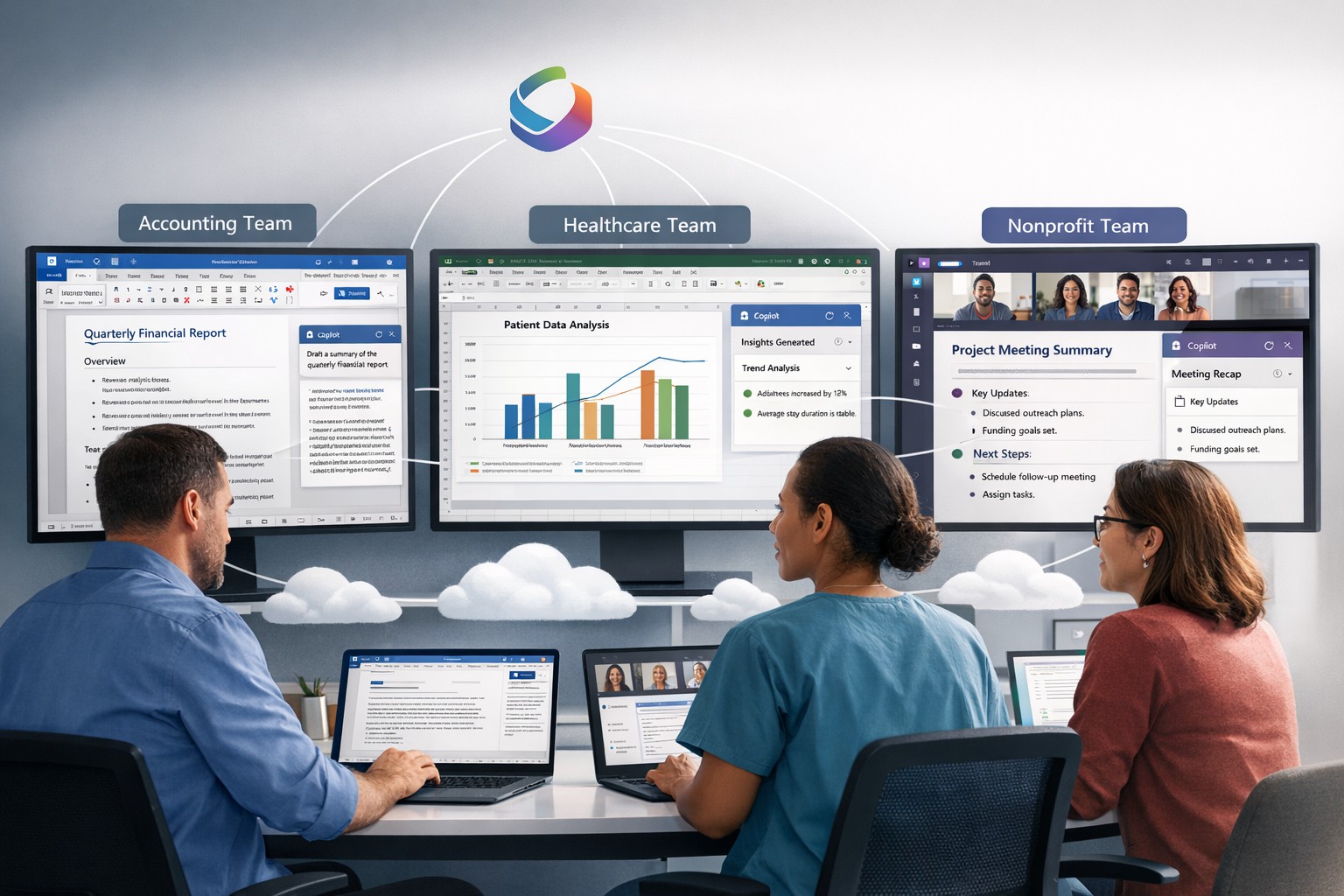
Microsoft 365 Copilot delivers AI-powered productivity across Word, Excel, Teams, and Outlook for small business efficiency.
Microsoft has recently unveiled a groundbreaking addition to its suite of Microsoft 365 apps and services – the AI-powered Copilot. This innovative tool is designed to assist users in generating documents, emails, presentations, and more, revolutionizing the way people work and interact with technology.
The Evolution of Copilot
Copilot, powered by GPT-4 from OpenAI, functions as an AI assistant embedded within Microsoft 365 apps such as Word, Excel, PowerPoint, Outlook, and Teams. It takes on the role of a chatbot, appearing in the sidebar, and can be summoned by users to perform a wide range of tasks. Whether it’s generating text in documents, creating presentations based on Word files, or providing assistance with Excel features like PivotTables, Copilot is there to lend a helping hand.
Streamlining Workflows
One of the key advantages of Copilot is its ability to enhance productivity and streamline workflows. For instance, users can leverage Copilot’s capabilities to prepare for meetings by providing information on related projects, organizational changes, and updates on co-workers who may have returned from vacation. In Word, Copilot can draft documents based on other files, allowing users to freely edit and adapt the AI-generated text. Similarly, Copilot can instantly create SWOT analyses or PivotTables in Excel based on data, making complex tasks easier and more efficient. In Microsoft Teams, Copilot can even transcribe meetings and summarize action items, ensuring that no important information is missed.
The Power of Copilot in Outlook
Copilot also extends its functionality to Outlook, helping users save time and improve email management. It can summarize email threads, create draft responses, and even adapt the tone and length of an email based on user preferences. By automating these tasks, Copilot allows users to focus on more strategic and meaningful work, increasing overall productivity.
The Role of AI Ethics
While Copilot offers significant benefits, Microsoft acknowledges that it may not always be perfect. Jared Spataro, head of Microsoft 365, emphasizes that Copilot might occasionally provide suggestions that are not entirely accurate. However, he also highlights the value of these imperfect suggestions, as they can still provide users with a head start and spark creative ideas.
To address concerns around the accuracy and ethical implications of AI, Microsoft emphasizes transparency and user control. They make it clear how the system makes decisions, provide links to sources, and prompt users to review and fact-check content based on their subject-matter expertise. Microsoft is committed to learning and improving Copilot based on user feedback and scaling the AI tool responsibly.
Copilot’s Integration and Pricing
Microsoft announced yesterday that it would be allowing all customers to purchase Copilot integration for Office 365 as long as you have one of the compatible licenses. The cost is $360 per user per year which equates to $30 per month – highly competitive with other AI services that will not directly integrate with Office 365 apps.
Considerations for Enterprises
While the potential value of Copilot in saving time and improving productivity is significant, organizations must also address potential risks. One concern is the potential for Copilot to provide inaccurate information, leading to what is known as “hallucinations.” Users should exercise caution and verify outputs from Copilot, supplementing its suggestions with human review and fact-checking.
Another critical consideration is data protection. Copilot’s ability to access a wide range of corporate data raises concerns about information oversharing and exposure of sensitive files. Organizations must ensure that proper data governance is in place, including robust permissions and access controls. Securing unstructured data and addressing potential data leaks are essential steps in mitigating risks associated with the deployment of Copilot.
Deployment and Adoption
While Copilot holds great promise, the deployment and adoption process for businesses will likely be gradual and cautious. Microsoft acknowledges the typical enterprise cycle times for adoption and ramp-up. The company expects a gradual growth in the adoption of Copilot, with around one-third of Microsoft 365 customers in the US expected to invest in Copilot within the first year. Businesses that choose to deploy Copilot are estimated to provide licenses to around 40% of their employees during this period.
Real-World Use Cases
During the early access program, several businesses, including Chevron, Goodyear, and General Motors, participated in trials of Copilot. These companies have already started reaping the benefits of the AI tool. Dentsu, a marketing firm, reported that the most common use case for Copilot was information summarization, particularly for Teams calls. Employees found value in Copilot’s ability to quickly pull information from various sources, saving time and improving efficiency.
The feedback from businesses involved in the early access program has been overwhelmingly positive, with employees experiencing increased productivity and more time for higher-level tasks. Different roles within organizations have found value in Copilot for various tasks, such as analysis in Excel or document drafting in Word. The versatility of Copilot makes it a valuable tool for a wide range of job functions and industries.
Microsoft’s AI-powered Copilot is set to revolutionize the way users interact with Microsoft 365 apps, providing enhanced productivity and streamlining workflows. As a trusted Microsoft Partner, Farmhouse Networking, can guide your company into adopting this game changing technology.
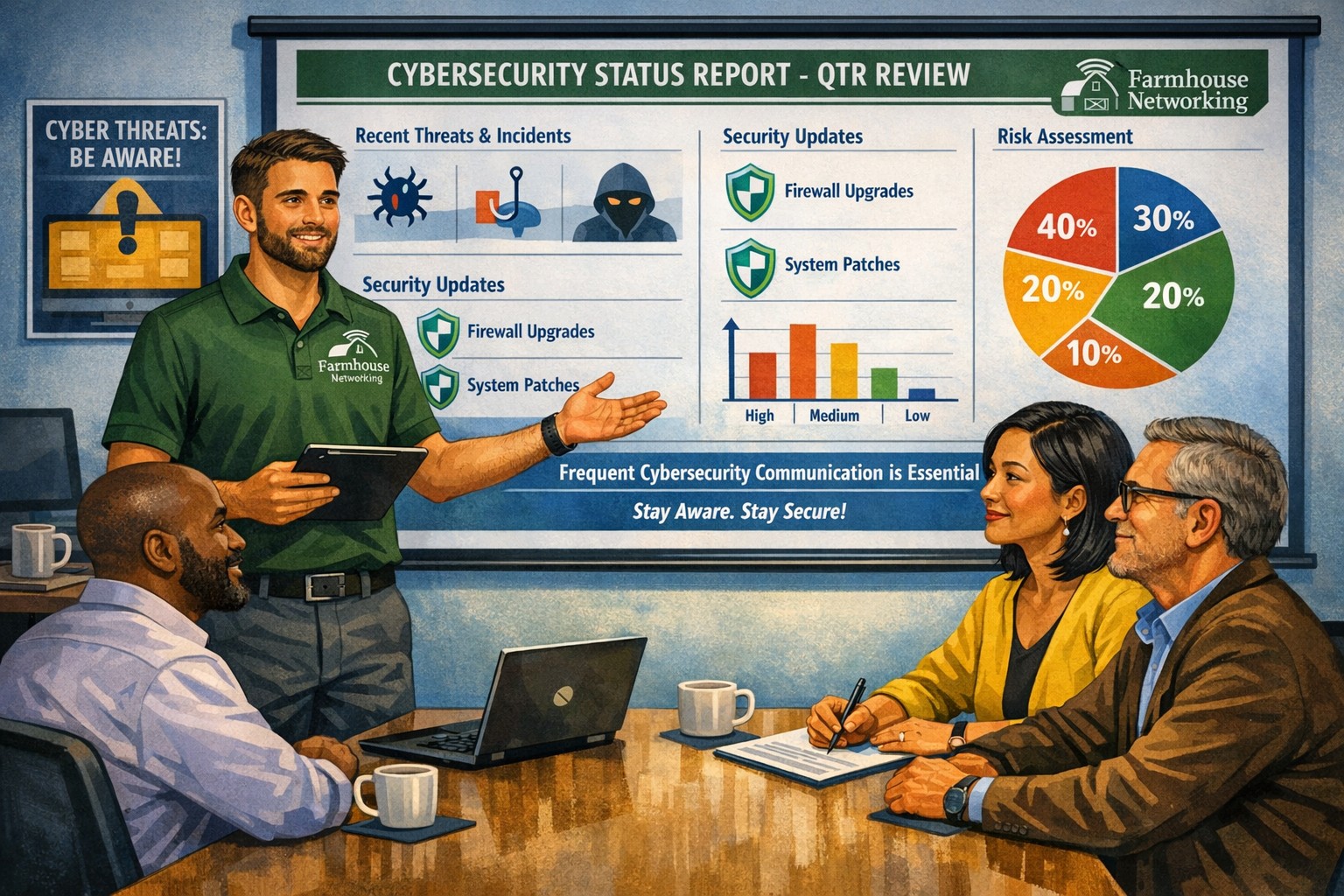
Business meeting between IT provider and client discussing cybersecurity threats and protection strategies
Cyber threats continue to evolve and become increasingly sophisticated, so the importance of robust cybersecurity measures cannot be overstated. Cybersecurity is a critical aspect of any company’s IT infrastructure, as it safeguards company / client data and ensures uninterrupted operations. However, one aspect that often gets overlooked is the proactive communication from IT providers about cybersecurity. This blog article aims to remind IT professionals and decision-makers of the significance of regular discussions with their IT providers regarding cybersecurity, and the potential risks they could be exposed to by neglecting this crucial dialogue.
Importance of Regular Cybersecurity Discussions:
Cybercriminals are continuously developing new attack vectors and exploring vulnerabilities in software, networks, and devices. Cybersecurity is not a one-time fix; it requires ongoing monitoring, updating, and adaptations to counter new threats.
Unfortunately, many organizations assume that by employing an IT provider to manage their systems, they are automatically protected against cyber threats. However, this assumption can lead to complacency, leaving vulnerabilities unaddressed. Regular conversations with your IT provider regarding cybersecurity ensure that your organization is consistently assessing and improving its defense against threats.
Addressing Emerging Threats:
Cybercriminals are constantly adapting their tactics, making it essential for IT providers to stay ahead by implementing proactive security measures. By engaging in frequent discussions, your IT provider can inform you about emerging threats and share strategies to mitigate risk. These discussions should cover topics such as:
Vulnerability Scanning / Penetration Testing: Testing your IT infrastructure to find the weak points is crucial to minimizing the available attack surface for a hacker and decreasing the impact of a breach. Reviewing these findings with your IT provider quarterly is vital to keeping your network safe.
Threat Detection: Standard antivirus software is no longer good enough to stop hackers. Talking with your IT provider about advanced threat detection software to make sure that both local and cloud resources are sufficiently protected from all kinds of attacks.
Patch Management: Ensuring that all software and systems are up-to-date with the latest security patches is crucial. Regular communication will allow your IT provider to inform you about critical patches or upgrades and discuss their implementation to keep your systems secure.
Employee Training: Cybersecurity is a collective effort, and employees play a vital role in maintaining a strong defense. Regular discussions about employee training will ensure that everyone in the organization is aware of best practices, such as identifying phishing emails or avoiding suspicious websites.
Data Backup and Recovery: Regular conversations with your IT company can help you establish and review comprehensive data backup and recovery strategies, minimizing the impact of potential cybersecurity incidents.
Incident Response Planning: In the unfortunate event of a cybersecurity incident, having a well-defined incident response plan is crucial. Meet with your IT provider at least annually to ensure that your plan is up to date, reflecting any changes in your IT infrastructure or evolving threat landscape.
When it comes to cybersecurity, communication is key. If your IT provider has not talked to you recently about cybersecurity, then it is time to call Farmhouse Networking. We are huge on communication and meet regularly with our clients to discuss 42 different IT related categories.
Cloud + BYOD = massive IT savings and unlimited scalability
Businesses, regardless of their size, need to stay agile, cost-efficient, and scalable to remain competitive. Cloud computing and online storage have revolutionized the way companies operate and handle data. By migrating your business operations to the cloud, you can leverage its numerous benefits to reduce costs, enhance scalability, and ultimately drive greater success. In this article, we’ll explore valuable strategies for harnessing the power of cloud computing and online storage to optimize your business operations.
Cost Reduction:
Cloud computing offers a cost-effective solution for businesses of all sizes. Here’s how you can leverage cloud technology to reduce costs:
Infrastructure cost reduction: By switching to cloud-based infrastructure, you eliminate the need for physical servers, hardware, and costly private data centers. This not only reduces upfront capital expenditure but also eliminates ongoing hardware maintenance / replacement costs.
Pay-as-you-go pricing model: Cloud service providers offer flexible pricing options, allowing you to pay for only the resources you consume. This eliminates the need for adding excess just-in-case capacity, resulting in significant cost savings. You can even turn off some services so you are not paying while you sleep.
Energy efficiency: Cloud computing minimizes energy consumption related to IT hardware. Cloud providers are equipped with highly efficient systems that optimize resource utilization, resulting in reduced energy costs for your business and smaller carbon footprint on the planet.
Scalability and Flexibility:
Cloud computing enables businesses to scale their operations seamlessly. Here’s how you can harness this scalability to grow fast and stay ahead:
Elasticity: Cloud-based systems can automatically scale resource capacity up or down in response to fluctuating demands. This scalability ensures that you can handle traffic spikes, seasonal variations, or sudden growth without any disruption.
Multi-region availability: Cloud platforms offer the ability to deploy your resources across multiple geographic regions. This redundancy guarantees uninterrupted service availability, even if a specific region experiences an outage or disruption.
On-demand resource provisioning: Cloud infrastructure allows you to quickly provision additional resources as your business expands. This eliminates the need for long wait times to procure and set up physical hardware.
Enhanced Collaboration and Accessibility:
Cloud-based storage and collaboration tools can revolutionize the way your team works. Here’s how to leverage the cloud for improved collaboration:
Centralized data management: Cloud storage solutions enables sharing of documents, pictures, videos, and other files. This eliminates the need for version control issues and multiple physically stored copies, leading to increased overall productivity.
Remote and mobile access: Cloud computing allows employees to access critical data and applications remotely, promoting flexible work arrangements and enhancing productivity. This accessibility ensures that your team remains connected and productive, regardless of physical location – think work from home without the need for VPN.
Real-time collaboration: Cloud-based tools facilitate real-time collaboration, allowing team members to work simultaneously on projects. This boosts efficiency, accelerates decision-making processes, and reduces time-to-market for products and services.
Don’t wait – adopt cloud technology in your business operations and stay ahead of the competition. Contact us today to learn more!
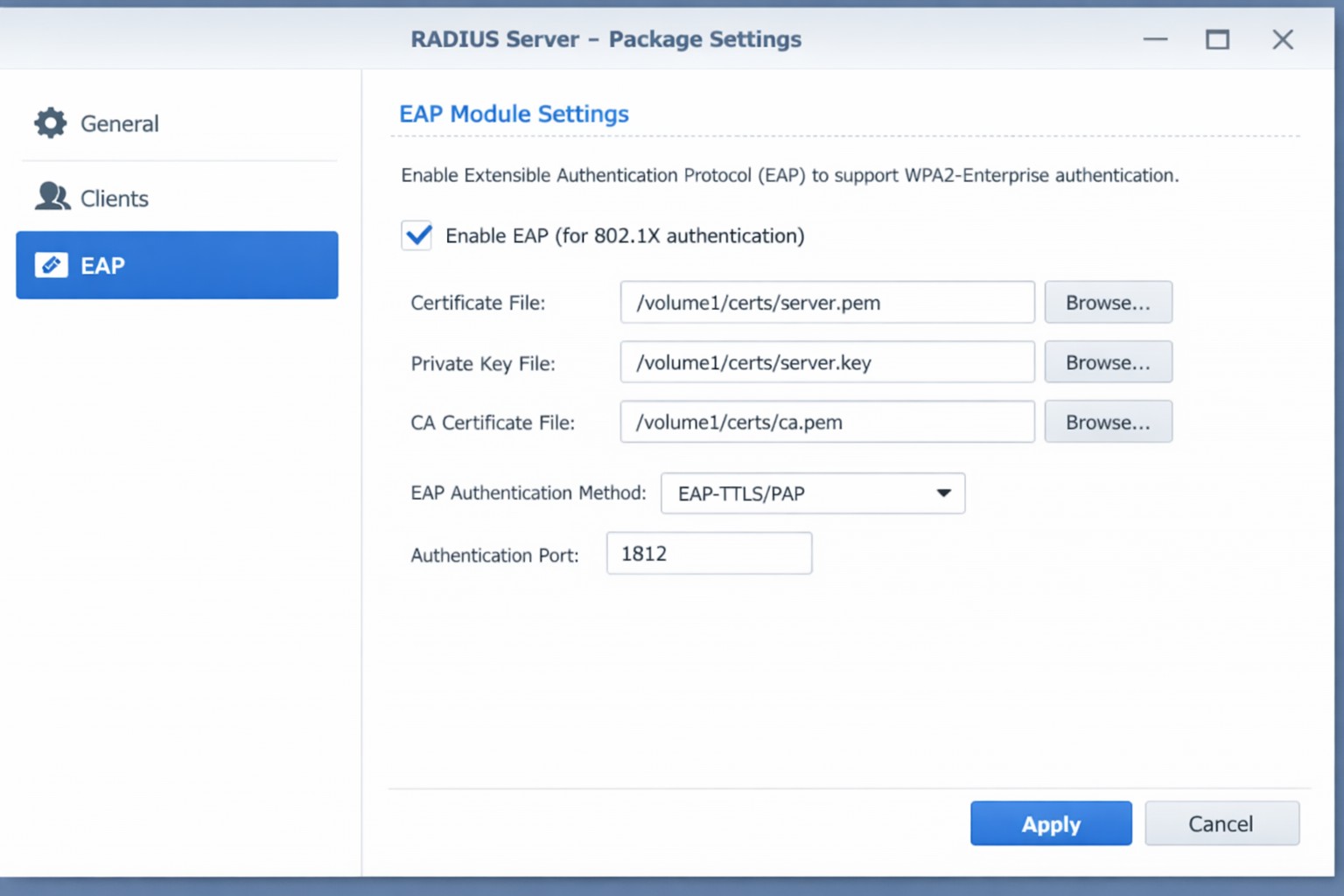
Configure Synology RADIUS for secure EAP enterprise WiFi authentication
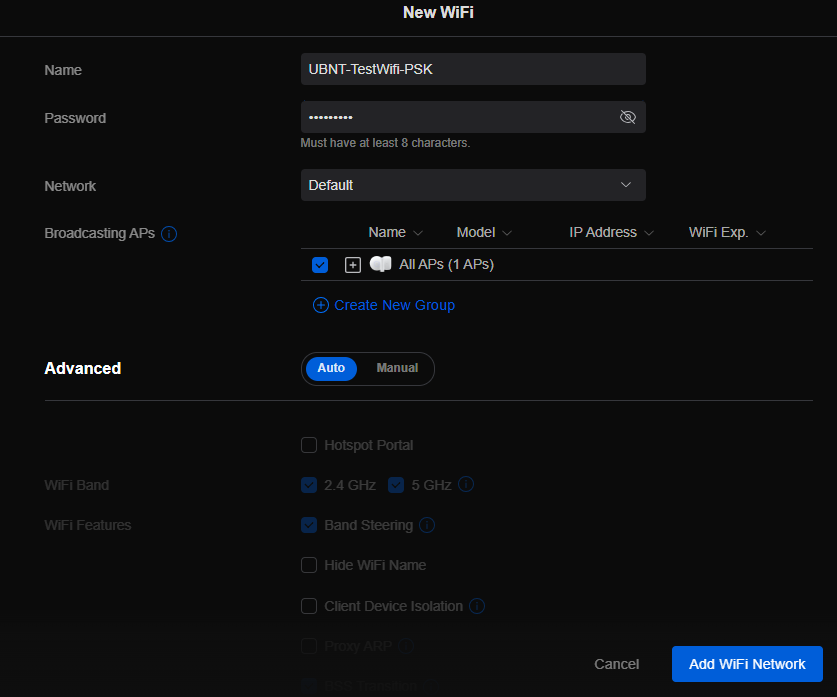
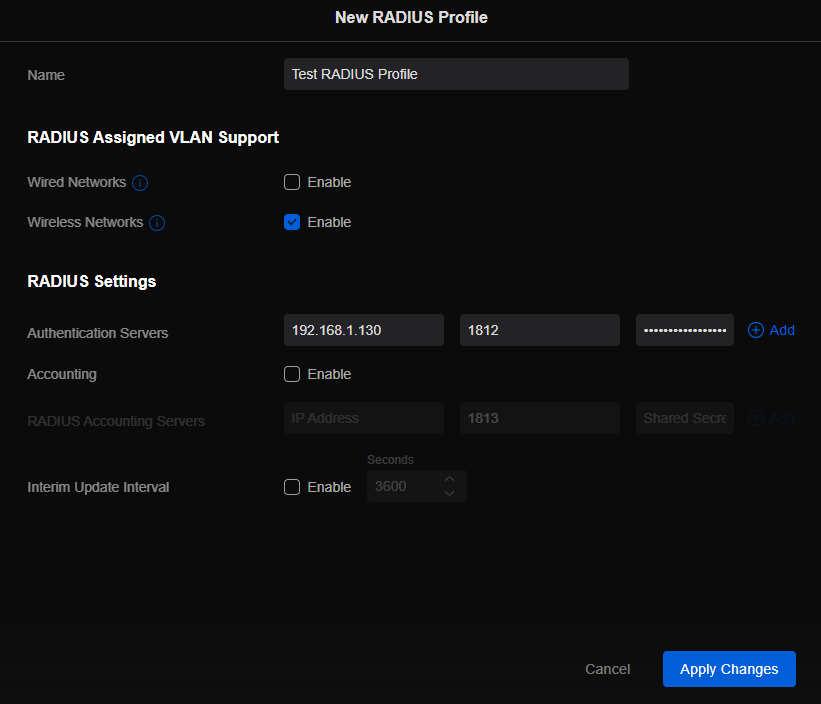
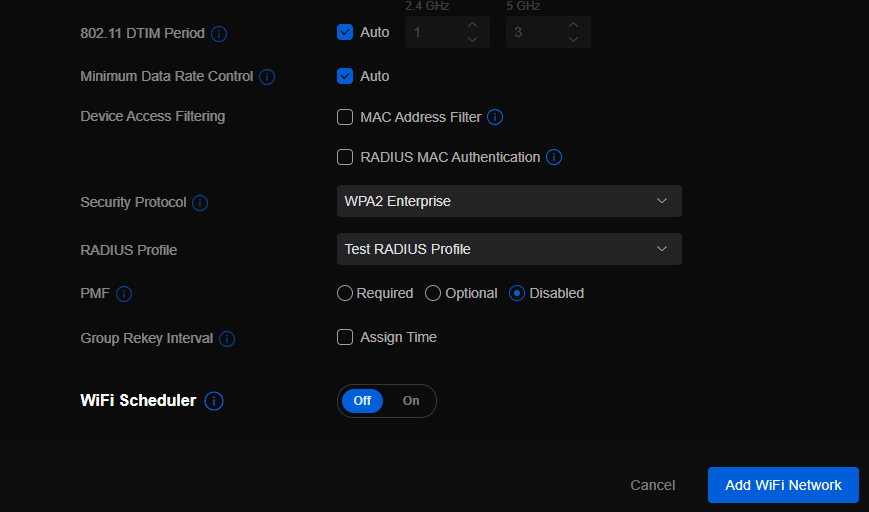
This is the eighth and final of a series that documents the Tier 3 / Co-Managed IT work we did to setup a wireless test bed for a Linux based scientific device. The testing environment included two different wireless network hardware types (Ubiquiti and Cisco). There was also a Synology device used for various purposes including hosting the Ubiquiti controller inside a Kubernetes container, providing certificate services, providing LDAP authentication, and providing RADIUS authentication. Each article has detailed a separate piece of the project. This article shows the setup of Synology RADIUS server for EAP authentication via EAP-PEAP, EAP-TLS, and EAP-TTLS.
Setup Synology Radius for EAP-PEAP
Login to Synology IP via SSH
Use admin login credentials
Go to the Radius certificate directory cd /var/packages/RadiusServer/target/etc/raddb/certs/
Radius must be configured on our certificates: sudo vi ../mods-enabled/eap
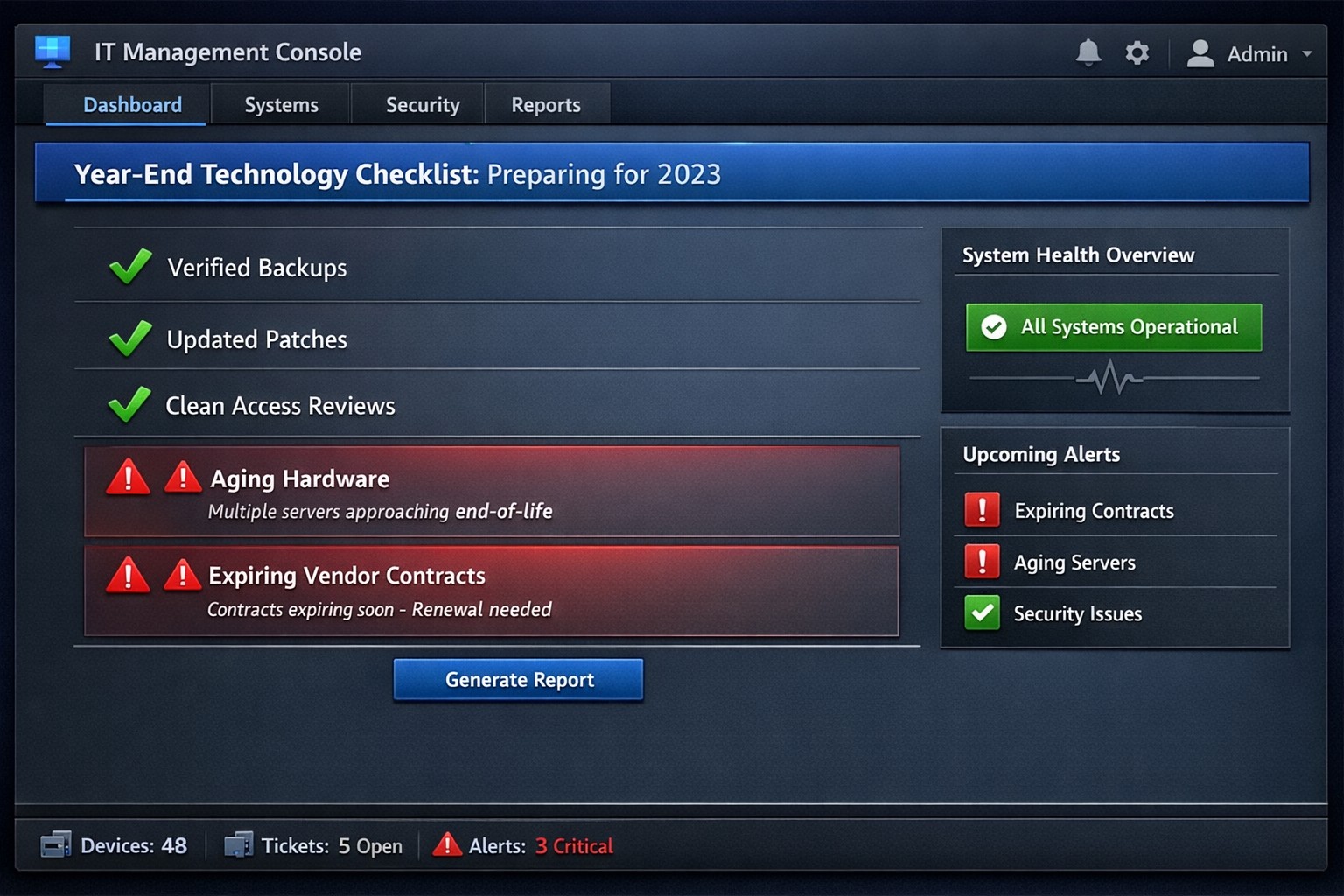
Year-end technology audit dashboard with critical tasks and compliance status.
As the year comes to a close, we at Farmhouse Networking want to ensure that your business technology is in optimal shape for a successful transition into the new year. We’ve put together a checklist to help you wrap up the year on a technologically high note. Some of these items we will work on together, and others will be the responsibility of your team.
Items we will work on together:
Asset Inventory: We have recently conducted a thorough review of your technology assets, including hardware, software, and networking equipment. We updated your inventory list to account for any additions or retirements of assets throughout the year. You should be receiving an invite to our new system called Narmada which gives you constant access to our replacement recommendations.
Password Security: Prompt your team to implement multi-factor authentication for critical systems and applications. This will help to enhance password security. This is not something that should be put off till later. Get it setup on every site possible. It can be made easier with a password manager.
Software Updates: We ensure that standard software applications, operating systems, and antivirus programs are up to date with the latest patches and updates. If you have industry specific software it would be a good time to check with them on the status of your support contract and if there are needed updates.
Data Backups: Verify that your data backup systems are functioning correctly. Test the restoration process to confirm that your business can recover essential data in the event of a disaster. If you don’t have backups in place now is the time to get this critical technology in place.
Security Assessment: Conduct a Security Risk Assessment to identify and address potential vulnerabilities. Ensure that your cybersecurity measures are up to date to protect against evolving threats. Many companies don’t realize that current compliance standards require this.
Employee Training: Provide cybersecurity training to employees to reinforce best practices and raise awareness about potential threats. This should be mandated by your team’s management.
Items you should work on with your team:
Subscription Reviews: Review and audit all software and service subscriptions to ensure they align with your business needs. Cancel any unnecessary subscriptions to optimize costs.
Budget Review: Evaluate your technology budget for the year and identify any areas where adjustments may be needed for the upcoming year.
Technology Roadmap: Develop or update your technology roadmap for the coming year, aligning it with your business goals and objectives.
Compliance Check: Ensure that your technology practices comply with industry regulations and standards applicable to your business.
Communication Plan: Communicate any upcoming changes or upgrades to your team to ensure a smooth transition without disruptions.
Policies & Procedures: Review current documentation to make sure that it includes all needed items like disaster recovery, incident response, computer use, BYOD, and AI usage.
Once you have determined some of your goals and budget, we should meet to discuss the implementation plan for any changes. We will be contacting you in February to setup our next Semi-Annual Business Review (SABR) meetings to discuss this years plan.
If you have any questions or need assistance with any of these items, please don’t hesitate to reach out to our support team. We’re here to help you navigate the year-end process and ensure a seamless start to the new year.
A Step-by-Step Guide for When the Internet Goes Out
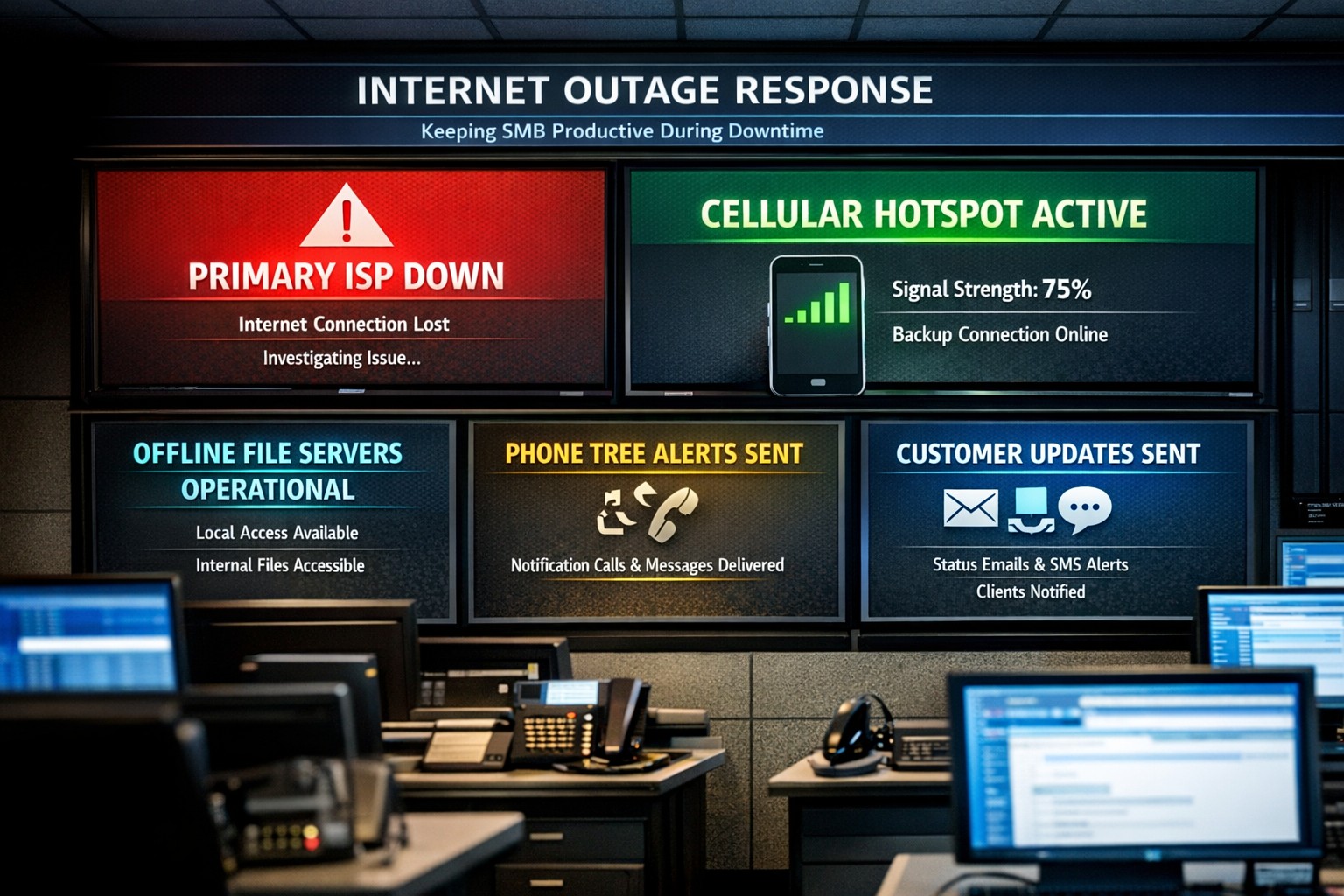
Offline operations dashboard with hotspot failover and local resource access.
Businesses heavily rely on internet access to stay connected and productive. However, what happens when the internet goes out? Whether it’s a temporary outage or a prolonged disruption, losing internet access can have a significant impact on businesses.
We will explore strategies and solutions for navigating the digital apocalypse and ensuring business continuity when the internet goes out. From setting up backup remote access options to implementing offline communication channels, this guide is a must-read for business owners looking to mitigate the impact of internet disruptions and keep their operations running smoothly.
Understanding the Impact
Before we delve into the strategies and solutions for navigating the digital apocalypse, it’s important to understand the potential impact of internet outages on your business. The consequences can be far-reaching and vary depending on the nature of your operations.
Productivity: Productivity can take a major hit when your employees are unable to access crucial online tools and resources. This can result in missed deadlines, delays in client deliverables, and a general slowdown in operations. It’s essential to assess which tasks are entirely dependent on internet connectivity and identify alternative methods to carry them out in the event of an outage.
Customer Satisfaction: If your business relies heavily on online customer interactions, such as e-commerce or customer support, a loss of internet connectivity can lead to frustrated customers, failed transactions, and a tarnished reputation. Having a plan in place to manage customer expectations during an outage is crucial.
Financial Impact: Depending on the duration and severity of the disruption, revenue loss can be substantial. To mitigate this risk, businesses should explore options for data backup, cloud services, and redundancy measures that ensure a seamless transition during an outage.
Preparing for Internet Outages
Backup Plan: One of the most effective ways to ensure business continuity during an internet outage is to have a comprehensive backup plan in place. This involves identifying critical systems and data that need to be accessible offline and regularly backing them up. By doing this, you can minimize the disruption caused by an extended outage and quickly get your business back up and running locally.
Redundancy: This might involve investing in multiple internet service providers (ISPs) or using alternative modes of connectivity, such as mobile hotspot devices or satellite internet. By diversifying your options, you can minimize the risk of a complete loss of internet connectivity. There are even routers that have multiple internet connections with automatic failover or cellular data backups.
Stay Connected
When the internet goes out, it is crucial to have a backup option that allows you to stay connected and continue basic business activities. Mobile hotspots and cellular data can be lifesavers in these situations. Investing in a reliable mobile hotspot device, which uses cellular data to create a Wi-Fi network, can ensure that you have access to the internet even if your primary connection fails. These devices are portable and easy to set up, making them convenient solutions for businesses of all sizes.
Before an outage occurs, it is essential to have a backup cellular plan in place. Assess your cellular service provider options and choose a plan that offers sufficient data, preferably with unlimited options. This will allow your team to continue accessing critical applications, emails, and other online resources without interruption. Furthermore, it is crucial to educate your employees on how to connect and utilize these backup solutions effectively. Inform them about the availability of mobile hotspots and ensure they understand how to use cellular data efficiently without exceeding the limits of the backup data plan.
By incorporating mobile hotspots and cellular data into your backup plans, you can maintain business productivity and minimize the disruption caused by internet outages.
Stabilize Communication
In times of internet outages, it becomes crucial to stabilize communication within your business. Without reliable internet access, VoIP phones and other forms of digital communication with clients and colleagues can become challenging. However, there are alternative solutions that can keep your business running smoothly.
VoIP Routing: Before an outage occurs, take the time to talk to your VoIP phone provider to explore options of how calls will be routed when the internet is out. There are often options that allow calls to be sent to an alternative number or cellphone app during an internet outage.
Mobile Devices: While the office internet may be out it does not necessarily mean that the cellular networks will be down at the same time. Before an internet outage occurs, make sure your team has important digital communication apps installed and that they are familiar with these tools. Provide training sessions or tutorials to ensure everyone is comfortable using them. Additionally, it is essential to have a backup option in case of technical difficulties with the primary tool.
Remote Work Policies
In the midst of a digital apocalypse, it is crucial for businesses to have well-established remote work policies and procedures in place. These policies ensure that employees can continue their work even without internet access, minimizing the impact on productivity. Remote work policies outline expectations for employees when working from home or other offline environments. They should include guidelines for communication, task management, and project deadlines. By establishing clear procedures, businesses can maintain a sense of normalcy and ensure that everyone knows how to navigate through the internet outage.
Additionally, remote work policies should address data security concerns. Employees should be educated on how to handle sensitive information and the appropriate measures to take when working outside the office. Regular training sessions can help reinforce these policies and keep employees up to date with best practices. By implementing remote work policies and procedures, businesses can effectively adapt to the challenges of a digital apocalypse.
Business Continuity Plan
When the internet goes out, having a comprehensive business continuity plan becomes paramount for businesses to minimize disruptions and maintain operations. A business continuity plan outlines the actions and strategies that need to be executed when faced with a digital apocalypse. This plan should include backup communication systems, such as phone lines or walkie-talkies, that can be utilized when the internet is unavailable. Additionally, offline storage and backup systems should be in place to ensure that critical data is available during an internet outage.
Creating a task force dedicated to business continuity can be invaluable during these times. This team can be responsible for implementing and executing the business continuity plan, regularly testing its effectiveness, and making necessary adjustments.
Optimizing remote work infrastructure is essential for seamlessly operating during an internet outage. Contact us today to get prepared before the digital apocalypse occurs.
IT tax deductions: Section 179 bonus depreciation cybersecurity software.
It’s that time of year, business owners need to start thinking about tax deductions and ways to maximize profit protection. One area not to be overlooked is IT expenses since IT plays a crucial role in every business. The good news is that many IT expenses can be deducted from your taxes. From hardware and software purchases to cybersecurity measures and cloud services, there are several essential IT tax deductions that can help you lower your tax bill and keep more money in your profit column.
IT Tax Deductions for Business Owners
As a business owner, it is crucial to recognize the importance of taking advantage of IT tax deductions before the end of the year. These deductions can significantly impact your bottom line. By deducting IT expenses, you are not only reducing your tax liability but also creating funds to re-invest in the growth of your business and upgrading to the latest technology, which positions your business for long-term success.
IT Tax Deductions to Maximize Your Savings
Take advantage of these IT tax deductions to maximize their profit savings:
Software and Hardware Expenses: Deducting the cost of industry specific software and hardware purchases is an excellent way to save on taxes. Whether you invested in new computer systems or upgraded your existing software, remember to include these expenses in your deductions as capital expenditures. Profit savings can be compounded by taking the amount saved through IT tax deductions and spending it on further software and hardware purchases.
Cybersecurity Measures: With the increasing threat of cyberattacks, investing in cybersecurity measures is crucial. These expenses can also be deducted from your taxes. From firewalls to antivirus software, make sure to claim any cybersecurity investments you have made throughout the year.
Cloud Services: Many businesses have moved to using cloud services for their storage and daily operations. These operational expenses are also eligible for tax deductions. Whether you use cloud computing, backup services, or cloud-based software, remember to include these costs in your deductions.
By focusing on these essential IT tax deductions, you will minimize your tax liability and position your business for success in the coming year.
Consulting with a Certified Public Accountant
While it’s important to have a basic understanding of the IT tax deductions for your business, it is equally important to consult with a certified public accountant. A knowledgeable CPA can provide you with personalized financial advice and guidance based on your company’s unique situation.
Tax laws and regulations are constantly changing, and it can be challenging to keep up with all the updates. By working closely with a CPA, you can stay updated on the latest deductions and strategies to maximize your savings while staying compliant with the law. They can review your financial records, identify missed deductions, and help you make informed decisions that positively impact your bottom line.
Remember, seeking advice from a tax professional will not only help you optimize your profit savings but also give you peace of mind knowing that your tax returns are accurate and in line with the regulations.
Keeping Detailed Records
One essential practice for maximizing your IT tax deductions is keeping detailed records of your IT expenses. Maintaining accurate and organized records throughout the year can help you claim all eligible deductions at tax time.
Start by creating a system to track and categorize your IT expenses. This can include items like software and hardware purchases, IT services, website development costs, and data storage fees. Keep receipts, invoices, and any supporting documents for each expense. Having detailed records allows you to easily identify and calculate eligible deductions. It also provides evidence and documentation if you ever face an audit or need to justify your deductions to the IRS.
Consider using accounting software or cloud-based platforms to streamline the record-keeping process. These tools can help you track expenses, generate reports, and ensure accuracy in your financial records. By maintaining detailed records of your IT expenses, you not only ensure that you are taking full advantage of available deductions, but you also create a solid foundation for your overall tax strategy.
Utilizing Section 179 Deductions
Section 179 of the tax code allows businesses to deduct the full purchase price of qualifying equipment and software purchased or financed during the tax year. By utilizing Section 179, you can deduct the entire cost of eligible technology investments in the year they are purchased. This deduction can help reduce your overall tax liability, allowing you to maximize your profit savings.
To qualify for Section 179 deductions, the equipment or software must be used for business purposes more than 50% of the time. This deduction is particularly beneficial for businesses investing in technology upgrades or replacements, as it encourages the adoption of new and improved IT systems. Be sure to consult with a tax professional to determine the eligibility of your IT investments for Section 179 deductions and to ensure you are maximizing this deduction for your business.
Bonus Depreciation for IT Purchases
Business owners can also benefit from bonus depreciation for their IT purchases. Bonus depreciation allows businesses to deduct a percentage of the cost of qualifying assets in the year they are placed in service. Under the Tax Cuts and Jobs Act, businesses can take an 80% bonus depreciation deduction for qualified property acquired and placed into service in 2023, then depreciate the remaining 20% over the course of several years.
To qualify for bonus depreciation, the property must have a recovery period of 20 years or less and be purchased for business use. This deduction is particularly valuable for businesses that are investing in new IT equipment or upgrading their existing technology infrastructure.
By timing your IT purchases strategically, you can take full advantage of bonus depreciation and significantly reduce your tax liability. However, it’s important to note that bonus depreciation is subject to change based on tax laws and regulations, so consulting with a CPA is crucial to ensure compliance and maximize your savings.
Research and Development Tax Credit
While bonus depreciation and Section 179 deductions are great for maximizing your tax deductions when it comes to IT purchases, there is another valuable tax credit that often goes unnoticed – the Research and Development (R&D) tax credit.
The R&D tax credit is designed to incentivize businesses to invest in innovation and development activities. Many business owners mistakenly believe that this credit is only applicable to scientific or technological research. However, the R&D tax credit is much broader than that and can apply to a wide range of industries and activities.
To make the most of the R&D tax credit, it’s important to keep detailed records of your qualifying activities and expenses. Consult with a tax professional who specializes in this area to ensure that you are maximizing your tax savings while staying compliant with the IRS requirements.
To make best use of your IT tax deduction spending, contact us to discuss new purchases and upgrades.
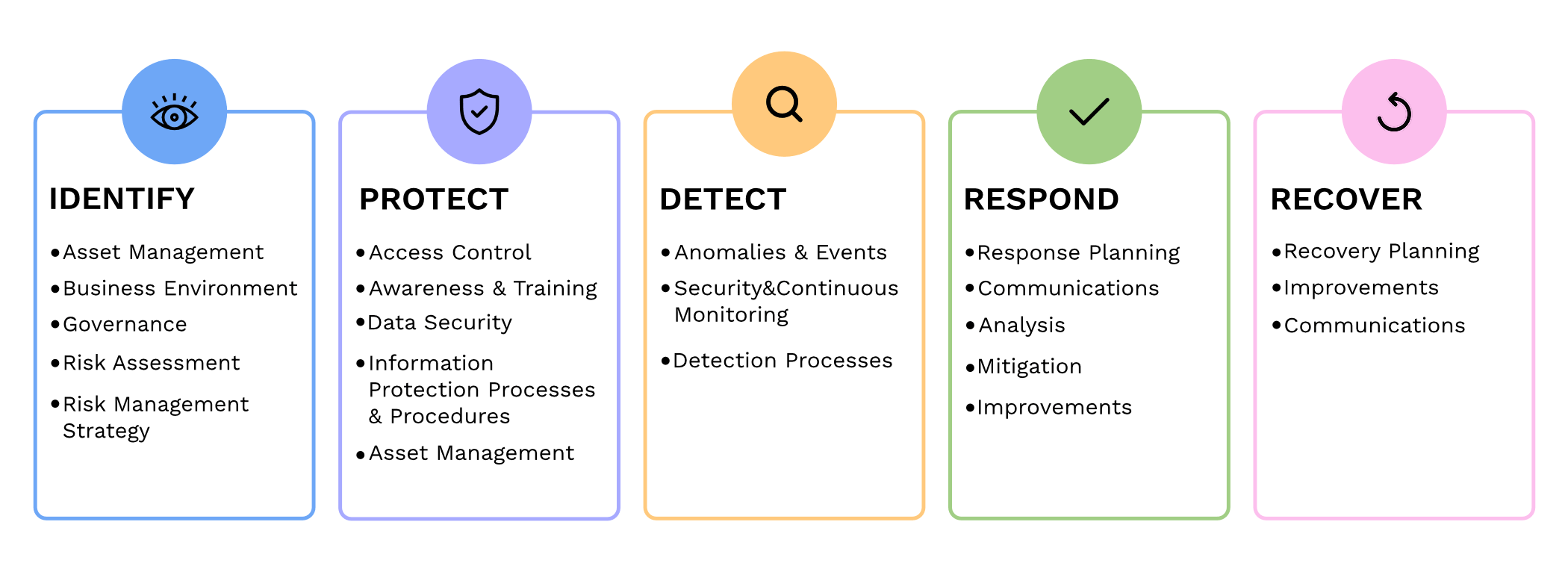
It has become increasingly crucial for businesses to prioritize cybersecurity. We all need to be proactive in safeguarding sensitive information and protecting against cyber threats. The National Institute of Standards and Technology (NIST) has been providing standards for cybersecurity practices. We will now delve into the updates and key changes in the fourth revision of the renowned NIST 800-53 publication.
Expanded Scope: NIST 800-53 Revision 4 broadens the standards scope to include private sector organizations dealing with sensitive information. This expansion reflects the need for all companies to implement cybersecurity best practices.
Threats and Vulnerabilities: This revision incorporates emerging threats and vulnerabilities faced by organizations today, such as advanced persistent threats, insider threats, supply chain risks, and cloud computing challenges. It emphasizes the importance of a comprehensive approach to identify and mitigate these risks effectively.
Security and Privacy: NIST 800-53 Revision 4 highlights the connection between security and privacy. The guidelines provided help organizations maintain the delicate balance of ensuring data protection while respecting privacy rights.
Continuous Monitoring and Assessment: One significant change is the emphasis on continuous monitoring. Instead of periodic assessments, companies are urged to implement an ongoing, systematic approach to monitor security, identify vulnerabilities, and respond to them in real-time. This proactive approach helps in detecting and mitigating threats promptly.
Role-Based Access Controls (RBAC): Another notable addition is the strengthening of Role-Based Access Controls (RBAC). This approach ensures that users only have access to the information and functions that are needed to complete their jobs. Implementing effective RBAC helps minimize the risk of unauthorized access, privilege escalation, and data breaches.
Supply Chain Risk Management (SCRM): Revision 4 also emphasizes the need for proper Supply Chain Risk Management (SCRM) practices. It recommends involving suppliers and stakeholders in security assessments and due diligence processes to mitigate risks associated with third party software, hardware, and services.
Remember, cybersecurity is a journey, not a one-time event. Stay vigilant, adapt to evolving threats, and contact us to create a comprehensive cybersecurity strategy to safeguard your business assets and reputation.
Your security is our top priority, and we want to make sure you and your business stay protected from evolving threats. Recently, we’ve seen a rise in AI-related scams, particularly voice scams, that can pose significant risks to individuals and businesses alike. Here’s what you need to know to stay safe:
AI Voice Scams
Voice scams involve malicious actors using AI-powered technology to impersonate trusted individuals or entities, such as your colleagues, clients, or even vendors. They may request sensitive information or even financial transactions, all under the guise of a familiar voice.
Protecting Your Business To safeguard your business from voice scams and other AI-related threats, here are some essential steps:
Verification Protocols: Establish strict verification procedures for any requests involving sensitive information or financial transactions, especially when received via voice communication.
Employee Training: Remind your team about the risks of voice scams and the importance of verifying requests, even if they sound legitimate.
Secure Communication Channels: Ensure that sensitive information is shared through secure channels and encrypted communication methods.
Regular Updates: Keep your security software, including anti-phishing and anti-malware tools, up to date to defend against evolving AI-driven threats.
MSP Support: As your MSP, we are here to help you implement these robust security measures and provide guidance on staying protected against AI scams.
We are committed to helping you navigate these challenges and keep your business secure. Please feel free to contact us if you have any specific questions or require assistance in strengthening your security protocols.
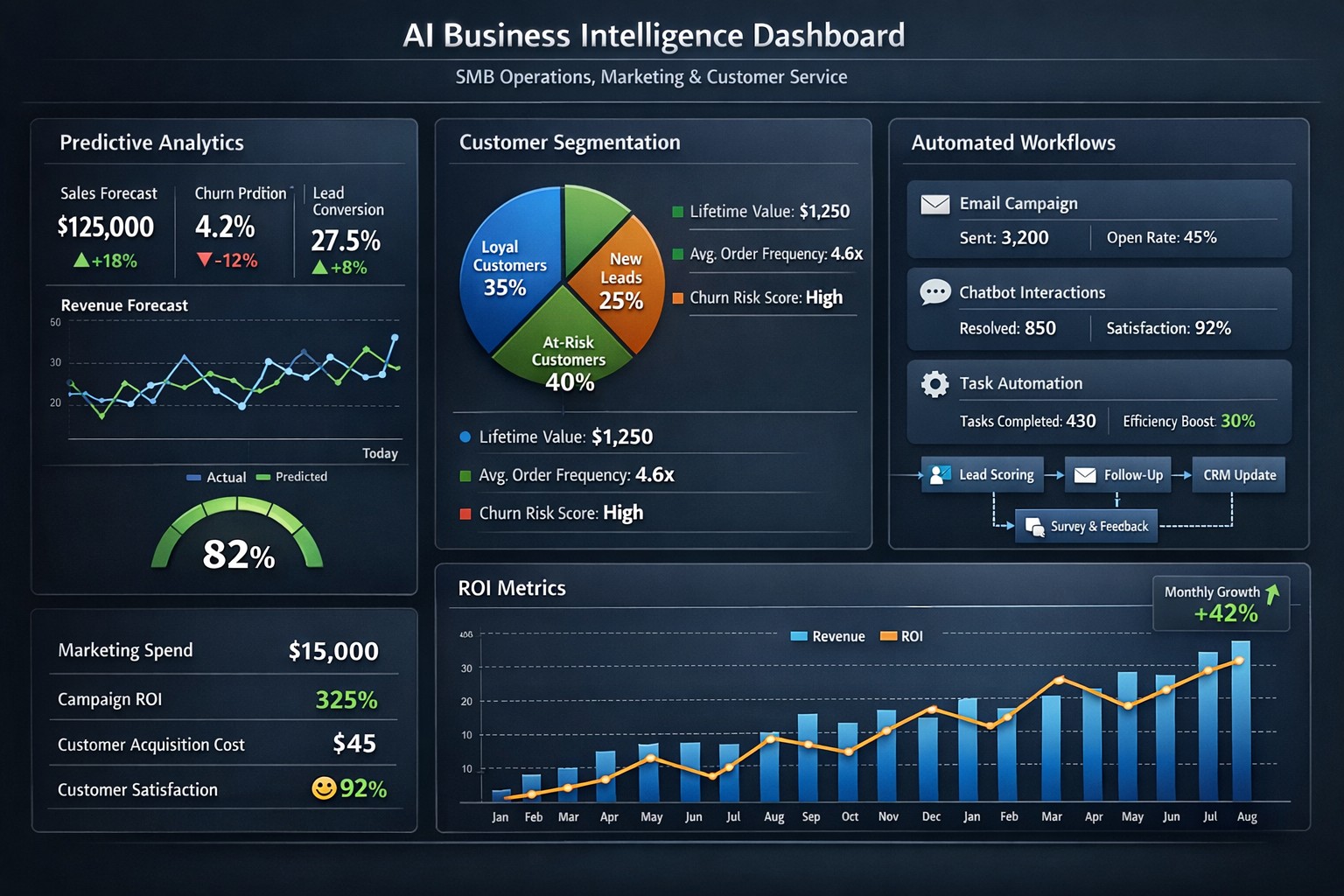
Enterprise AI platform integrating predictive maintenance customer insights process automation.
As your trusted Managed IT Service Provider (MSP), we are always looking for ways to help your business thrive. Today, we want to shed some light on the remarkable potential of Artificial Intelligence (AI) and how it can benefit your day-to-day operations.
Artificial Intelligence
AI isn’t just a buzzword; it’s a game-changer for businesses of all sizes, including businesses like yours. We wanted to highlight some of the ways AI can empower your business:
Improved Efficiency: AI can automate repetitive tasks, saving your employees time and allowing them to focus on more strategic and creative endeavors.
Data Analysis: AI can analyze large sets of data quickly and accurately, helping you make informed decisions and uncover valuable insights.
Personalized Customer Experiences: AI can help you tailor your products and services to individual customer needs, enhancing satisfaction and loyalty.
Enhanced Security: AI can bolster your cybersecurity efforts, identifying threats and vulnerabilities more effectively.
Cost Savings: With AI-driven solutions, you can reduce operational costs while increasing productivity.
We believe that implementing AI safely in your business can give you a competitive edge, improve your bottom line, and create new opportunities for growth. If you’re interested in exploring AI solutions for your business, please don’t hesitate to reach out. We’re here to help you navigate this exciting technology landscape.
Let’s embrace AI together and unlock new possibilities for your business’s success. Feel free to contact us for a personalized consultation and guidance on AI integration into your processes.
Enterprise managed backup console with real-time monitoring and recovery analytics.
Data is the lifeblood of any business. From customer information to financial records, losing critical data can have devastating consequences for a company. That’s why businesses must have a reliable backup system in place. Managed backup services offer a comprehensive solution for data protection, providing automated backups, off-site storage, and quick data recovery in case of emergencies. In this blog post, we will explore the importance of protecting your business with managed backup services and how they can safeguard your valuable data.
The importance of data protection for businesses
Data protection is a top priority for businesses of all sizes. The importance of safeguarding your valuable data cannot be overstated. In addition to the potential financial losses that can result from data breaches or loss, businesses also face the risk of damaging their reputation and losing customer trust. Managed backup services are an essential part of a comprehensive data protection strategy. With automated backups and off-site storage, businesses can ensure that their data is safe and accessible, even in the event of a disaster. Additionally, quick data recovery capabilities minimize downtime and keep operations running smoothly. By investing in managed backup services, businesses can have peace of mind knowing that their critical data is protected and their business is secure.
Benefits of using managed backup services for your business
Using managed backup services can bring numerous benefits to your business. Let’s explore some of the key advantages that come with implementing managed backup services:
Increased Data Security: With automated backups and off-site storage, your valuable business data is protected from human errors, accidental deletions, or potential disasters. In the event of any mishaps, your data remains safe and easily recoverable.
Enhanced Disaster Recovery: Storing your data off-site ensures that even if your primary business location is compromised, you can still access your data and continue operations seamlessly. This added layer of security is crucial for business continuity.
Time and Cost Savings: The quick data recovery capabilities of managed backup services minimize downtime and save your business from significant financial losses. By swiftly restoring your data, you can maintain productivity and keep customer trust intact.
Peace of Mind: Investing in managed backup services equips your business with reliable and comprehensive data protection, giving you the peace of mind that your critical information is secure.
Factors to consider when choosing a managed backup service provider
When it comes to choosing a managed backup service provider for your business, there are several important factors to consider. Here are six key considerations that will help you make an informed decision:
Reliability and Security: Look for a provider that offers reliable and secure backup solutions. They should have a track record of successfully protecting data and providing seamless disaster recovery.
Scalability: Your business needs may change over time, so it is crucial to choose a provider that can scale its services to meet your evolving backup requirements without hindering performance.
Data Encryption: Ensure that the provider offers strong encryption measures to protect your data during storage and transmission. This will safeguard your sensitive information from unauthorized access.
Monitoring and Support: Opt for a provider that offers proactive monitoring and support services. They should be readily available to address any issues promptly and assist you in restoring your data whenever needed.
Cost and Pricing Model: Consider your budget and choose a provider that offers transparent pricing with no hidden costs. Assess the value of the service and determine if it aligns with your business’s financial objectives.
Backup Reliability: Regular testing and monitoring of your backups is crucial to ensure their effectiveness and reliability. It is important to regularly review and test the backups to verify that they are working correctly.
Taking a proactive approach to backup will provide you with confidence in your data protection strategy. By minimizing downtime and potential risks, you can focus on growing your business and achieving your goals. Invest in managed backup services today and secure your business’s future – contact us to get started
Office 365 anti-phishing policy configuration with impersonation protection enabled.
Phishing Protection
Enable This in Office 365 Now
Had a charity notify us that they were getting a ton of phishing attempts to their email every day and wanted to know what we could do for them. They use Office 365, so we looked through the settings and found one called “First Contact Safety Tip” which makes a small banner appear at the top of the email like this:
Co-managed IT dashboard with MSP monitoring supplementing internal team.
Managing IT can be a daunting task, especially for businesses that lack dedicated IT personnel or the expertise to handle today’s complex technology. In recent years, more and more organizations have recognized the benefits of outsourcing their IT management to Managed Service Providers (MSPs).
What is an MSP?
A Managed Service Provider, or MSP, is a company that offers a range of IT services to businesses. These services can include network monitoring, infrastructure management, data backup, cybersecurity, and more. By partnering with an MSP, businesses can offload their IT responsibilities to professionals with deep expertise and industry-best practices.
The Challenges of Self-Managed IT
Self-managing your IT can be a significant challenge. Here are some of the common pain points that organizations face:
Lack of Expertise: IT is a complex and ever-evolving field. Keeping up with the latest technologies, security threats, and best practices can be overwhelming, especially for businesses without dedicated IT staff.
Resource Constraints: Managing IT requires time, manpower, and financial resources. Small and medium-sized businesses often struggle to allocate these resources effectively, leading to inefficiencies, downtime, and security vulnerabilities.
Limited Scalability: Growing businesses often find it difficult to scale their IT infrastructure to meet increased demand. Self-managing your IT environment may require significant investments in hardware, software, and additional staff, which can strain budgets and hinder growth.
Cybersecurity Risks: Data breaches and cyber-attacks are on the rise. Without proper security measures in place, businesses face significant financial and reputational risks. Implementing and maintaining robust cybersecurity protocols can be challenging for organizations without the necessary expertise.
The Benefits of MSP-Managed IT
Switching to an MSP-managed IT environment offers several benefits:
Expertise and Support: MSPs have a team of experienced professionals who specialize in different aspects of IT management. They stay up-to-date with the latest industry trends and best practices, providing businesses with access to a breadth of knowledge and expertise.
Proactive Monitoring and Maintenance: MSPs utilize advanced tools and technologies to monitor your IT infrastructure 24/7. They identify potential issues before they become critical, minimizing downtime and ensuring smooth operations.
Scalability and Flexibility: MSPs provide scalable solutions tailored to your business needs. Whether you’re experiencing rapid growth or need to downsize, an MSP can quickly adapt your IT infrastructure to meet changing requirements without additional investments or resources.
Enhanced Security: MSPs employ robust security measures to protect your systems, networks, and data from cyber threats. They implement industry-standard security practices, conduct regular security audits, and ensure compliance with data protection regulations.
Cost Savings: By outsourcing IT management to an MSP, businesses can reduce the overhead costs associated with maintaining an in-house IT department. MSPs work on a subscription-based model, allowing organizations to pay for the services they need, when they need them.
Strategic Planning: MSPs can act as your virtual chief information officer providing project planning services that keep IT spend spread across the years to make the IT budget easier to manage.
Consider making the switch to an MSP today and unlock the benefits of professional IT management, contact us to get started.
This is the seventh in a series that document the Tier 3 / Co-Managed IT work we did to setup a wireless test bed for a Linux based scientific device. The testing environment included two different wireless network hardware types (Ubiquiti and Cisco). There was also a Synology device used for various purposes including hosting the Ubiquiti controller inside a Kubernetes container, providing certificate services, providing LDAP authentication, and providing RADIUS authentication. Each article will detail a separate piece of the project. This article shows the basic setup of Ubiquiti Controller for PSK and RADIUS authentication from wireless devices.
Setup Ubiquiti Wireless Network with PSK
Login to Ubiquiti controller previously created – Here
Click on Setting gear icon at bottom left
Make sure you are on Wifi tab and click Create New link
Set network BSSID
Create Password
Click Add Wifi Network button
UniFi SSID advanced security settings with RADIUS profile and PPSK configuration.
Setup Ubiquiti Wireless Network with RADIUS
Login to Ubiquiti controller previously created – Here
Click on Setting gear icon at bottom left
Click on Profiles
Click on Radius Tab
Click on Create New link
Give the Profile a name
Enter RADIUS server IP address as Authentication Server
Enter RADIUS shared secret
Click Add
Click Apply Changes
Click on Wifi Tab
Click on Create New link
Set network BSSID
Change Advanced to Manual
Set Security Protocol – WPA2 Enterprise
Select new RADIUS Profile
Click Add Wifi Network
If your company has highly customized setup requirements that you need consulting for, then contact us for assistance.
And God will generously provide all you need. Then you will always have everything you need and plenty left over to share with others. As the Scriptures say, “They share freely and give generously to the poor. Their good deeds will be remembered forever.” For God is the one who provides seed for the farmer and then bread to eat. In the same way, he will provide and increase your resources and then produce a great harvest of generosity in you. - 2 Corinthians 9:8-10
We use cookies to ensure that we give you the best experience on our website. If you continue to use this site we will assume that you are happy with it.