Cloud + BYOD = massive IT savings and unlimited scalability
Businesses, regardless of their size, need to stay agile, cost-efficient, and scalable to remain competitive. Cloud computing and online storage have revolutionized the way companies operate and handle data. By migrating your business operations to the cloud, you can leverage its numerous benefits to reduce costs, enhance scalability, and ultimately drive greater success. In this article, we’ll explore valuable strategies for harnessing the power of cloud computing and online storage to optimize your business operations.
Cost Reduction:
Cloud computing offers a cost-effective solution for businesses of all sizes. Here’s how you can leverage cloud technology to reduce costs:
Infrastructure cost reduction: By switching to cloud-based infrastructure, you eliminate the need for physical servers, hardware, and costly private data centers. This not only reduces upfront capital expenditure but also eliminates ongoing hardware maintenance / replacement costs.
Pay-as-you-go pricing model: Cloud service providers offer flexible pricing options, allowing you to pay for only the resources you consume. This eliminates the need for adding excess just-in-case capacity, resulting in significant cost savings. You can even turn off some services so you are not paying while you sleep.
Energy efficiency: Cloud computing minimizes energy consumption related to IT hardware. Cloud providers are equipped with highly efficient systems that optimize resource utilization, resulting in reduced energy costs for your business and smaller carbon footprint on the planet.
Scalability and Flexibility:
Cloud computing enables businesses to scale their operations seamlessly. Here’s how you can harness this scalability to grow fast and stay ahead:
Elasticity: Cloud-based systems can automatically scale resource capacity up or down in response to fluctuating demands. This scalability ensures that you can handle traffic spikes, seasonal variations, or sudden growth without any disruption.
Multi-region availability: Cloud platforms offer the ability to deploy your resources across multiple geographic regions. This redundancy guarantees uninterrupted service availability, even if a specific region experiences an outage or disruption.
On-demand resource provisioning: Cloud infrastructure allows you to quickly provision additional resources as your business expands. This eliminates the need for long wait times to procure and set up physical hardware.
Enhanced Collaboration and Accessibility:
Cloud-based storage and collaboration tools can revolutionize the way your team works. Here’s how to leverage the cloud for improved collaboration:
Centralized data management: Cloud storage solutions enables sharing of documents, pictures, videos, and other files. This eliminates the need for version control issues and multiple physically stored copies, leading to increased overall productivity.
Remote and mobile access: Cloud computing allows employees to access critical data and applications remotely, promoting flexible work arrangements and enhancing productivity. This accessibility ensures that your team remains connected and productive, regardless of physical location – think work from home without the need for VPN.
Real-time collaboration: Cloud-based tools facilitate real-time collaboration, allowing team members to work simultaneously on projects. This boosts efficiency, accelerates decision-making processes, and reduces time-to-market for products and services.
Don’t wait – adopt cloud technology in your business operations and stay ahead of the competition. Contact us today to learn more!
Configure Synology RADIUS for secure EAP enterprise WiFi authentication
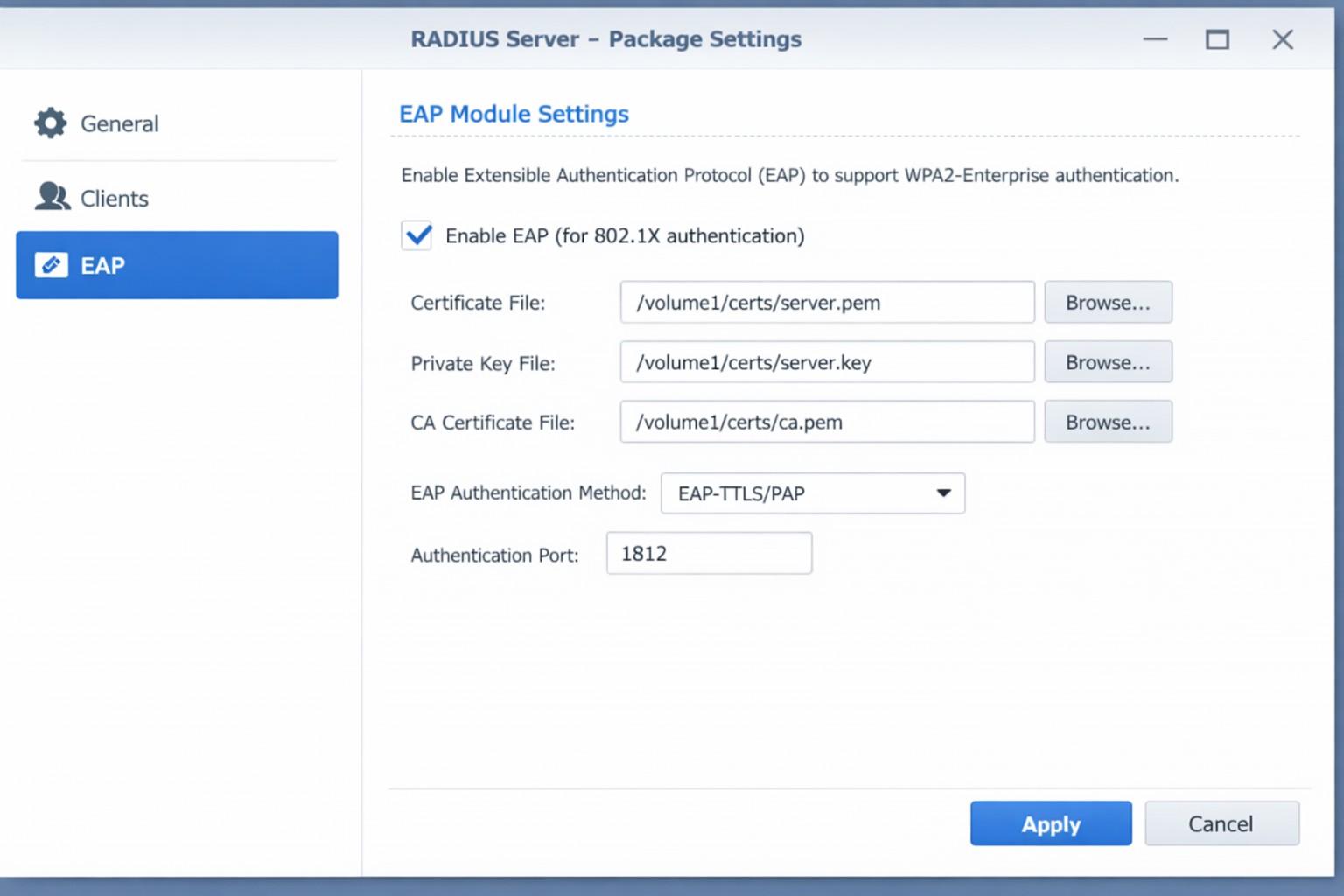
This is the eighth and final of a series that documents the Tier 3 / Co-Managed IT work we did to setup a wireless test bed for a Linux based scientific device. The testing environment included two different wireless network hardware types (Ubiquiti and Cisco). There was also a Synology device used for various purposes including hosting the Ubiquiti controller inside a Kubernetes container, providing certificate services, providing LDAP authentication, and providing RADIUS authentication. Each article has detailed a separate piece of the project. This article shows the setup of Synology RADIUS server for EAP authentication via EAP-PEAP, EAP-TLS, and EAP-TTLS.
Setup Synology Radius for EAP-PEAP
Login to Synology IP via SSH
Use admin login credentials
Go to the Radius certificate directory cd /var/packages/RadiusServer/target/etc/raddb/certs/
Radius must be configured on our certificates: sudo vi ../mods-enabled/eap
IT tax deductions: Section 179 bonus depreciation cybersecurity software.
It’s that time of year, business owners need to start thinking about tax deductions and ways to maximize profit protection. One area not to be overlooked is IT expenses since IT plays a crucial role in every business. The good news is that many IT expenses can be deducted from your taxes. From hardware and software purchases to cybersecurity measures and cloud services, there are several essential IT tax deductions that can help you lower your tax bill and keep more money in your profit column.
IT Tax Deductions for Business Owners
As a business owner, it is crucial to recognize the importance of taking advantage of IT tax deductions before the end of the year. These deductions can significantly impact your bottom line. By deducting IT expenses, you are not only reducing your tax liability but also creating funds to re-invest in the growth of your business and upgrading to the latest technology, which positions your business for long-term success.
IT Tax Deductions to Maximize Your Savings
Take advantage of these IT tax deductions to maximize their profit savings:
Software and Hardware Expenses: Deducting the cost of industry specific software and hardware purchases is an excellent way to save on taxes. Whether you invested in new computer systems or upgraded your existing software, remember to include these expenses in your deductions as capital expenditures. Profit savings can be compounded by taking the amount saved through IT tax deductions and spending it on further software and hardware purchases.
Cybersecurity Measures: With the increasing threat of cyberattacks, investing in cybersecurity measures is crucial. These expenses can also be deducted from your taxes. From firewalls to antivirus software, make sure to claim any cybersecurity investments you have made throughout the year.
Cloud Services: Many businesses have moved to using cloud services for their storage and daily operations. These operational expenses are also eligible for tax deductions. Whether you use cloud computing, backup services, or cloud-based software, remember to include these costs in your deductions.
By focusing on these essential IT tax deductions, you will minimize your tax liability and position your business for success in the coming year.
Consulting with a Certified Public Accountant
While it’s important to have a basic understanding of the IT tax deductions for your business, it is equally important to consult with a certified public accountant. A knowledgeable CPA can provide you with personalized financial advice and guidance based on your company’s unique situation.
Tax laws and regulations are constantly changing, and it can be challenging to keep up with all the updates. By working closely with a CPA, you can stay updated on the latest deductions and strategies to maximize your savings while staying compliant with the law. They can review your financial records, identify missed deductions, and help you make informed decisions that positively impact your bottom line.
Remember, seeking advice from a tax professional will not only help you optimize your profit savings but also give you peace of mind knowing that your tax returns are accurate and in line with the regulations.
Keeping Detailed Records
One essential practice for maximizing your IT tax deductions is keeping detailed records of your IT expenses. Maintaining accurate and organized records throughout the year can help you claim all eligible deductions at tax time.
Start by creating a system to track and categorize your IT expenses. This can include items like software and hardware purchases, IT services, website development costs, and data storage fees. Keep receipts, invoices, and any supporting documents for each expense. Having detailed records allows you to easily identify and calculate eligible deductions. It also provides evidence and documentation if you ever face an audit or need to justify your deductions to the IRS.
Consider using accounting software or cloud-based platforms to streamline the record-keeping process. These tools can help you track expenses, generate reports, and ensure accuracy in your financial records. By maintaining detailed records of your IT expenses, you not only ensure that you are taking full advantage of available deductions, but you also create a solid foundation for your overall tax strategy.
Utilizing Section 179 Deductions
Section 179 of the tax code allows businesses to deduct the full purchase price of qualifying equipment and software purchased or financed during the tax year. By utilizing Section 179, you can deduct the entire cost of eligible technology investments in the year they are purchased. This deduction can help reduce your overall tax liability, allowing you to maximize your profit savings.
To qualify for Section 179 deductions, the equipment or software must be used for business purposes more than 50% of the time. This deduction is particularly beneficial for businesses investing in technology upgrades or replacements, as it encourages the adoption of new and improved IT systems. Be sure to consult with a tax professional to determine the eligibility of your IT investments for Section 179 deductions and to ensure you are maximizing this deduction for your business.
Bonus Depreciation for IT Purchases
Business owners can also benefit from bonus depreciation for their IT purchases. Bonus depreciation allows businesses to deduct a percentage of the cost of qualifying assets in the year they are placed in service. Under the Tax Cuts and Jobs Act, businesses can take an 80% bonus depreciation deduction for qualified property acquired and placed into service in 2023, then depreciate the remaining 20% over the course of several years.
To qualify for bonus depreciation, the property must have a recovery period of 20 years or less and be purchased for business use. This deduction is particularly valuable for businesses that are investing in new IT equipment or upgrading their existing technology infrastructure.
By timing your IT purchases strategically, you can take full advantage of bonus depreciation and significantly reduce your tax liability. However, it’s important to note that bonus depreciation is subject to change based on tax laws and regulations, so consulting with a CPA is crucial to ensure compliance and maximize your savings.
Research and Development Tax Credit
While bonus depreciation and Section 179 deductions are great for maximizing your tax deductions when it comes to IT purchases, there is another valuable tax credit that often goes unnoticed – the Research and Development (R&D) tax credit.
The R&D tax credit is designed to incentivize businesses to invest in innovation and development activities. Many business owners mistakenly believe that this credit is only applicable to scientific or technological research. However, the R&D tax credit is much broader than that and can apply to a wide range of industries and activities.
To make the most of the R&D tax credit, it’s important to keep detailed records of your qualifying activities and expenses. Consult with a tax professional who specializes in this area to ensure that you are maximizing your tax savings while staying compliant with the IRS requirements.
To make best use of your IT tax deduction spending, contact us to discuss new purchases and upgrades.
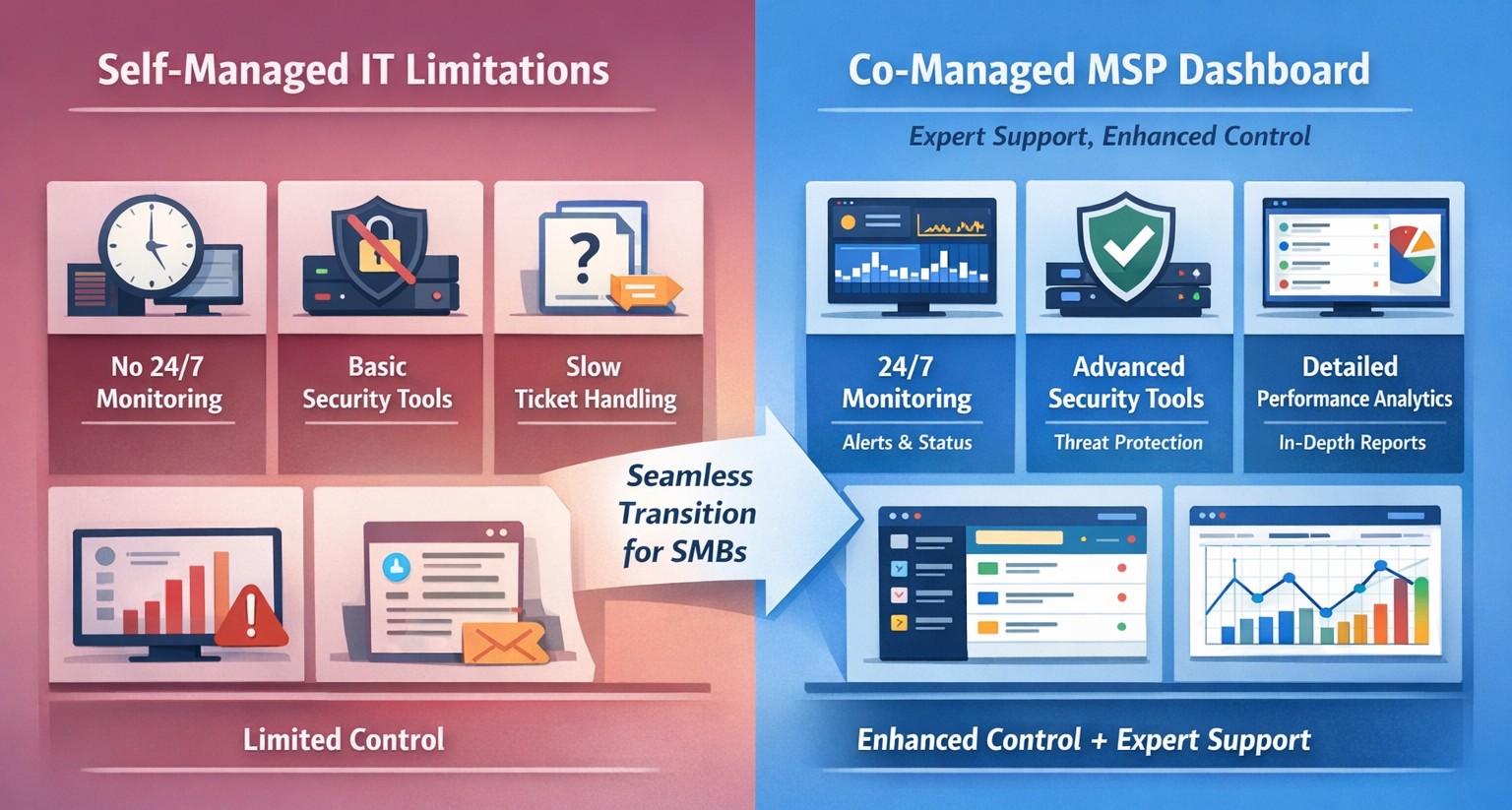
Co-managed IT dashboard with MSP monitoring supplementing internal team.
Managing IT can be a daunting task, especially for businesses that lack dedicated IT personnel or the expertise to handle today’s complex technology. In recent years, more and more organizations have recognized the benefits of outsourcing their IT management to Managed Service Providers (MSPs).
What is an MSP?
A Managed Service Provider, or MSP, is a company that offers a range of IT services to businesses. These services can include network monitoring, infrastructure management, data backup, cybersecurity, and more. By partnering with an MSP, businesses can offload their IT responsibilities to professionals with deep expertise and industry-best practices.
The Challenges of Self-Managed IT
Self-managing your IT can be a significant challenge. Here are some of the common pain points that organizations face:
Lack of Expertise: IT is a complex and ever-evolving field. Keeping up with the latest technologies, security threats, and best practices can be overwhelming, especially for businesses without dedicated IT staff.
Resource Constraints: Managing IT requires time, manpower, and financial resources. Small and medium-sized businesses often struggle to allocate these resources effectively, leading to inefficiencies, downtime, and security vulnerabilities.
Limited Scalability: Growing businesses often find it difficult to scale their IT infrastructure to meet increased demand. Self-managing your IT environment may require significant investments in hardware, software, and additional staff, which can strain budgets and hinder growth.
Cybersecurity Risks: Data breaches and cyber-attacks are on the rise. Without proper security measures in place, businesses face significant financial and reputational risks. Implementing and maintaining robust cybersecurity protocols can be challenging for organizations without the necessary expertise.
The Benefits of MSP-Managed IT
Switching to an MSP-managed IT environment offers several benefits:
Expertise and Support: MSPs have a team of experienced professionals who specialize in different aspects of IT management. They stay up-to-date with the latest industry trends and best practices, providing businesses with access to a breadth of knowledge and expertise.
Proactive Monitoring and Maintenance: MSPs utilize advanced tools and technologies to monitor your IT infrastructure 24/7. They identify potential issues before they become critical, minimizing downtime and ensuring smooth operations.
Scalability and Flexibility: MSPs provide scalable solutions tailored to your business needs. Whether you’re experiencing rapid growth or need to downsize, an MSP can quickly adapt your IT infrastructure to meet changing requirements without additional investments or resources.
Enhanced Security: MSPs employ robust security measures to protect your systems, networks, and data from cyber threats. They implement industry-standard security practices, conduct regular security audits, and ensure compliance with data protection regulations.
Cost Savings: By outsourcing IT management to an MSP, businesses can reduce the overhead costs associated with maintaining an in-house IT department. MSPs work on a subscription-based model, allowing organizations to pay for the services they need, when they need them.
Strategic Planning: MSPs can act as your virtual chief information officer providing project planning services that keep IT spend spread across the years to make the IT budget easier to manage.
Consider making the switch to an MSP today and unlock the benefits of professional IT management, contact us to get started.
This is the seventh in a series that document the Tier 3 / Co-Managed IT work we did to setup a wireless test bed for a Linux based scientific device. The testing environment included two different wireless network hardware types (Ubiquiti and Cisco). There was also a Synology device used for various purposes including hosting the Ubiquiti controller inside a Kubernetes container, providing certificate services, providing LDAP authentication, and providing RADIUS authentication. Each article will detail a separate piece of the project. This article shows the basic setup of Ubiquiti Controller for PSK and RADIUS authentication from wireless devices.
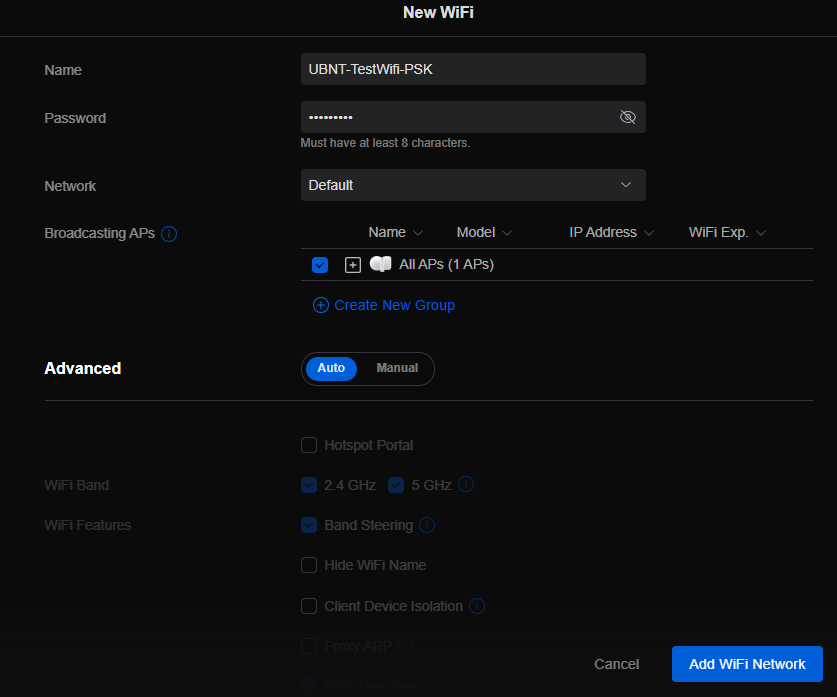
Setup Ubiquiti Wireless Network with PSK
Login to Ubiquiti controller previously created – Here
Click on Setting gear icon at bottom left
Make sure you are on Wifi tab and click Create New link
Set network BSSID
Create Password
Click Add Wifi Network button
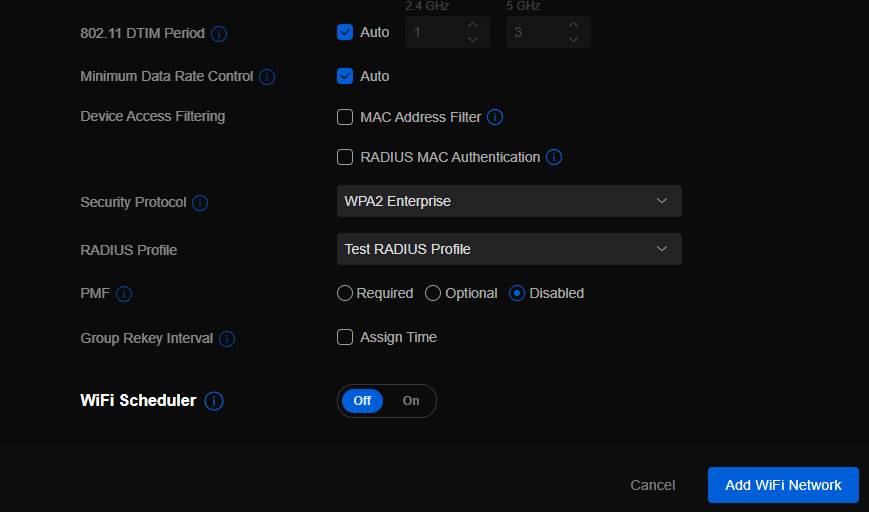
UniFi SSID advanced security settings with RADIUS profile and PPSK configuration.
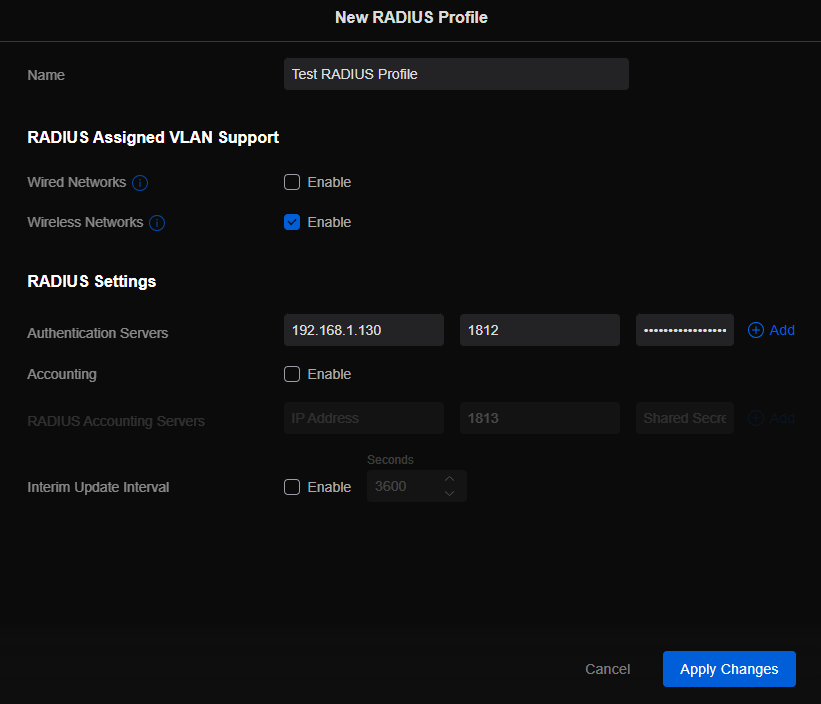
Setup Ubiquiti Wireless Network with RADIUS
Login to Ubiquiti controller previously created – Here
Click on Setting gear icon at bottom left
Click on Profiles
Click on Radius Tab
Click on Create New link
Give the Profile a name
Enter RADIUS server IP address as Authentication Server
Enter RADIUS shared secret
Click Add
Click Apply Changes
Click on Wifi Tab
Click on Create New link
Set network BSSID
Change Advanced to Manual
Set Security Protocol – WPA2 Enterprise
Select new RADIUS Profile
Click Add Wifi Network
If your company has highly customized setup requirements that you need consulting for, then contact us for assistance.
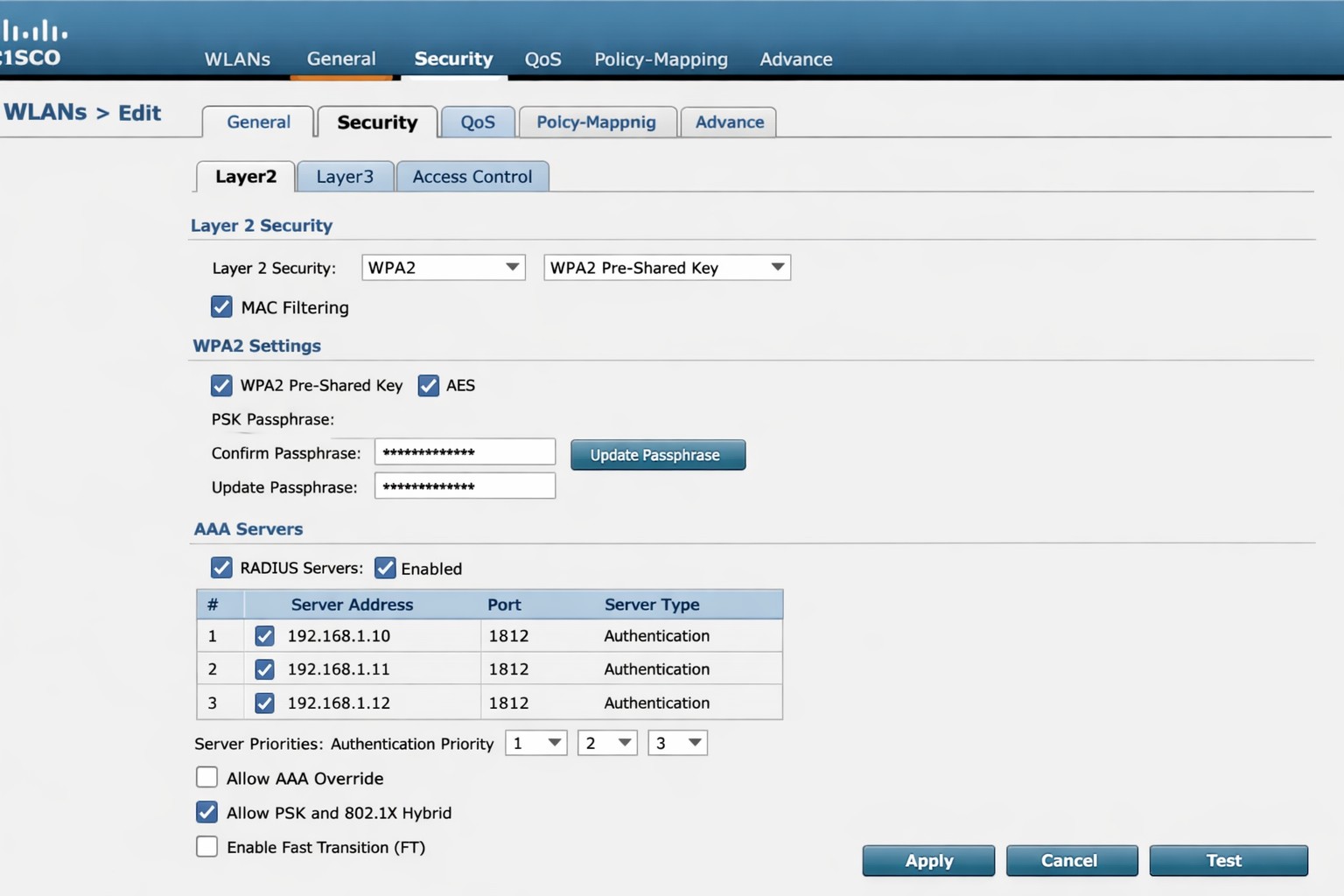
Cisco WLC WLAN configuration enabling PSK with RADIUS backend authentication.
This is the sixth in a series that document the Tier 3 / Co-Managed IT work we did to setup a wireless test bed for a Linux based scientific device. The testing environment included two different wireless network hardware types (Ubiquiti and Cisco). There was also a Synology device used for various purposes including hosting the Ubiquiti controller inside a Kubernetes container, providing certificate services, providing LDAP authentication, and providing RADIUS authentication. Each article will detail a separate piece of the project. This article shows the basic setup of Cisco Wireless Controller for PSK and RADIUS authentication from wireless devices.
Setup Cisco Wireless Network with PSK
Login to Cisco Wireless Controller
Click on WLANs tab at top
Click on GO next to Create New drop down
Create Profile Name & SSID
Click Apply
Click Enabled next to Status
Click Apply
Click on Security tab
Uncheck 802.1x
Check PSK
Enter Pre-Shared Key next to PSK format
Click Apply
Click Save Configuration at the top
Setup Cisco Wireless Network with RADIUS
Log into Cisco Wireless Controller
Click on Security tab at top
Click on Authentication under RADIUS on left hand side
Change both Acct Call Station ID Type to IP Address
Click Apply
Click on New
Add RADIUS server IP address
Add Shared Secret
Uncheck management
Click Apply
Click on WLANs tab at top
Edit WLAN 1
Click on Security tab
Click on AAA Servers tab
Change Server 1 to the one entered on RADIUS Authentication page
Click Apply
Click on Layer 2 tab
Change Authentication type to 802.11x
Click Apply
Click Save Configuration at the top
If your company has highly customized setup requirements that you need consulting for, then contact us for assistance.
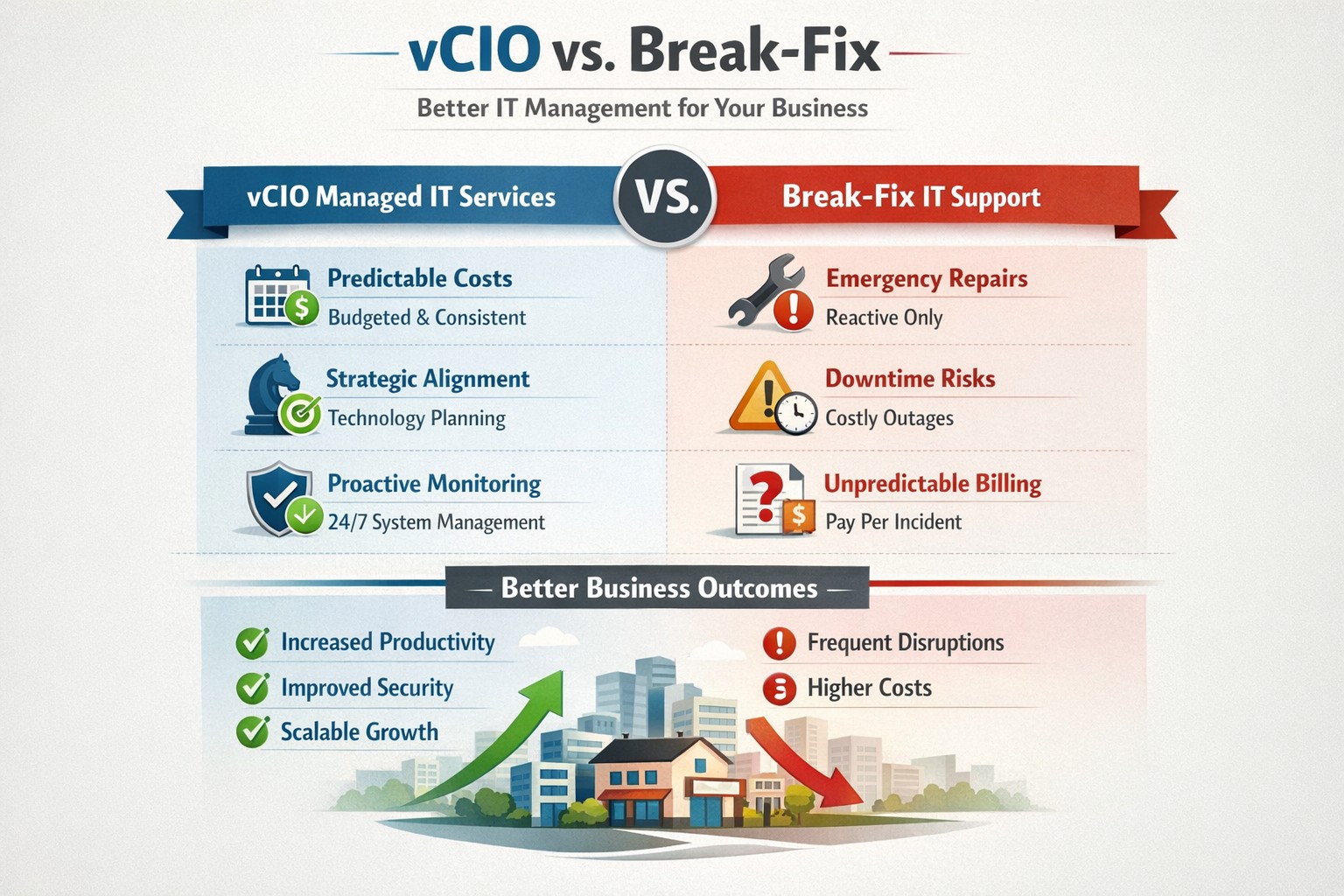
vCIO strategic services vs break-fix reactive IT model performance comparison.
In the ever-evolving world of IT support, two strategic approaches have emerged to address the needs of businesses – vCIO (Virtual CIO) services and break-fix services. Each of these approaches has its own merits and drawbacks, making it crucial for businesses to carefully consider which option best aligns with their goals and IT requirements. So, let’s dive into the comparison between vCIO services and break-fix services and find out which one takes the crown!
vCIO Services: Unleashing the Power of Proactive IT Management
The vCIO model offers businesses a cost-effective and strategic solution to IT management, delivering benefits far beyond simple problem-solving. Here’s a breakdown of what vCIO services bring to the table:
Strategic Technology Planning: A vCIO provides a long-term roadmap for your IT infrastructure, aligning it with your business objectives. They assess your current technology landscape, analyze potential risks, and develop a comprehensive IT strategy to ensure your technology infrastructure drives success.
Proactive IT Monitoring and Management: By constantly monitoring your systems, a vCIO can detect and address issues before they turn into full-blown disasters. They implement proactive measures, such as 24/7 system monitoring, patch management, and security audits to keep your IT environment optimized and secure.
IT Budgeting and Procurement: A vCIO helps you streamline your IT budget by aligning your investment with your business goals. They provide insights into cost-effective technology solutions, negotiate contracts with vendors, and manage IT procurement to help you make informed decisions while optimizing your spending.
Technology Vendor Management: Collaborating with multiple technology vendors can be time-consuming and complex. A vCIO acts as a single point of contact for all your technology vendors, managing relationships and ensuring smooth coordination between various stakeholders.
Break-Fix Services: The Traditional Firefighter Approach
Break-fix services have long been the go-to approach for businesses seeking IT support on an as-needed basis. Here’s a closer look at what break-fix services bring to the table:
Issue-Specific Support: Break-fix services are designed to address specific IT issues as and when they arise. This approach involves fixing problems after they occur, reacting to incidents rather than proactively managing your systems.
Limited Scope of Support: Break-fix services typically focus solely on resolving immediate technical issues. While they can provide quick fixes, they do not offer strategic planning or ongoing support to help prevent future issues or optimize your IT infrastructure.
Variable Costs: Break-fix service costs can be unpredictable, as you are billed per incident or hourly basis. This makes budgeting and financial planning more challenging, especially if you encounter frequent or recurring IT issues.
Less Focus on Prevention: With break-fix services, the emphasis is on remedying existing problems, leaving behind the potential for other underlying issues to remain undetected, ultimately leading to more costly and time-consuming problems down the line.
The Verdict: vCIO Takes the Throne!
While break-fix services may have their place in certain scenarios, vCIO services offer a more comprehensive approach to IT management, aligning your technology with your business goals and providing ongoing support. The proactive nature, strategic planning, and cost optimization provided by vCIO services make it the winning solution for businesses looking to stay ahead of the ever-changing technology landscape. So, without a doubt, the crown firmly sits on the head of vCIO services!
If your company is tired of just calling your IT service company when things are broken, then contact us for vCIO services.
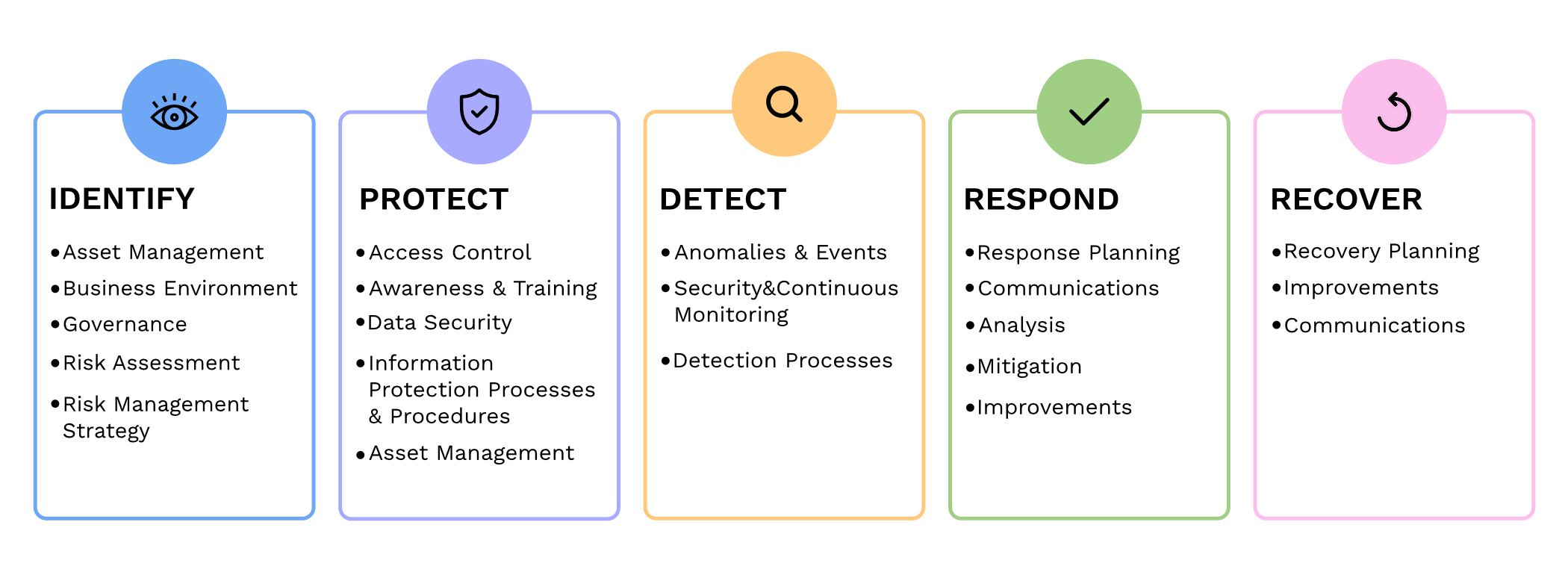
Small and medium-sized businesses (SMBs) are the backbone of the economy, but they are often the primary targets for cyberattacks. In fact, according to recent reports, nearly half of all cyberattacks are aimed at SMBs. To protect themselves from these threats and ensure the security of their critical assets, SMBs should consider following the guidelines provided by the National Institute of Standards and Technology (NIST) in their Special Publication 800 series.
Comprehensive Cybersecurity Framework
NIST 800 series provides a comprehensive framework that helps SMBs establish and maintain effective cybersecurity measures. By implementing the NIST guidelines, SMBs can enhance their cybersecurity posture and reduce the risk of potential data breaches, financial losses, and reputational damage.
Improved Risk Management
NIST 800 guidelines focus on risk management, helping SMBs identify and mitigate potential vulnerabilities and threats. Following the guidelines allows SMBs to proactively assess their cybersecurity risks and develop effective strategies to safeguard their sensitive data, intellectual property, and customer information.
Industry-Recognized Standards
NIST 800 series is widely recognized and adopted by both the public and private sectors. By adhering to these guidelines, SMBs demonstrate their commitment to meeting industry standards and best practices. This not only helps build trust with customers and partners but also increases their chances of securing lucrative business contracts and partnerships.
Cost-Effective Approach
Implementing NIST 800 guidelines can be a cost-effective approach for SMBs. These guidelines offer scalable solutions that can be tailored according to the organization’s size, budget, and specific requirements. SMBs can leverage the NIST framework to prioritize their cybersecurity investments, ensuring that they maximize their security efforts within their available resources.
In today’s digitally connected world, SMBs cannot afford to neglect cybersecurity. Following the NIST 800 guidelines provides SMBs with a comprehensive framework to enhance their cybersecurity posture, improve risk management, establish industry-recognized standards, and reduce costs, By working with a managed IT service provider to implementing these guidelines, SMBs can protect their assets, maintain their reputation, and thrive in an increasingly cyber-threatened landscape.
If your company is looking to implement stronger security through an standards based framework, then contact us for assistance.
This is the fifth in a series that documents the Tier 3 / Co-Managed IT work we did to setup a wireless test bed for a Linux based scientific device. The testing environment included two different wireless network hardware types (Ubiquiti and Cisco). There was also a Synology device used for various purposes including hosting the Ubiquiti controller inside a Kubernetes container, providing certificate services, providing LDAP authentication, and providing RADIUS authentication. Each article will detail a separate piece of the project. This article shows the setup Synology RADIUS server & certificates.
Setup RADIUS Server
Login to Synology
Open Package Center
Install RADIUS Server app
Open RADIUS Server package
Uncheck local users
Check LDAP users
Click Apply
Click on Clients on left hand side
Click on Add
Create Name
Create Shared Secret
Enter IP address of Cisco WLAN controller
Click on Add
Create Name
Create Shared Secret
Enter IP address of Ubiquiti Controller
Configure RADIUS Certificates
Open Control Panel
Click on External Access
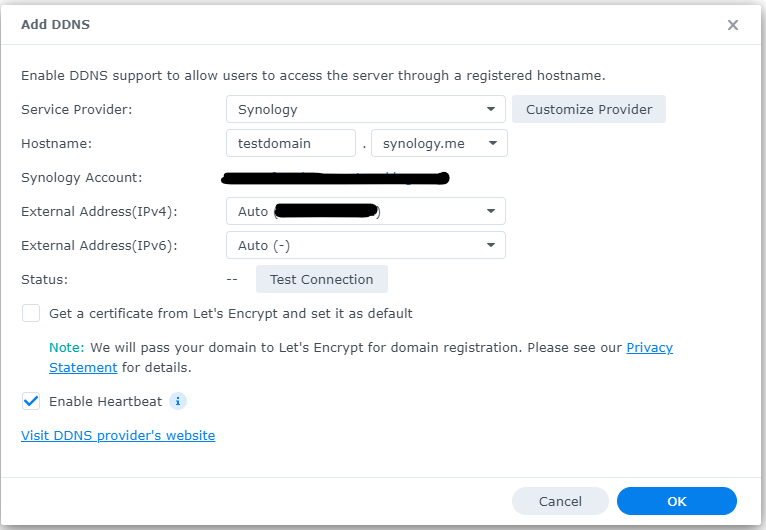
Click on DDNS tab
Click Add
Choose Synology as service provider
Add hostname
Click Test Connection
Click OK
Click on Security on left hand side
Click on the Certificate tab
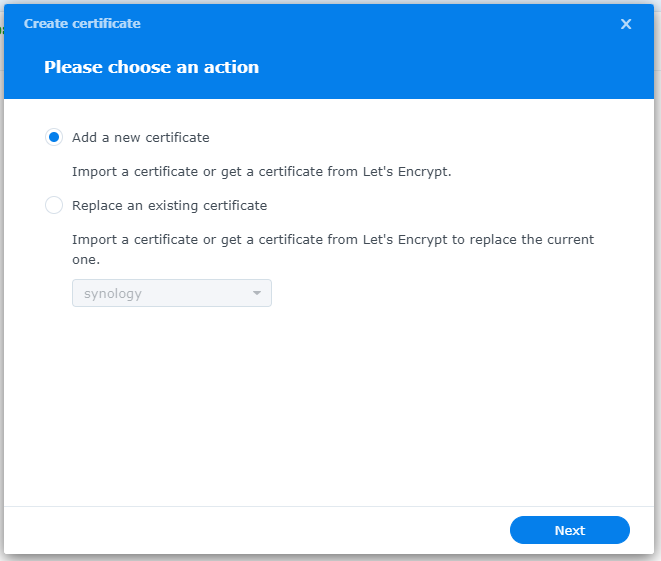
Click on Add
Add new certificate
Click Next
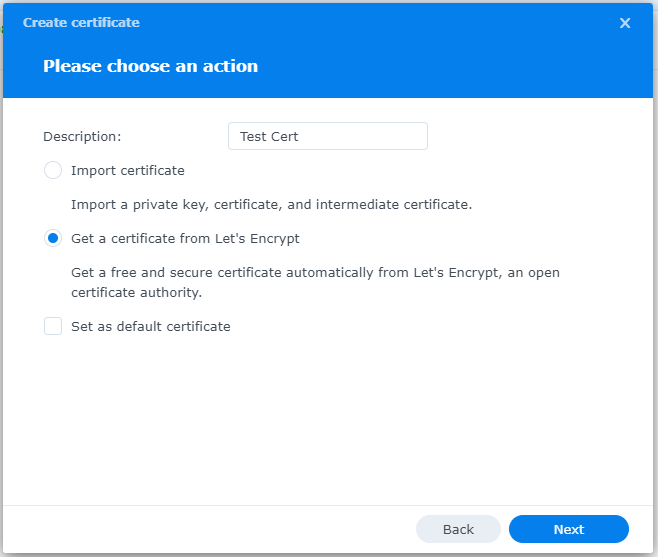
Create description
Get a certificate from Let’s Encrypt
Click Next
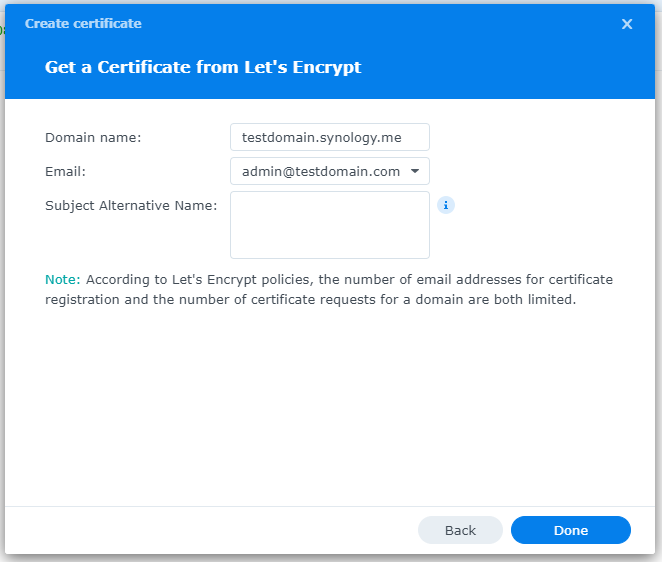
Add needed certificate information
Click Done
Click Settings button and choose appropriate RADIUS server certificate
If your company has highly customized setup requirements that you need consulting for, then contact us for assistance.
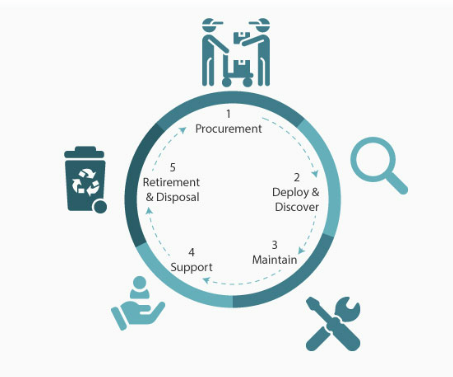
IT lifecycle dashboard tracking device age, refresh cycles, and replacement planning for SMB hardware.
In today’s fast-paced business environment, effectively managing IT equipment throughout its lifecycle has become essential. Equipment Lifecycle Management (ELM) refers to the systematic approach of acquiring, operating, maintaining, and disposing of equipment. By implementing an ELM strategy, businesses can maximize the lifespan and productivity of their equipment, while also minimizing costs and downtime. Let’s explore some of the secret benefits of equipment lifecycle management.
Cost Optimization
IT equipment can represent a significant investment for businesses. Through ELM, companies can optimize costs by planning IT equipment updates and replacements in a strategic manner. With a clear understanding of the IT equipment’s lifespan and maintenance requirements, businesses can budget for these costs well in advance, avoiding unexpected expenses that could negatively impacting their finances.
Increased Equipment Efficiency
One of the primary goals of ELM is to maximize equipment efficiency and productivity. By conducting regular inspections, maintenance, and repairs, businesses can identify and address performance issues before they become major problems. Proactively managing IT equipment ensures that it operates at optimal levels, reducing downtime and improving overall operational efficiency.
Enhanced Asset Tracking and Planning
ELM provides businesses with a comprehensive understanding of their equipment inventory. Through proper record-keeping and asset tracking systems, companies can easily identify the location, condition, and maintenance history of each piece of IT equipment. This information enables businesses to plan for IT equipment updates, replacements, or adjustments based on their lifecycle and performance, ensuring that resources are allocated efficiently.
Sustainable and Environmentally Responsible Practices
Efficient IT equipment management is not only beneficial for businesses but also for the environment. By properly maintaining and disposing of equipment, companies can significantly reduce waste generation and minimize their carbon footprint. Implementing ELM strategies, such as equipment reuse or recycling programs, aligns with sustainable business practices and demonstrates a commitment to environmental responsibility.
Effective equipment lifecycle management is crucial for businesses looking to optimize costs, improve productivity, and minimize their environmental impact. By proactively managing IT equipment throughout its lifecycle, companies can maximize its efficiency, extend its lifespan, and ensure smooth operations. Investing in IT equipment lifecycle management ultimately leads to long-term benefits and a competitive advantage in today’s business landscape.
If you haven’t already, contact us to implement an ELM strategy for your business.
And God will generously provide all you need. Then you will always have everything you need and plenty left over to share with others. As the Scriptures say, “They share freely and give generously to the poor. Their good deeds will be remembered forever.” For God is the one who provides seed for the farmer and then bread to eat. In the same way, he will provide and increase your resources and then produce a great harvest of generosity in you. - 2 Corinthians 9:8-10
We use cookies to ensure that we give you the best experience on our website. If you continue to use this site we will assume that you are happy with it.