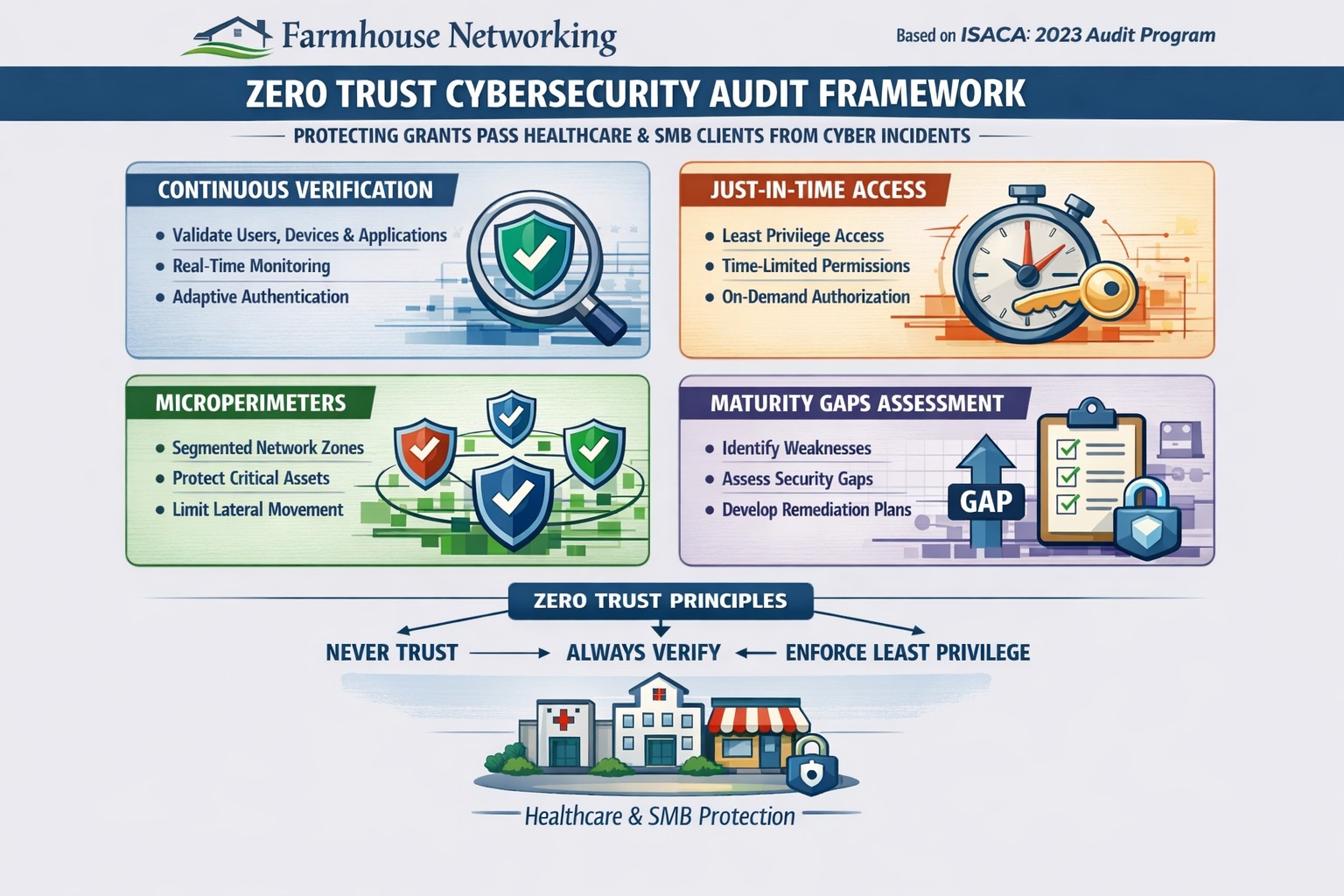
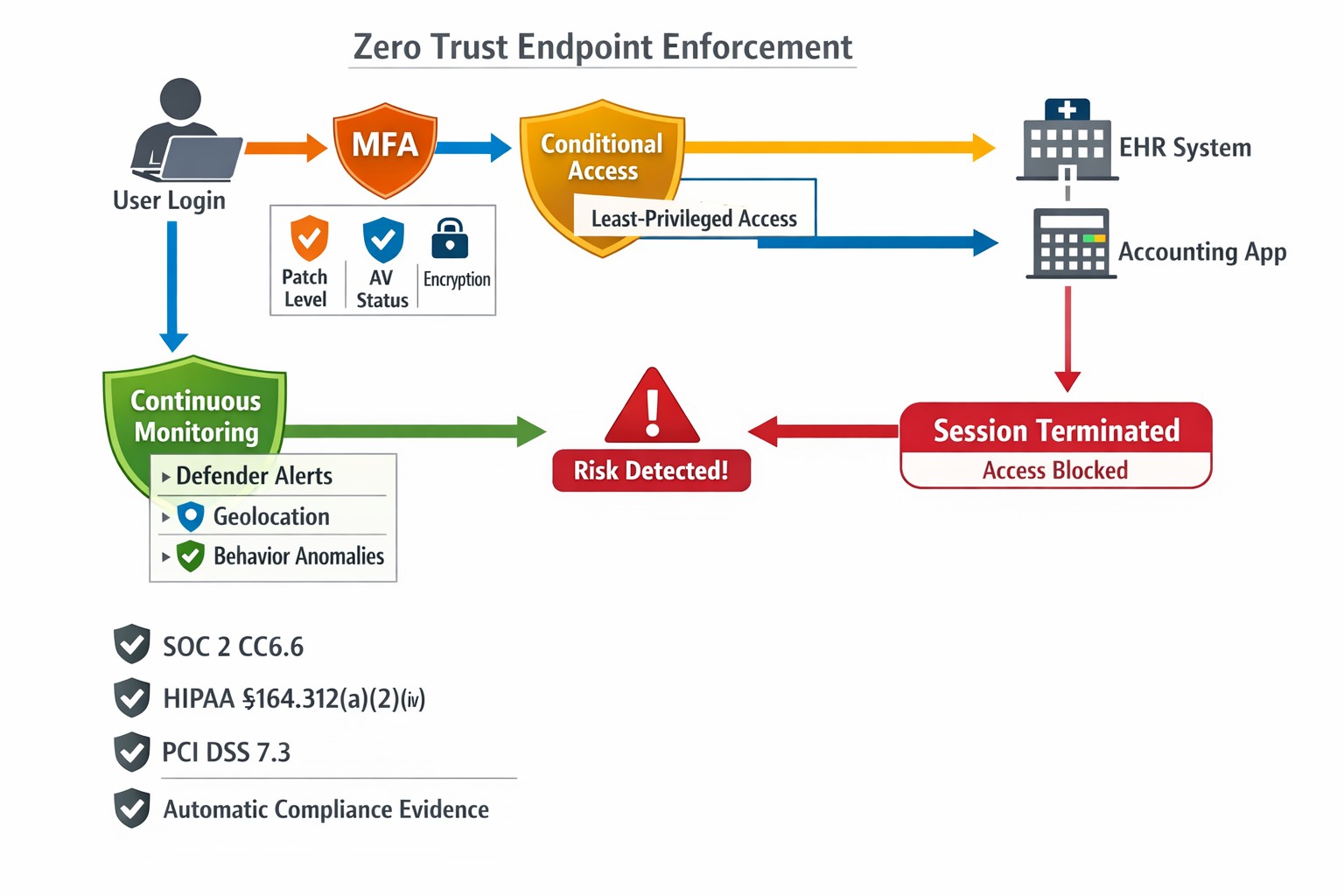
This is the sixth in a series about the concept of Zero Trust, which means in the IT sense that you trust nothing and always verify everything surrounding and connected to your network. Today’s discussion will be on endpoint security.
Endpoint Security
Endpoint security is a fancy term used to describe how the computers on the network are protected. This used to be done by antivirus but due to the complexity of the attacks hackers are using to compromise networks these days, the definition has expanded greatly. This now includes things like Enhanced Detection & Response software, Security Operations Centers, DNS Filtering, employee train and more. Here are some questions that you should be asking yourself:
Are your endpoints protected by antivirus or enhanced detection & response?
Is website traffic being monitored? Restricted?
Are your employees being trained in cyber security?
Are computer logs being monitored for malicious activity?
Would unusual or suspicious activity on a computer be noticed? Alerted on?
Do you have security permissions set on all file shares?
Do you have least privileged access configured on those shares?
Do you keep track of what software is installed on all workstations?
Do you block access to unauthorized software?
Are files encrypted on servers and workstations?
Are your mobile devices managed? Can you wipe them remotely?
Are USB ports blocking removeable storage devices?
Are endpoints set to automatically log-out?
If your company is going to use full disk encryption or has compliance requirements that you need consulting for, then contact us for assistance.
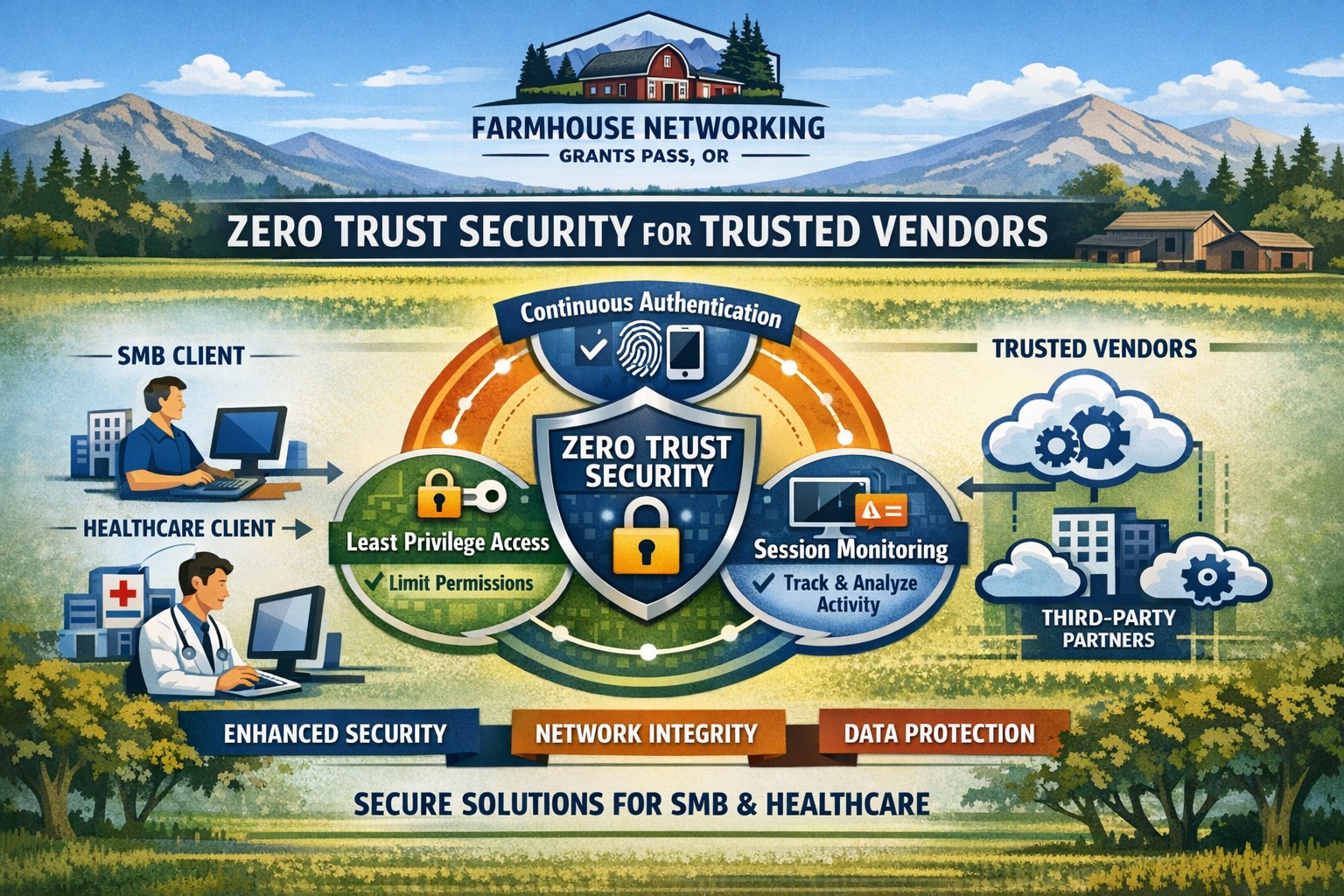
Farmhouse Networking secures vendor access with zero trust verification for Grants Pass businesses, protecting against supply chain threats.
This is the second in a series about the concept of Zero Trust, which means in the IT sense that you trust nothing and always verify everything surrounding and connected to your network. Today’s discussion will be on the vendors you purchase network equipment from.
Trusted Vendors
Trusted vendors are those who supply workstations, servers, routers, switches, power protection, software, and anything else connected to your network. Here are some questions that you should be asking yourself:
Do you know who makes your network equipment, servers, computers, and software?
Do you know the way to contact their support and have current account access information?
Do you have current warranties / support contracts on hardware and software?
Is the hardware able to perform at the level needed?
Are you purchasing software from those who meets industry standards?
If a subscription, how much are you paying and are you on the correct plan for your needs?
When is the last time you upgraded your software and hardware?
Have you budgeted for the next upgrade?
Take time to think about these questions and decide where changes can be made to better protect your IT investments, or contact us to do the thinking for you.
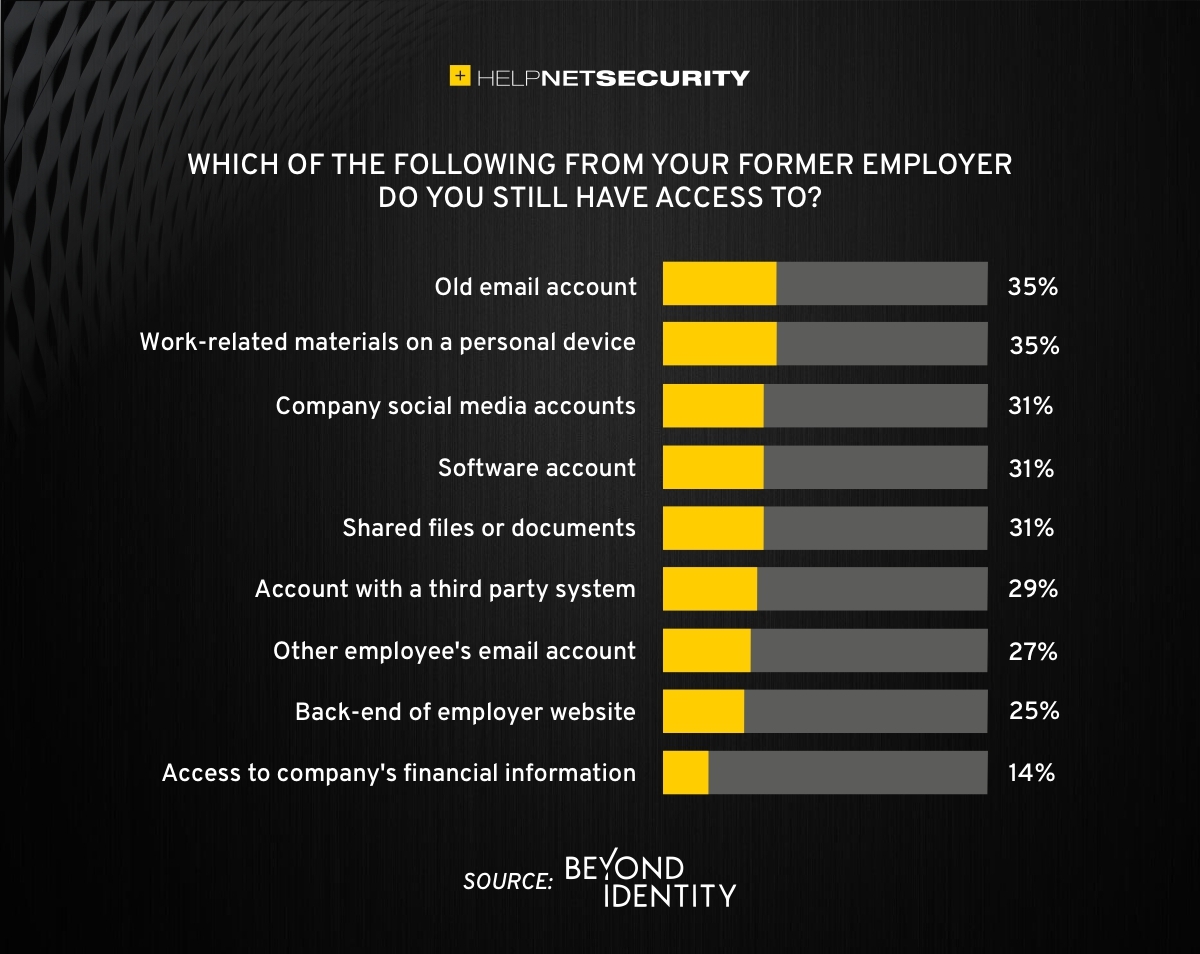
83% of employees continue accessing old employer’s accounts
Farmhouse Networking Grants Pass implements robust employee offboarding to revoke access and secure networks for Oregon businesses.
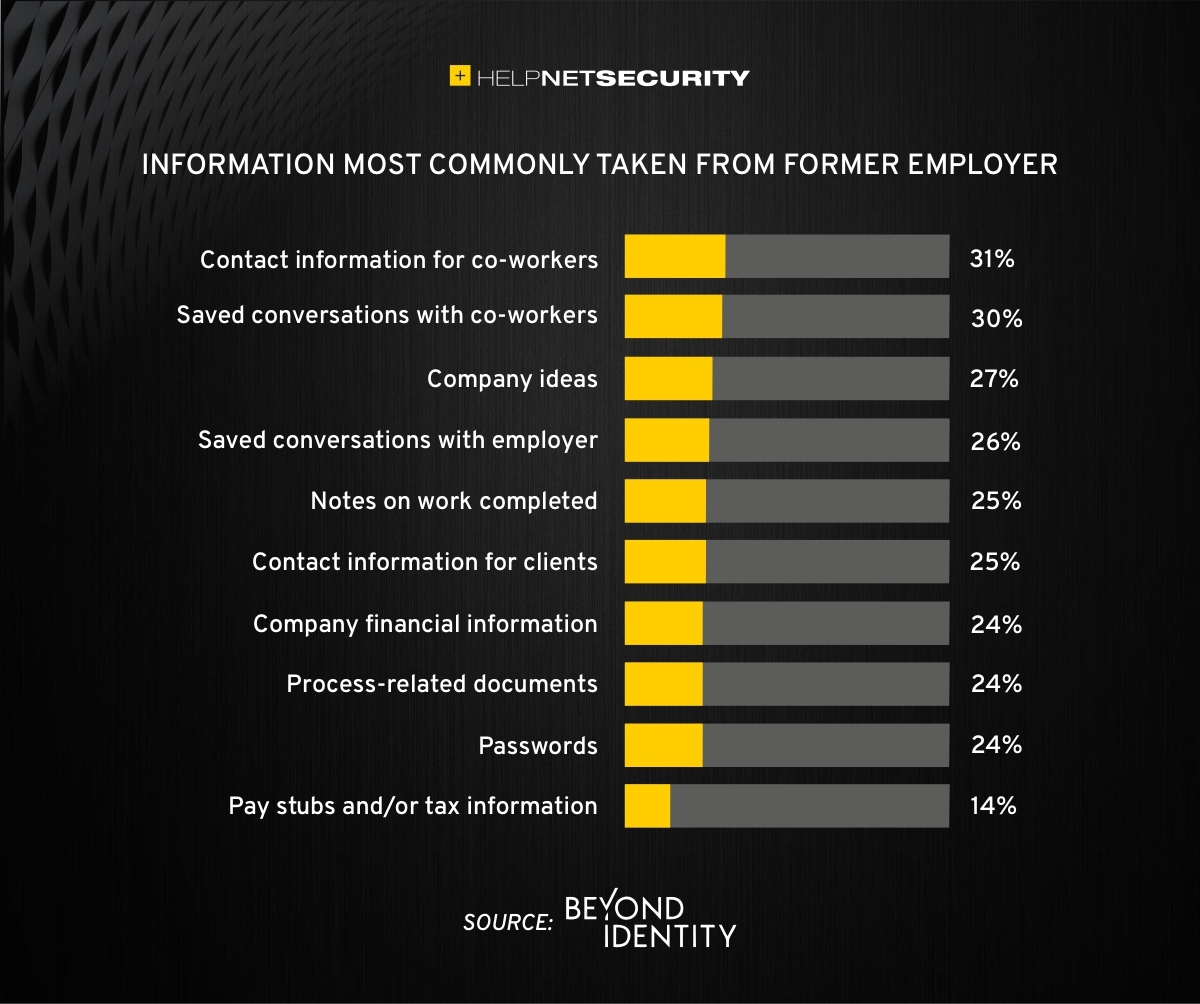
A study was performed by Beyond Identity throughout the US, UK, and Ireland which found that 83% of employees admitted to maintaining continued access to accounts from a previous employer. Also a shocking 56% admitted to using this access to harm their former employer.
The study also states that a professional and details offboarding process can prevent unauthorized access by former employees by eliminating their passwords and other insecure authentication methods. Strangely enough this also creates a sense of goodwill in the company that helps to lessen the motivation for employees to attempt this kind of malicious access. This kind of process is vital considering the current employment market and high turn over rates at almost all companies.
If your company does not have a detailed and documented offboarding process, thencontact usfor assistance.
Security researchers performed penetration testing on the networks of 45 various mid-sized companies and found that in real life scenarios 93% of those networks were able to be compromised to the point of business disruption. Here are the details:
The Target
The 45 companies were polled to determine what would be an unacceptable business interruption. They decided that the following met that criteria:
Disruption of production processes
Disruption of service delivery processes
Compromise of the digital identity of top management
Theft of funds
Theft of sensitive information
Fraud against users
These became the target for the penetration testers.
The Process
In order for the penetration tester to achieve their target, they followed the following process:
Breach the network perimeter – This was done by the use of compromised passwords found on the Dark Web and know vulnerabilities on devices that were directly connected to the internet
Obtain maximum privileges – In 100% of the networks, once an attacker was inside the network
Gaining access to key systems – With maximum privileges, the testers are able to gain access to other areas of the network including databases, executives computers, and production servers
Develop attacks on target systems – Once key systems are compromised the testers then figured out how to create the unacceptable business interruption. Although they could have created these interruptions, they only gathered proof that they could to present the data to the companies.
How to Defend
There are a couple main ways to defend against these kinds of attacks:
Security Controls / Segmentation – Creating least privileged access to key systems and segmenting the network will keep hackers from traversing the network once inside
Enhanced Network Monitoring – Modern cyber security tools watch activity and traffic on the network to find indicators of compromise. They pool this information into an attack history that can be used to remediate and further protect.
Your company is not as safe as you think, so contact us for free initial cybersecurity evaluation and risk report. .
Visualize your Azure migration success with the Microsoft Azure Migration Program (AMP)—structured steps, cost savings, and expert guidance for seamless cloud adoption.
If you are considering moving servers, line‑of‑business apps, or databases into Microsoft Azure, the Azure Migration Program (often called AMP) is designed to reduce risk, speed up the project, and lower your total cost of migration. For a business owner, AMP means structured guidance from Microsoft and certified partners, funded assessments, and proven tools instead of “figure it out as we go.”
What Is the Azure Migration Program (AMP)?
Microsoft’s Azure Migration Program provides a guided, end‑to‑end approach to moving workloads into Azure, based on the Cloud Adoption Framework. It combines technical guidance, training, migration tools, and cost‑saving offers so your team is not reinventing the wheel.
Key elements include:
Curated, step‑by‑step guidance from Microsoft experts and specialized migration partners.
Free Azure migration tools such as Azure Migrate, Azure Site Recovery, and Database Migration Service.
Cost‑reduction offers like Azure Hybrid Benefit and extended security updates for legacy Windows Server and SQL Server.
Training and skill building for your IT staff so they can operate confidently in Azure after the move.
Practical Action Steps for You and Your IT Team
As the owner, your role is to set business priorities and ensure the migration stays aligned with revenue, risk, and customer impact, while IT handles the technical execution.
Step 1: Define business outcomes and constraints
Identify which systems are most critical (ERP, EMR, accounting, CRM) and what can tolerate downtime.
Set financial guardrails: target monthly cloud budget and acceptable payback period on the migration.
Step 2: Assess your current environment Your IT team, often with an AMP‑qualified partner, should:
Inventory servers, applications, databases, and dependencies (who talks to what, and when).
Use Azure Migrate to scan workloads and estimate right‑sized Azure resources and costs.
Group applications into logical waves (low‑risk first, mission‑critical later).
Decide per workload: rehost (“lift and shift”), refactor, or modernize.
Agree on success metrics: performance, availability, RPO/RTO, and cost per workload.
Step 4: Secure funding and enroll in AMP
Confirm AMP eligibility and available funding for assessments and implementation with a certified partner.
Use funded assessments to validate architecture, security, and migration approach before committing to a full rollout.
Step 5: Execute, optimize, then expand
Start with a pilot migration to prove performance, security, and cost assumptions.
Monitor usage with Azure Cost Management and tune sizing, auto‑scaling, and reserved instances.
Apply lessons from the pilot to subsequent waves to reduce timelines and surprises.
Common Client Questions (and Clear Answers)
Q1: Is Azure really more cost‑effective than keeping my servers on‑premises? A: For most organizations, especially those facing hardware refresh, licensing renewals, or colo costs, Azure can be more cost‑effective when workloads are right‑sized and governed. AMP helps you estimate costs with real data and use cost‑optimization tools like Azure Hybrid Benefit and Azure Cost Management from day one.
Q2: How will this impact uptime and my customers? A: The program is designed to minimize disruption using tools such as Azure Site Recovery and structured migration waves. With proper planning, most critical workload cutovers are scheduled during low‑usage windows and can be rolled back if required.
Q3: What about security and compliance? A: Azure includes built‑in security controls, encryption, identity management, and compliance certifications that often exceed what small and mid‑sized businesses maintain on‑premises. AMP engagements incorporate security and governance reviews so your new environment aligns with industry and regulatory requirements.
Q4: My internal IT team is stretched. Do they have to do everything? A: No—AMP is explicitly structured around collaboration between your team, Microsoft engineers, and certified partners. Your staff focuses on business knowledge and application nuances while the partner handles the heavy lifting and trains your team on new cloud operations.
Q5: We tried “cloud” before and it was painful. Why will this be different? A: Most failed migrations lacked a standardized framework, proper assessment, or cost governance. AMP enforces a proven methodology, tooling, and checkpoints, reducing the likelihood of budget overruns, downtime, or security gaps.
How Farmhouse Networking Helps You Succeed with AMP
Farmhouse Networking aligns your Azure migration with your business strategy, not just your server list. We help you translate goals like “reduce downtime,” “improve security posture,” or “support remote work” into a concrete cloud roadmap.
Here is how we typically engage:
Eligibility and strategy session – We review your environment, validate AMP eligibility, and map out a phased migration aligned with risk and cash‑flow tolerance.
AMP‑style assessment and planning – We perform an in‑depth inventory, dependency analysis, and sizing estimate using Azure’s migration tools, then deliver a prioritized migration plan and business‑level impact summary.
Hands‑on migration and modernization – We handle the technical execution: configuring Azure landing zones, security and networking, moving servers and databases, and modernizing apps where it makes financial sense.
Training and ongoing optimization – We coach your IT staff on Azure operations and put cost, security, and performance monitoring in place so you continue to see value after the cutover.
Take the Next Step
If you are ready to explore whether the Azure Migration Program is the right path for your business—and want a partner who understands both the technical and financial side of migration—Farmhouse Networking is ready to help. Email support@farmhousenetworking.com for more information about how Farmhouse Networking can help improve your business with a structured, low‑risk move to Azure.
Farmhouse Networking helps businesses modernize their networks for faster performance, smarter automation, and secure connectivity.
The business world is moving at the speed of data. From cloud applications to video conferencing and smart devices, modern companies thrive on connectivity — and that means your network must be faster, more reliable, and intelligent enough to adapt. The days of “good enough” internet are gone. The next-generation network is faster, closer to your customers, and smarter in the way it predicts and manages performance.
Why “Faster, Closer, Smarter” Matters for Every Business Owner
A few years ago, network upgrades were viewed as an IT luxury. Today they’re a business necessity. Productivity, customer experience, and profit margins increasingly depend on how efficiently your systems communicate across multiple sites and cloud services.
Faster: Applications like video meetings, VoIP, and cloud storage demand low latency and high bandwidth. Slow connections mean lost opportunities.
Closer: Edge computing brings resources and data processing nearer to users, reducing lag and improving responsiveness for remote teams and mobile customers.
Smarter: Artificial intelligence (AI)–driven networks detect issues before they cause downtime, automatically direct traffic, and protect against cyber threats.
Business growth in 2020 and beyond will favor companies that embrace these technologies early — and that’s where proactive planning makes all the difference.
Action Steps for Business Owners and IT Teams
Modernizing your network doesn’t have to be complicated. Here are practical steps to future-proof your infrastructure:
Audit your current network. Identify bottlenecks, aging hardware, and underperforming Wi-Fi zones. Tools like traffic analyzers or managed network assessments can pinpoint areas for improvement.
Move critical workloads to the cloud wisely. Hybrid cloud environments balance flexibility and security — but only when configured with responsive bandwidth and monitored connections.
Invest in network automation and AI-based monitoring. Smart analytics help your IT team spot anomalies before employees notice performance issues.
Upgrade for speed and reliability. Fiber-optic connectivity, gigabit routers, and Wi-Fi 6 access points deliver measurable performance boosts.
Secure everything. With more connected devices comes more risk. Integrated firewalls, endpoint protection, and regular patch management are essential defenses.
Partner with a managed services provider (MSP). Outsourcing these functions ensures around-the-clock monitoring and proactive support so your internal staff can focus on core business priorities.
Common Client Questions — Answered
Q: “Is upgrading my network really worth the cost?” A: Absolutely. Slow or unreliable connectivity costs more in downtime and lost productivity than the upgrade itself. Modern networks reduce maintenance time, prevent outages, and improve customer satisfaction.
Q: “What about security? Doesn’t a smarter network mean more risk?” A: Actually, the opposite. With automated patching, real-time threat detection, and AI-powered monitoring, a smarter network significantly strengthens protection.
Q: “How do I know what network capacity I’ll need?” A: Your ideal bandwidth depends on your business applications, remote workers, and cloud services. A professional assessment from an MSP can provide accurate data and recommendations tailored to your growth goals.
How Farmhouse Networking Can Help
At Farmhouse Networking, we specialize in helping businesses modernize their IT infrastructure with practical, budget-conscious solutions. Whether you need a network assessment, faster connectivity, smart automation, or enhanced cybersecurity, our team brings years of expertise in network design, implementation, and ongoing support.
We work with local businesses to:
Audit existing network performance and identify inefficiencies.
Implement cloud and edge computing solutions.
Automate monitoring through intelligent network management tools.
Strengthen IT security to protect sensitive data and client trust.
Our mission is to make enterprise-grade technology accessible to your small or mid-sized business — keeping your network running faster, closer, and smarter than ever before.
Ready to Upgrade Your Network?
Don’t let outdated systems slow you down in 2020’s fast-moving digital economy. Future-proof your business with a smarter, more efficient network built for growth.
Email support@farmhousenetworking.com today to learn how Farmhouse Networking can help your business stay connected, secure, and competitive.
How your business can connect on‑premises servers and workloads to Microsoft Azure for scalable, secure, and compliant cloud computing
The cloud is no longer a “nice‑to‑have”—it’s the backbone of modern operations. Moving to Microsoft Azure gives you enterprise‑grade security, scalability, and cost control without the burden of managing your own data center. In this post, you’ll learn why the cloud matters, why Azure in particular is the right fit for many businesses, and—most importantly—how Farmhouse Networking can guide you through each step of the journey.
Why the cloud matters for your business
The cloud lets you turn capital‑heavy IT (servers, routers, on‑site backups) into a predictable operating expense. Instead of buying and maintaining hardware, you pay for what you use, when you use it. This model is especially powerful for companies with seasonal spikes, hybrid workforces, or plans to grow into new markets.
For business owners, the cloud means:
Lower upfront costs and easier budgeting.
Faster innovation and deployment of new tools or applications.
Built‑in disaster recovery and business continuity capabilities.
Azure, in particular, is trusted by 90% of Fortune 500 companies and offers a globally distributed, secure platform tightly integrated with familiar Microsoft tools like Microsoft 365, Entra ID, and Dynamics 365.
Why choose Microsoft Azure?
Azure stands out for three reasons relevant to owners and IT teams:
Security and compliance Azure provides enterprise‑level protection, identity management, and compliance certifications that small‑ and mid‑sized businesses can leverage without hiring a full‑time security team.
Scalability and flexibility You can scale compute, storage, and networking up or down in minutes—perfect for handling seasonal demand, new projects, or unexpected growth.
Seamless integration with Microsoft tools If your team already uses Microsoft 365, Teams, or Windows‑based applications, Azure simplifies integration and reduces complexity in permissions, patching, and remote access.
Practical steps for your business and IT team
Making the move to Azure doesn’t have to be disruptive. Here’s a realistic, phased roadmap:
Assess your current environment
Inventory servers, applications, and data.
Identify which workloads are good candidates for the cloud (e.g., file servers, backups, certain line‑of‑business apps). Farmhouse Networking can perform a free infrastructure assessment to help you classify and prioritize workloads.
Define your cloud strategy and goals
Decide what “success” looks like: better uptime, remote work support, cost savings, faster backups, etc.
Set a timeline (e.g., 6–18 months for a phased migration).
Start with low‑risk, high‑impact workloads
Migrate backups, archival storage, or non‑critical applications first.
Use Azure Backup and Azure Site Recovery to test disaster‑recovery scenarios without disrupting production.
Build identity and security foundations
Sync your on‑premises directories (or move entirely) to Microsoft Entra ID.
Implement multi‑factor authentication (MFA) and conditional access policies for remote users and admins. Farmhouse Networking can help design and deploy these policies with minimal friction for your team.
Train and support your internal team
Provide basic Azure operations training for your IT staff.
Set up monitoring dashboards so your team can track costs, performance, and security events.
Client questions and answers
Here are some typical questions business owners and clients might ask:
Q: Is the cloud really more secure than our own servers? A: When properly configured, Azure offers better security than most on‑premises environments, including advanced threat detection, encryption at rest and in transit, and continuous Microsoft‑led security updates. Azure also meets many industry‑specific compliance standards that can be difficult and expensive to maintain in‑house.
Q: Will migrating to Azure be expensive and disruptive? A: Migrations can be staged so core operations stay online. You shift from large capital investments to predictable monthly costs, and you often achieve savings by retiring aging hardware and consolidating tools. A phased approach, with Farmhouse Networking managing the planning and execution, keeps disruption low.
Q: What happens if we need to move back on‑premises someday? A: Azure supports hybrid scenarios, so you can keep some workloads on‑site and others in the cloud. Azure’s hybrid tools (such as Azure Stack, VPNs, and ExpressRoute) make it possible to move workloads back or between environments as business needs change.
How Farmhouse Networking can help
Farmhouse Networking acts as your strategic partner for cloud adoption, not just a vendor. We help you:
Conduct a current‑state assessment and build a tailored Azure roadmap aligned with your growth goals.
Manage the technical migration with minimal disruption to your team and clients.
Implement security, governance, and monitoring so you retain control while Azure does the heavy lifting.
By partnering with us, you get a clear, documented plan and ongoing support—so you can focus on running your business while your systems stay secure, available, and scalable.
Ready to explore Azure for your business?
If you’re wondering whether the cloud—and specifically Microsoft Azure—is the right fit for your organization, let’s start the conversation. Email us at support@farmhousenetworking.com to schedule a consultation, and we’ll walk through your current environment, your goals, and a practical next step toward a smarter, more resilient IT foundation.
Launch your business on Microsoft Azure: Sign up, deploy resources, and monitor costs in minutes.
Migrating to Microsoft Azure can cut IT costs by up to 40% while scaling operations seamlessly—without the hassle of on-premises servers. This guide delivers practical steps tailored for you and your IT team to launch Azure quickly, addressing common concerns and showing how Farmhouse Networking streamlines the process.
Practical Action Steps
Follow these actionable steps to get your business on Azure. Designed for owners overseeing IT without deep technical dives.
Sign Up for a Free Azure Account: Visit azure.microsoft.com, select “Start Free,” and use your Microsoft account or create one. You’ll get $200 in credits for 30 days plus 12 months of popular free services like VMs and storage—no upfront charges if you monitor usage.
Access the Azure Portal and Customize Dashboard: Log in at portal.azure.com. Use the search bar for quick navigation, create Resource Groups to organize projects (e.g., “Marketing Apps”), and pin key metrics like costs to your dashboard for at-a-glance oversight.
Estimate Costs and Set Budgets: In the portal, go to Cost Management + Billing. Input your expected usage (e.g., VMs, storage) via the Pricing Calculator to forecast expenses. Set alerts for $50+ thresholds to avoid surprises—essential for business budgeting.
Deploy Your First Resource: Start with a simple Web App or VM. Search “App Service” > Create > Choose runtime (e.g., .NET), free tier, and region near Grants Pass, OR (West US 2). Deploy in minutes to test scalability.
Secure and Monitor Basics: Enable Multi-Factor Authentication (MFA) under Security settings. Use Azure Monitor for alerts on performance and Azure Advisor for free optimization tips like rightsizing resources.
These steps typically take 1-2 hours initially, scaling as your business grows.
Common Q&A for Business Owners
Q: Is Azure secure for sensitive business data? A: Yes—Azure meets standards like HIPAA, GDPR, and SOC 2 via built-in encryption, firewalls, and compliance tools. Your IT team can enforce policies automatically.
Q: How much will this cost my business? A: Free tier covers starters; paid scales pay-as-you-go (e.g., $0.01/hour for basic VM). Use the Azure Pricing Calculator and Cost Management to cap spends—many businesses save 30% vs. AWS.
Q: Do I need Azure-certified staff? A: Not immediately—use the Quickstart Center for guided checklists. For complex setups, partner with experts to avoid pitfalls.
Q: Can Azure handle growth for accounting/healthcare firms? A: Absolutely—auto-scaling VMs and App Services support spikes (e.g., tax season), with HIPAA-compliant storage for healthcare records.
How Farmhouse Networking Helps
Farmhouse Networking specializes in B2B cloud migrations for accounting, healthcare, and nonprofits—driving organic traffic via Azure-optimized sites and converting visitors to clients. We handle full setups: account config, custom resource groups, cost forecasting, secure deployments, and 24/7 monitoring. Our SEO-infused strategies (e.g., Azure-backed blogs) boost your visibility, while lead-gen tools turn portal analytics into qualified prospects. Skip the learning curve—our team deploys production-ready Azure in days, ensuring compliance and ROI from day one.
Call to Action
Ready to unlock Azure’s potential for your business? Email support@farmhousenetworking.com today for a free consultation on streamlining your first steps.
Essential GDPR compliance steps for SQL Server and Azure SQL Database: Classify data, encrypt, audit, and respond to requests.
Non-compliance with GDPR can cost millions in fines—up to 4% of global revenue. Microsoft SQL Server and Azure SQL Database offer built-in tools to secure personal data, but proper setup is essential for businesses handling EU customer info.
Why GDPR Matters for Your SQL Databases
GDPR mandates discovering personal data, controlling access, protecting it, and enabling reporting. SQL Server and Azure SQL Database support this via features like data discovery, encryption, and auditing, reducing compliance risks while maintaining performance.
Microsoft’s four-step framework aligns directly: discover data locations, govern access, strengthen protection, and record activities. This applies to on-premises SQL Server and cloud-based Azure SQL, making hybrid setups viable for growing businesses.
Practical Action Steps for Compliance
Follow these steps with your IT team to achieve GDPR readiness.
Discover Personal Data: Use SQL Server Data Discovery & Classification (right-click database > Tasks > Classify Data). Scan columns for PII like names, emails, or health info; label sensitivity (e.g., Confidential-GDPR).
Govern Access: Enable Azure AD authentication over SQL logins. Configure row-level security (RLS) and firewall rules to enforce least privilege. Limit IT staff to role-based access.
Strengthen Protection: Turn on Transparent Data Encryption (TDE), Always Encrypted for sensitive columns, and Dynamic Data Masking (DDM) to hide PII from non-privileged users. Encrypt backups with long-term retention policies.
Monitor and Report: Activate SQL Auditing and Advanced Threat Protection for logs on access, changes, and threats. Set email alerts for breaches. Handle Data Subject Requests (DSR) like “right to be forgotten” via built-in tools for discover, access, rectify, and delete.
Test quarterly: Simulate DSRs and review audit logs to ensure 72-hour breach notifications per GDPR Article 33.
FAQ: Client Questions Answered
Q: Does Azure SQL automatically make us GDPR compliant? A: No—features like auditing and encryption help, but you must configure them and conduct gap analysis. GDPR requires organizational processes beyond tech.
Q: How do we handle PII in backups or audit logs? A: Encrypt backups; purge PII from long-term storage on DSRs. Audit logs may capture PII—treat as scoped under GDPR, deleting on request unless legally retained.
Q: What’s the difference for SQL Server vs. Azure SQL? A: Both offer core tools (e.g., classification, TDE), but Azure adds managed services like auto-threat detection and easier scaling. Hybrid works via Azure Arc.
Q: How long to respond to data access requests? A: One month max; use SQL tools for quick exports. Non-compliance risks supervisory fines.
How Farmhouse Networking Helps
Farmhouse Networking specializes in B2B tech for accounting, healthcare, and nonprofits—industries heavy on regulated data. We audit your SQL Server/Azure SQL setups, implement classification/encryption, and automate DSR workflows to cut compliance time by 50%.
Our team handles gap analysis, custom policies, and ongoing monitoring, integrating with your CRM/ERP for seamless ops. We’ve helped similar clients avoid audits while boosting data-driven growth.
Visual timeline: SQL Server 2008 end of support (2019) and Windows Server 2008 EOS (2020)—start your secure migration now.
Relying on SQL Server 2008 or Windows Server 2008 exposes your operations to severe security risks since both reached end of support years ago—SQL Server on July 9, 2019, and Windows Server on January 14, 2020. Without Microsoft’s security patches, your databases and servers are vulnerable to exploits, data breaches, and compliance failures that could cost millions in fines, downtime, and lost trust.
Critical Risks for Your Business
Unpatched systems like these attract cyberattacks targeting outdated databases and servers, often holding sensitive customer data in accounting, healthcare, or charity sectors. Regulatory mandates (e.g., HIPAA, PCI-DSS) demand supported software, risking penalties if breached. Performance lags and incompatibility with modern apps further erode efficiency, directly hitting your bottom line.
Action Steps for You and Your IT Team
Follow these prioritized steps to migrate securely and minimize disruption.
Inventory Assets: Use tools like Microsoft Assessment and Planning Toolkit (MAP) to scan for SQL Server 2008/R2 and Windows Server 2008 instances across on-premises, VMs, and apps.
Assess Compatibility: Run SQL Server Upgrade Advisor to identify migration blockers; test apps on newer versions like SQL Server 2022 or Azure SQL.
Choose Path: Upgrade in-place to supported versions, lift-and-shift to Azure, or modernize with containers—avoid Extended Security Updates (ESU) as they’re costly and temporary (up to 3 years extra, post-2023).
Plan Migration: Phase workloads by risk; start with dev/test environments. Budget 3-6 months for complex setups.
Test and Go Live: Validate post-migration with backups, failover tests, and monitoring; cut over during low-traffic windows.
Secure and Monitor: Enable Azure Defender, multi-factor auth, and ongoing patching on new platforms.
Option
Pros
Cons
Cost Estimate
On-Prem Upgrade
Familiar setup
Hardware refresh needed
High upfront
Azure Migration
Scalable, pay-as-you-go
Learning curve
Lower TCO long-term
ESU (Temporary)
Quick fix
Expensive, no new features
$30K+ per core/year
FAQs: Client Questions Answered
Q: What if we can’t migrate immediately? A: Purchase ESU for critical security patches, but it’s a stopgap—plan full migration to avoid doubled costs later.
Q: Will our apps break on upgrade? A: Most do fine; use upgrade advisors early. Legacy apps may need refactoring, but Azure compatibility is high for 2008 workloads.
Q: How much downtime? A: Near-zero with Azure Site Recovery or Database Migration Service; test to confirm.
Q: What’s the breach risk? A: High—unpatched flaws enable ransomware/data theft. Post-EOS, no auto-updates mean manual fixes only if Microsoft deems critical.
Q: Cloud or on-prem? A: Cloud cuts costs 30-50% via scaling; ideal for variable workloads in your industries.
How Farmhouse Networking Helps
Farmhouse Networking specializes in B2B migrations for accounting, healthcare, and charity clients, driving organic traffic via SEO-optimized sites while securing infrastructure. We conduct free EOS assessments, execute inventory/scans, and handle end-to-end migrations to Azure/SQL Managed Instance—reducing risk and boosting performance. Our branding/SEO strategies ensure your site ranks for terms like “SQL Server 2008 migration,” converting visitors to leads. Past projects cut downtime 90% and compliance risks to zero.
And God will generously provide all you need. Then you will always have everything you need and plenty left over to share with others. As the Scriptures say,
“They share freely and give generously to the poor. Their good deeds will be remembered forever.”
For God is the one who provides seed for the farmer and then bread to eat. In the same way, he will provide and increase your resources and then produce a great harvest of generosity in you. - 2 Corinthians 9:8-10
We use cookies to ensure that we give you the best experience on our website. If you continue to use this site we will assume that you are happy with it.