Cybersecurity Skills Through Innovative Funding Program
Innovative funding accelerates cybersecurity training for stronger team defenses.
Farmhouse Networking, a leading provider of managed IT services, today announced a groundbreaking initiative to enhance its cybersecurity capabilities by leveraging the Rogue Business Elevate program to fund comprehensive cybersecurity training for all employees through TryHackMe. Farmhouse Networking is taking proactive steps to fortify its clients’ defenses and cultivate a culture of cybersecurity awareness across all the organization it supports. By partnering with Rogue Business Elevate and TryHackMe, the company is demonstrating its commitment to staying ahead of potential security risks while investing in the professional development of its workforce.
Empowering Employees with Cutting-Edge Skills The TryHackMe platform offers an innovative, gamified approach to cybersecurity education, making the learning process both engaging and effective .Employees will have access to:
Interactive lessons that bridge theory and practice
Simulated network environments for hands-on experience
Real-world challenges based on actual cybersecurity scenarios
This comprehensive training program will equip Farmhouse Networking’s staff with the skills to identify, prevent, and respond to a wide range of cyber threats.
Investing in the Future of Cybersecurity “At Farmhouse Networking, we recognize that our employees are our first line of defense against cyber attacks for many businesses throughout Oregon,” said Scott G. Carr II, CEO of Farmhouse Networking. “By investing in their skills through this innovative funding program and partnering with TryHackMe, we’re not just enhancing our clients’ security posture; we’re also providing our team with valuable, career-advancing knowledge.” The initiative aligns with Farmhouse Networking’s long-term strategy to build a resilient and knowledgeable workforce capable of addressing the complex cybersecurity challenges faced by businesses today.
Community and Collaboration Beyond individual skill development, this program will foster a sense of community among Farmhouse Networking’s employees. TryHackMe’s platform encourages collaboration, allowing team members to connect with like-minded professionals, share knowledge, and learn from each other’s experiences. Farmhouse Networking’s innovative approach to employee development and cybersecurity preparedness sets a new standard in the industry. By leveraging the Rogue Business Elevate program to fund this initiative, the company is maximizing its investment in both its people and its technological defenses.
Cybersecurity isn’t just an option—it’s a necessity. At Farmhouse Networking, we’re not only enhancing our own security measures but we’re also ready to help you fortify your defenses. Don’t wait for a breach to happen. Take proactive steps to protect your business today. Contact Farmhouse Networking today for a free consultation. Let’s work together to create a robust security strategy that safeguards your business, your data, and your peace of mind.
Businesses of all sizes face unprecedented cybersecurity challenges. Blackpoint Cyber emerges as a leader in providing comprehensive, cutting-edge solutions to protect organizations from cyber threats. Let’s explore why Blackpoint Cyber stands out as the premier choice for business cybersecurity.
Comprehensive Ecosystem of Security Solutions
Blackpoint Cyber offers a fully managed, integrated ecosystem of services centered around their powerful nation-state-grade Managed Detection and Response (MDR) technology. This ecosystem is designed to keep businesses ahead of potential threats by proactively understanding the threat landscape and actively neutralizing adversaries before they can cause harm.
Managed Detection & Response (MDR)
At the core of Blackpoint’s offerings is their purpose-built MDR technology. This solution combines network oversite, malicious activity detection, and endpoint security to rapidly identify and neutralize hacker and virus activities in their earliest stages. By harnessing data around suspicious events, hacker tradecraft, and endpoint activity, Blackpoint’s MDR can stop advanced attacks faster than any other solution on the market.
Cloud Response
With the shift to hybrid and cloud environments, Blackpoint’s Cloud Response extends the power of their MDR service to these critical areas. Their 24/7 Security Operations Center (SOC) actively monitors cloud environments and provides fast responses to threats on platforms like Office 365.
LogIC
LogIC enhances the value of security logs and data collected from networks, turning them into real-time threat hunting and response capabilities. With push-button setup, LogIC allows for quick addition of log sources, generation of compliance reports, and automatic mapping against hundreds of compliance requirements.
Unmatched Threat Awareness and Response Times
Blackpoint Cyber’s proprietary security operations and incident response platform, SNAP-Defense, enables continuous monitoring and response to modern threats. Their SOC, established by former US government cybersecurity operators, leverages deep knowledge of hacker tradecraft to provide 24/7 unified detection and response services.
The company boasts impressive response times, with an average of 7 minutes for cloud incidents and an overall average of 27 minutes. This rapid response capability is crucial in minimizing potential damage from cyber attacks.
Tailored Solutions for Businesses of All Sizes
While Blackpoint Cyber’s technology is enterprise-grade, they specialize in bringing these advanced solutions to small and medium-sized businesses through partnerships with Managed Service Providers (MSPs) like Farmhouse Networking. This approach allows businesses of all sizes to benefit from top-tier cybersecurity protection.
Continuous Innovation and Growth
Blackpoint Cyber continues to invest in growth and innovation. With a recent $190 million investment round and the appointment of industry veteran Manoj Srivastava as Chief Technology and Product Officer, the company is poised for further advancements in their product strategy and technology.
Blackpoint Cyber’s suite of solutions offers businesses a robust, proactive approach to cybersecurity. Their technology, combined with human expertise, provides a level of protection that’s essential in today’s threat landscape.
Ready to elevate your business’s cybersecurity with Blackpoint Cyber’s cutting-edge solutions? Contact Farmhouse Networking today to manage your cyber security needs and implement these powerful tools. Don’t wait for a breach to happen – take proactive steps to protect your business now.
Enhanced DNS filtering protects networks from phishing, malware, and non-compliant content.
This is a quick note to all current and future customers, we have made a business decision to move from our old DNS filter / web filter software (called DNSFilter) to a new provider called DefensX.
Why Does This Even Matter?
We recently performed network inventory for all our Monthly Managed IT Services clients and found that many of them had an issue where the filtering software was in an error state and needed to be re-installed. This started our search for a more reliable partner. We found that DefensX provided all the needed functionality and gave our clients the added benefit of reports to see who is looking at what on the internet – something we think that business owners will find extremely valuable.
What Happens Now?
We are automatically removing the old software and deploying the new software to those who have already signed up for service. If you are Monthly Managed IT Services client and do not currently use our DNS filtering service, then reach out to get started at No Additional Cost!
This new service has many new categories to choose from as well, so if there are any sites being blocked or not blocked that you see in your new reports, then just let us know and we can quickly make those changes.
Don’t wait for a cyber attack to compromise your business. Take proactive steps to safeguard your network today! Contact Farmhouse Networking now to implement our advanced DNS filtering solution. Our experts will tailor a protection plan that fits your unique business needs.
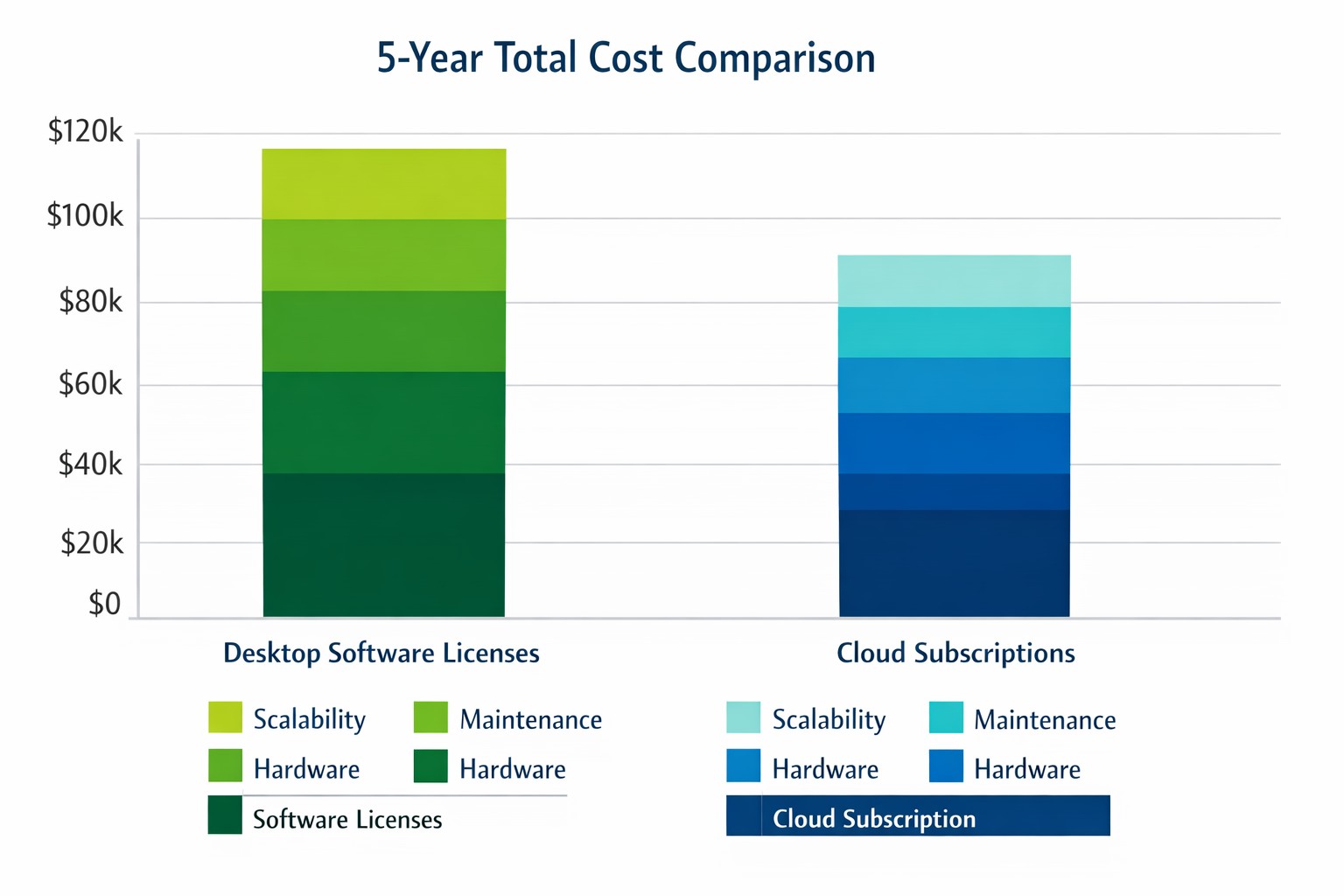
Cloud subscriptions often beat desktop software on long-term TCO and scalability.
Choosing the right productivity software for your company is a critical decision that can impact your bottom line and operational efficiency. The debate between traditional desktop software and cloud-based subscription models is particularly relevant when considering Microsoft Office, a staple in most business environments. Let’s examine the cost implications and benefits of both options to help you make an informed decision for your organization.
Microsoft Office 2024: One-Time Purchase for Business
Microsoft Office 2024 offers a perpetual license option that may appeal to businesses looking to have a single capital expenditure (CAPEX) and value ownership of a product.
Office Home & Business 2024
Price: $249.99 per license
Includes: Word, Excel, PowerPoint, OneNote, and Outlook
End of Life: 5 years from date of publication (October 1st, 2024)
This option provides access to core Office applications without the need for annual renewals. However, it’s important to note that this version lacks some features available in the subscription-based Microsoft 365, such as advanced collaboration tools and continuous updates.
Microsoft 365: Subscription Model for Businesses
Microsoft 365 offers a subscription-based model with more frequent updates and additional features tailored for business needs. This is an option that may appeal to businesses looking to have a gradual operating expenditure (OPEX).
Microsoft 365 Business Standard
Price: $12.50 per user/month (annual commitment)
Includes: All features of Business Basic plus desktop versions of Office apps
Microsoft 365 Business Premium
Price: $22.00 per user/month (annual commitment)
Includes: All features of Business Standard plus advanced security and device management
The subscription model provides more flexibility, allowing users to access Office apps on multiple devices and platforms. It also includes additional services like advanced threat protection and device management tools.
Cost Comparison for Businesses
To illustrate the cost implications, let’s consider a small business with 10 employees over a five-year period:
Office Home & Business 2024: $2,499.90 (10 licenses at $249.99 each)
Microsoft 365 Business Standard: $7,500 (10 users for 5 years at $12.50/user/month)
While the one-time purchase appears more economical initially, it’s crucial to consider the added value of the subscription model, including:
Regular feature updates and security patches
Cloud storage and collaboration tools
Multi-device access
Advanced security features
Scalability as your business grows
Factors to Consider for Business Owners
When making your decision, consider the following:
Growth projections: If you anticipate hiring more employees, the subscription model offers easier scalability.
Collaboration needs: Cloud-based solutions provide better tools for team collaboration and remote work.
IT resources: Subscription models often require less in-house IT management.
Cash flow: While subscriptions are more expensive long-term, they require less upfront investment.
Feature requirements: Evaluate if your business needs the advanced features offered in Microsoft 365.
Making the Right Choice for Your Business
The best option depends on your specific business needs:
If your company requires the latest features, values cloud integration, and needs robust collaboration tools, Microsoft 365 might be the better choice.
If you prefer a one-time purchase, have limited need for updates or cloud services, and have a stable workforce size, Office 2024 could be more cost effective.
Call to Action
Navigating the complexities of software licensing and cloud services can be challenging for business owners. At Farmhouse Networking, we specialize in helping businesses optimize their IT infrastructure and software solutions. Whether you’re considering a switch to cloud-based services or looking to streamline your current setup, our experts can guide you through the process. Contact Farmhouse Networking today to discuss your options and find the best solution for your business needs. Let us help you configure your network for maximum efficiency and cost-effectiveness, ensuring that your software choices align with your business goals and budget.
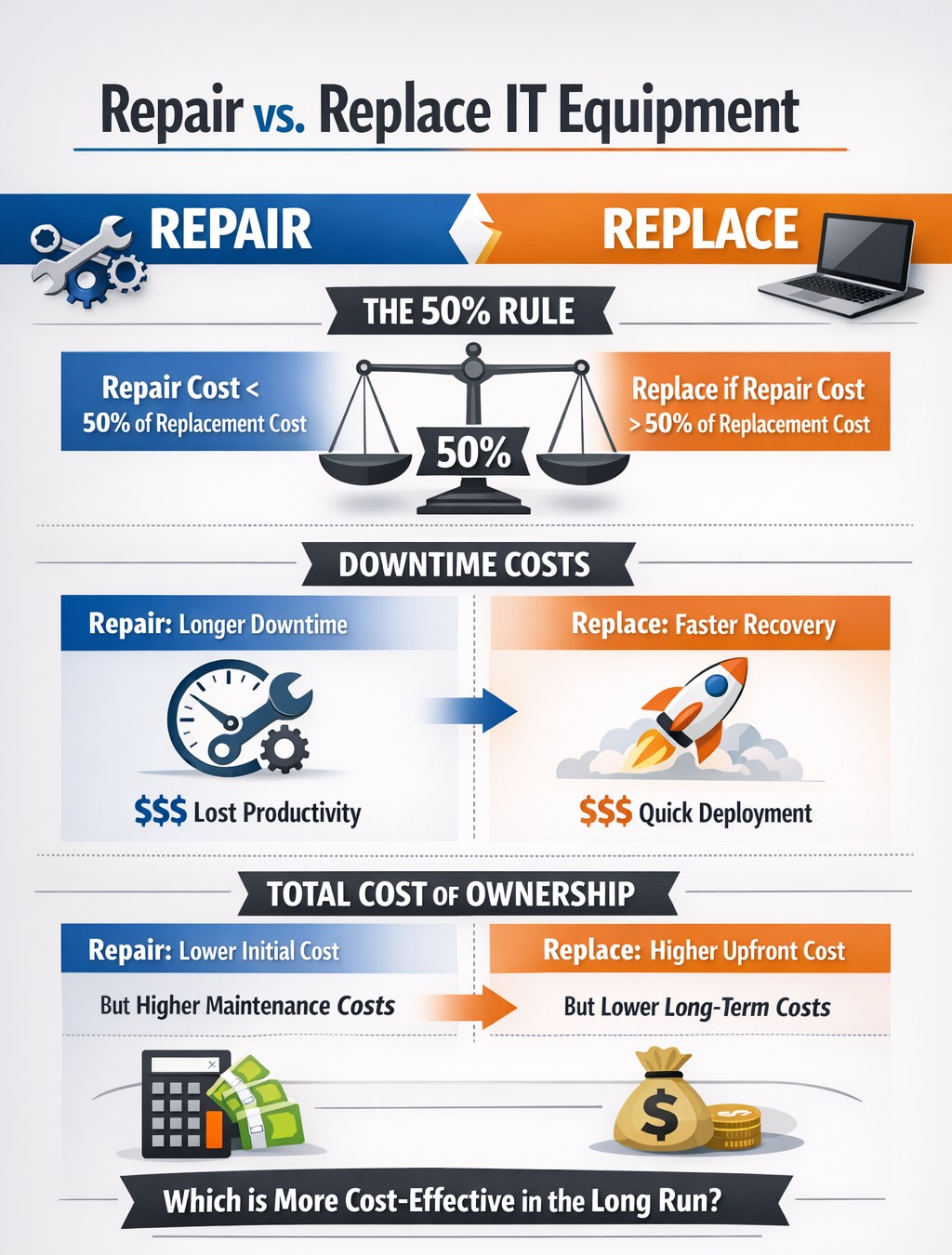
TCO chart reveals when repair beats replacement for network hardware.
With the end of the year approaching, we are continuing our Budget Talk series our newsletter. This time we are diving into the cost of repairing a computer verses the cost of replacing it. Here are the considerations
Why Repair a Computer?
For those who are looking to save money and extend the value of the assets they already have should consider either repairing or upgrading their current computers. There are some repairs or upgrades that are worth considering:
Network Adapter: This is usually simple and cheap to repair in the majority of desktops and some laptops.
Memory: This is a good way to breath new life and performance into a computer. Depending on the age of the memory technology this is another simple and cheap repair or upgrade on all systems.
Hard Drive: Especially for older computers still using the spinning disk type of hard drive, a repair or upgrade is worth the money for the easy boost in performance.
Laptop Keyboard: This item could go either way, the price from the manufacturer is sometimes high but the repair time is fairly low.
These will often allow computers to continue being used for an additional 1-2 years, but it is our experience that if internal components have started to fail then it is best to start budgeting for replacement.
Why Replace a Computer?
There are repairs and upgrades that are not worth the cost. These items should definitely make you consider replacement:
CPU: The main processor of the computer is usually not easily upgraded and every year they come out with significant improvements in them. If your CPU is more than 3 years old then there is enough of an increase in speed that replacement it best.
Motherboard: If the motherboard of the computer is failing, especially for computers that from major manufacturers, the cost of repair is usually too high (over half the cost of new computer). Best to replace the computer if not under warranty.
Laptop Screen: This item, especially if it is a touch screen, is absolutely not worth replacing. The cost of the part is usually around half the cost of the laptop and the labor involved can be prohibitive. If your screen is broken best to get a replacement.
Please remember that all new computers are able to be depreciated for up to four years based on industry standards and that repairs do not qualify.
Don’t wait until system failures disrupt your operations. Contact Farmhouse Networking now to schedule a comprehensive IT lifecycle assessment. Let’s work together to optimize your technology investments and keep your business running smoothly into the new year and beyond.
Araknis delivers enterprise-grade performance and remote monitoring for business networks.
A reliable and robust network infrastructure is crucial for success. Araknis, a leading provider of networking solutions, offers a range of multi-gig VPN routers that are specifically designed to meet the diverse needs of modern businesses. Let’s explore why Araknis stands out as the top choice for business networks.
Unparalleled Performance
Araknis routers and switches are built to handle the demands of high-speed internet connections, supporting up to multi-gigabit 2.5Gbps throughput from your internet provider and up to 10Gbps throughout the network. This impressive capability ensures that your business network can handle large data transfers, video conferencing, and other bandwidth-intensive applications with ease.
Versatility and Flexibility
One of the key strengths of Araknis is its versatility. Whether you need a wireless solution, a wired setup, or a combination of both, Araknis has you covered. Their product line includes:
Wireless access points with built-in Wi-Fi 6 technology
Wired routers and switches for more traditional ethernet or modern fiber setups
PoE+ enabled ports to power all the phones, cameras, and other network devices
1U rack-mountable options for server rooms
This variety ensures that regardless of your business’s physical environment or networking requirements, there’s an Araknis network that fits perfectly.
Advanced Security Features
Araknis doesn’t compromise on protection. Their routers come with:
OpenVPN support: allowing for secure remote worker connections.
IPsec VPN support: allowing for secure office-to-office or office-to-cloud connection
Embedded firewall: Stateful Packet Inspection (SPI), Denial of Service (DoS) prevention, and WAN Request Blocking
VLAN routing: segment your network for added security
WiFi guest network: keep guest online and separated from business data
Cloud Management
Perhaps one of the most compelling reasons to choose Araknis is cloud management. This powerful management platform offers:
Faster setup and configuration
Robust remote management capabilities including printers and other network devices
Enhanced visibility and access to all network devices
Advanced troubleshooting tools
Real-time system health and diagnostic data
These features significantly reduce the need for on-site visits, saving time and resources while ensuring your network runs smoothly.
Future-Proof Investment
By choosing Araknis, businesses are making a future-proof investment. The routers, switches, and access points are designed to support the increasing internet speeds available today and are ready for the demands of tomorrow. This forward-thinking approach means your network infrastructure can grow and adapt as your business evolves.
Araknis routers offer a compelling combination of performance, versatility, security, and management capabilities that make them an excellent choice for business networks of all sizes. From small offices to medium enterprises, Araknis provides the reliable foundation needed to keep your business connected and productive.
Ready to elevate your business network with Araknis? Don’t wait to experience the difference. Contact Farmhouse Networking today to discuss how we can configure an Araknis-powered network tailored to your specific business needs. Let us help you build a network that drives your business forward.
Zero trust enables secure, high-performance networks across distributed business sites.
Multi-location companies face unique challenges when it comes to maintaining consistent and efficient network performance across all their sites. A robust and optimized network is crucial for seamless operations, effective communication, and maintaining a competitive edge. Let’s explore how businesses can optimize their network performance across multiple locations.
The Importance of Network Optimization
For multi-location businesses, network optimization is not just about speed—it’s about creating a cohesive, secure, and efficient digital environment that supports productivity and growth. A well-optimized network ensures:
Consistent performance across all locations
Improved collaboration and communication
Enhanced security and data protection
Increased operational efficiency
Better customer experience
Key Strategies for Network Optimization
Network Monitoring and Analysis: Implementing comprehensive network monitoring tools allows businesses to gain real-time insights into their network performance across all locations. This proactive approach helps identify potential issues before they impact operations.
Traffic Prioritization: Utilizing Quality of Service (QoS) protocols to prioritize critical business applications ensures that essential services receive the necessary bandwidth, regardless of location.
Load Balancing: Distributing network traffic evenly across multiple servers or network links prevents any single point from becoming overwhelmed, ensuring smooth operations across all sites. This also avoids single points of failure.
Network Segmentation: Dividing the network into smaller, manageable segments can significantly reduce congestion and improve overall performance, especially for businesses with multiple locations.
Regular Hardware and Software Updates: Keeping network infrastructure up-to-date across all locations is crucial for maintaining optimal performance and security.
Secure Remote Connections: Satellite offices will need to connect back to the main office for specific resources like authentication, computer policies, and industry specific applications. Making sure these remote connections remain online and secure is essential to make sure remote offices stay productive.
Implementing Network Optimization Strategies
To effectively optimize your multi-location network:
Conduct a comprehensive network audit across all locations to identify performance bottlenecks and security vulnerabilities.
Implement unified network monitoring tools to gain visibility into performance across all sites.
Standardize network infrastructure and policies across locations to ensure consistency and ease of management.
Utilize cloud-based solutions for improved accessibility and scalability across multiple sites.
Regularly review and update your network optimization strategy to adapt to changing business needs and technological advancements.
The Role of Managed IT Services in Network Optimization
A Managed IT services provider can be instrumental in implementing and maintaining these optimization strategies:
Centralized Management: They provide a single point of contact for all network-related issues across locations.
Customized Solutions: Tailoring optimization strategies to meet the specific needs of each business location.
Continuous Improvement: Regularly assessing and upgrading network performance based on the latest technologies and best practices.
Disaster Recovery and Business Continuity: Implementing robust backup and recovery solutions to ensure business continuity across all locations.
Optimizing network performance for multi-location businesses is a complex but crucial task. By leveraging the expertise of a Managed IT services provider, businesses can ensure that their network infrastructure is not just a utility, but a strategic asset that drives growth and innovation.
Ready to take your multi-location network performance to the next level? Contact Farmhouse Networking today to get started on your network optimization journey. Our team of experts is ready to help you create a seamless, efficient, and secure network environment across all your business locations.
MDM centralizes BYOD security, remote wipe, and app control for enterprise protection.
Mobile devices, like smart phones and tablets, have become integral to business operations. However, with the convenience of mobility comes the challenge of securing sensitive corporate data. This is where Mobile Device Management (MDM) steps in as a crucial strategy for businesses of all sizes.
Understanding Mobile Device Management
Mobile Device Management refers to the administration and oversight of mobile devices like smartphones, tablets, and laptops that connect to your company’s network. The primary goal is to enable employees to conduct business from convenient devices while maintaining robust data security.
Key Strategies for Secure Mobile Device Management
Implement Comprehensive Policies: Developing clear and enforceable mobile device policies is the foundation of effective MDM. These policies should cover:
Acceptable use guidelines
Password requirements
App installation restrictions
Data access protocols
Utilize Encryption: Encryption is a powerful tool in your MDM arsenal. By encrypting data both in transit and at rest, you significantly reduce the risk of unauthorized access if a device is lost or stolen.
Enable Remote Wiping Capabilities: In the event of device loss or theft, the ability to remotely wipe corporate data is invaluable. This feature ensures that sensitive information doesn’t fall into the wrong hands.
Implement App Management: Control which apps can be installed on devices and manage app updates centrally. This helps prevent security vulnerabilities and ensures all devices have the latest, most secure versions of approved apps.
Regular Security Updates: Ensure all devices receive timely security updates and patches. This helps protect against newly discovered vulnerabilities and threats.
The Role of a Managed IT Services Provider
Implementing and maintaining an effective MDM strategy can be complex and time-consuming. This is where a Managed IT Services Provider (MSP) can be invaluable. An MSP can:
Assess your specific MDM needs
Implement the right MDM solution for your business
Manage device enrollment and configuration
Monitor devices for security threats
Provide ongoing support and maintenance
By partnering with an MSP, you can ensure your MDM strategy is robust, up-to-date, and aligned with your business needs.
Benefits of Effective Mobile Device Management
When implemented correctly, MDM offers numerous benefits:
Enhanced data security
Improved employee productivity
Reduced IT administration overhead
Better compliance with data protection regulations
Simplified device lifecycle management
Mobile Device Management is no longer a luxury—it’s a necessity for businesses operating in our mobile-first world. By implementing strong MDM strategies and partnering with a trusted Managed IT Services Provider, you can harness the power of mobile technology while keeping your business data secure.
Ready to take control of your mobile device security? Contact Farmhouse Networking today to get started with a comprehensive Mobile Device Management solution tailored to your business needs. Don’t wait for a security breach to happen—secure your mobile future now.
As our business continues to grow our focus is on providing white labeled Tier 3 IT support services, RMM as a service, and co-managed IT services. This blog will be highlighting tips for using PowerShell to deploy Synology Active Backup for Business.
Research
Found a support page from Synology that details how to edit the MSI file and deploy it via a Group Policy Object. We are using a similar method to edit the MSI package and deploy it from a local share to all computers via the RMM. You will need to configure a Synology Active Backup for Business template for PCs and download the MSI installer. We use a software called InstEd to edit the MSI installer as follows:
Click Property in the Tables list on the left. Enter the values for the following properties3:
USERNAME: Enter the username for accessing the Synology NAS.
NO_SHORTCUT: Enter “1” if you want to hide the Active Backup for Business Agent’s icon from the main menu of the end user’s device.
ADDRESS: Enter the IP address of the Synology NAS.
PASSWORD: Enter the password for accessing the Synology NAS.
ALLOW_UNTRUST: Enter “1” if you want to connect to the Synology NAS using an IP address instead of a domain or DDNS.
PROXY_ADDR, PROXY_PORT, PROXY_USERNAME, PROXY_PASSWORD: Enter these values only when users have to access your Synology NAS via proxy.
Click File > Save
Once done, upload to the local network share and take note of the share path – i.e. \\192.168.20.10\Support
Variables
$MSIArguments = This will include full file name of the Synology Active Backup for Business MSI installer – i.e. ‘Synology Active Backup for Business Agent-2.7.0-3221-x64.msi’
Script Snippet
Push-Location -Path '\\192.168.20.10\Support' -StackName 'Backup'
Set-Location -StackName 'Backup'

$MSIArguments = "/i Synology Active Backup for Business Agent-2.7.0-3221-x64.msi"

Start-Process "msiexec.exe" -ArgumentList $MSIArguments -Wait -NoNewWindow
The script will take several seconds to minutes to run based on the speed of the computer. The computers will start populating on their own into the Synology Active Backup for Business app.
If your company is a MSP or wants to become one and automation just seems out of reach, then contact usto run your RMM for you.
Cloud backups enable robust DR and BCP for seamless business operations.
Businesses face numerous threats that can disrupt operations and compromise critical data. From natural disasters to cyberattacks, the potential for catastrophic events looms large. This is where comprehensive disaster recovery and business continuity planning comes into play, offering a lifeline for organizations in times of crisis.
The Importance of Preparedness
Disaster recovery (DR) and business continuity planning (BCP) are essential components of any robust IT strategy. While often used interchangeably, these two concepts have distinct focuses:
Disaster Recovery primarily deals with restoring data access and IT infrastructure after a disaster. It’s about getting systems back online and operational as quickly as possible.
Business Continuity focuses on keeping the business operational during a disaster. It ensures that critical functions can continue even in unfavorable circumstances.
When combined, DR and BCP create a powerful shield against potential disruptions, minimizing downtime and protecting valuable data.
Benefits of a Comprehensive Plan
A well-crafted DR and BCP strategy offers numerous advantages:
Ensures Business Continuity: With a solid plan in place, businesses can quickly restart operations after a disaster, reducing costly downtime.
Enhances System Security: Integrated data protection and backup processes limit the impact of security threats like ransomware and malware.
Improves Customer Retention: A swift response to disasters instills confidence in customers, showcasing the organization’s reliability.
Reduces Recovery Costs: By enabling rapid system restoration, a robust plan helps avoid unnecessary financial losses.
Key Components of an Effective Plan
A comprehensive DR and BCP strategy should include:
Clear Communication Protocols: Ensuring all stakeholders know their roles and responsibilities during a crisis.
Regular Data Backups: Implementing backup solutions with both onsite and offsite aka cloud storage options.
Redundant Infrastructure: Establishing backup systems to maintain operations during primary system failures.
Employee Training: Conducting regular drills and awareness programs to prepare staff for potential disasters.
Regular Testing and Updates: Periodically reviewing and updating the plan to address evolving threats and business needs.
The Role of Managed IT Services
Partnering with a managed IT services provider can significantly enhance your DR and BCP efforts. These experts bring specialized knowledge and resources to:
Develop comprehensive strategies tailored to your business needs
Implement resilient backup and recovery solutions
Provide monitoring and rapid incident response
Conduct regular testing and plan updates
By leveraging managed IT services, businesses can ensure they’re prepared for any eventuality, minimizing the risk of prolonged downtime and data loss.
Don’t wait for disaster to strike before taking action. A proactive approach to DR and BCP can mean the difference between a minor setback and a major catastrophe for your business. Contact Farmhouse Networking today to start developing your comprehensive disaster recovery and business continuity plan. Our team of experts will work with you to assess your unique needs, identify potential risks, and create a tailored strategy to keep your business running smoothly, no matter what challenges arise. Don’t leave your business’s future to chance.
And God will generously provide all you need. Then you will always have everything you need and plenty left over to share with others. As the Scriptures say, “They share freely and give generously to the poor. Their good deeds will be remembered forever.” For God is the one who provides seed for the farmer and then bread to eat. In the same way, he will provide and increase your resources and then produce a great harvest of generosity in you. - 2 Corinthians 9:8-10
We use cookies to ensure that we give you the best experience on our website. If you continue to use this site we will assume that you are happy with it.