How Employee Security Training Protects SMBs from Cyber Threats
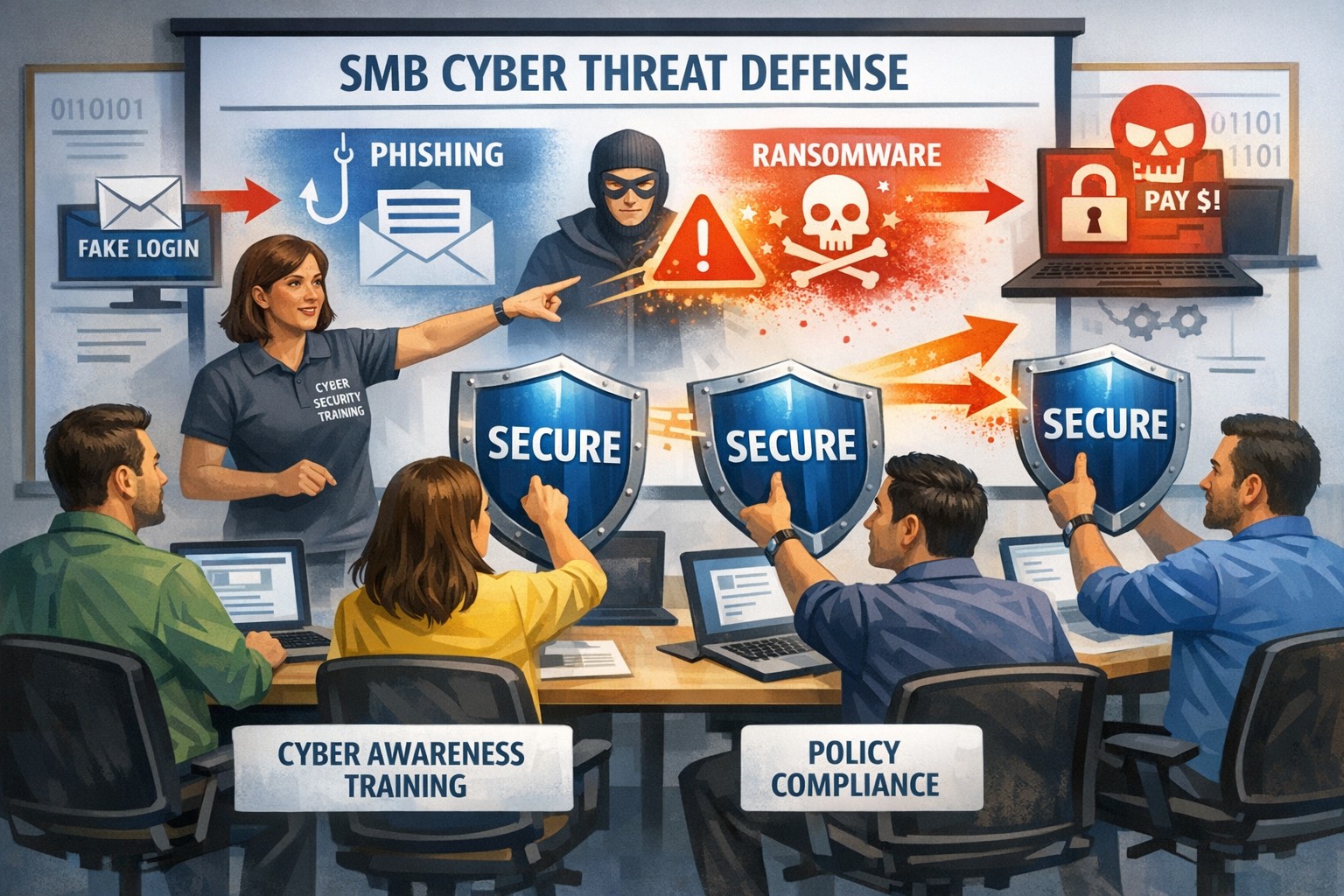
Infographic: How employee cybersecurity training protects small businesses from rising cyber threats.
Small and medium-sized businesses (SMBs) face an ever-evolving array of cyber threats. While investing in advanced security technologies is crucial, it’s equally important to recognize that employees are often the first line of defense against these threats. Employee security training is not just a nicety; it’s a necessity for safeguarding your business from potential breaches and financial losses.
Why Employee Security Training Matters
Cyber attacks frequently exploit human vulnerabilities rather than technological ones. Tactics like phishing, social engineering, and malware rely on manipulating individuals into divulging sensitive information or clicking on malicious links. By educating employees about these tactics, businesses can transform their staff from potential vulnerabilities into proactive defenders.
Benefits of Employee Training:
– Prevention of Costly Attacks: Comprehensive cybersecurity training helps prevent costly cyber attacks by equipping employees with the knowledge to identify and avoid threats. – Building a Culture of Cybersecurity: It fosters a culture where all employees take responsibility for protecting company data. – Enhanced Compliance: Well-informed employees are better equipped to comply with industry regulations, reducing the risk of fines and legal consequences.
Essential Components of Effective Training Programs
An effective cybersecurity training program should include several key components:
1. Phishing Prevention: Teach employees how to recognize suspicious emails and links. 2. Social Engineering Awareness: Educate staff on verifying identities and questioning unusual requests. 3. Malware Recognition: Focus on safe internet practices to avoid downloading unverified attachments. 4. Interactive Sessions: Use real-world simulations to reinforce learning. 5. Ongoing Updates: Regularly update content to reflect evolving threats.
Engaging Employees in Cybersecurity
To ensure that training is impactful:
– Use interactive methods like workshops or role-playing scenarios. – Utilize content that is fun and engaging – Incorporate real-world examples relevant to specific departments. – Gamify learning materials through quizzes or challenges.
By engaging employees meaningfully in cybersecurity efforts, businesses can foster a proactive security culture where everyone feels invested in protecting company assets.
Employee security training is no longer optional; it’s essential for SMBs looking to protect themselves against cyber threats effectively. By investing in comprehensive cybersecurity education, you not only safeguard your business but also empower your workforce as vigilant defenders against evolving digital dangers.
If you’re ready to shield your business from cyber threats by empowering your team with the latest knowledge and skills, contact Farmhouse Networking today! Our expert trainers will help you develop an effective employee security training program tailored specifically for your organization’s needs—ensuring that every employee becomes part of your robust defense strategy against cybercrime.
AI-powered RingCentral solutions enhancing SMB VoIP productivity and customer interactions
Small and medium-sized businesses (SMBs) face numerous challenges in maintaining efficient communication systems. The integration of Artificial Intelligence (AI) into business communications has emerged as a game-changer, offering solutions that enhance productivity, improve customer experiences, and drive revenue growth. RingCentral, a leader in AI-powered cloud communications, is at the forefront of this transformation. Here’s how RingCentral’s innovative AI solutions are revolutionizing SMB communications.
Enhancing Employee Efficiency with Real-Time Notes
RingCentral’s AI Notes feature automatically captures key points from meetings and calls in real-time. This allows sales teams to focus on client interactions while ensuring that all details are documented accurately for future reference. Customer service teams can also benefit by instantly logging customer queries and solutions, improving service quality over time.
Smarter SMS Interactions
RingCentral’s SMS enhancements provide businesses with tools to streamline text messaging interactions. Features like muting notifications during meetings and organizing SMS threads help keep conversations organized and distraction-free. Additionally, integrating SMS APIs can automate processes such as appointment confirmations and real-time updates, significantly reducing costs while speeding up customer response times.
Intelligent Virtual Assistants for Superior Self-Service
Small businesses can leverage intelligent virtual assistants (IVAs) to offer superior self-service options through digital and voice interactions. These IVAs automate tasks like answering frequent questions or providing basic support information without human intervention.
Unlocking Insights with Conversation Intelligence
RingSense AI provides conversation intelligence that unlocks valuable insights from every customer interaction across calls, emails, contact centers, and video meetings. This empowers sales teams with actionable intelligence for revenue optimization by analyzing trends in customer interactions and seamlessly integrating with CRMs.
Simplifying Event Management with AI-Powered Events
RingCentral Events simplifies end-to-end event management using AI capabilities such as Q&A categorization and auto-generated summaries for social media clips. This helps marketing teams manage virtual or hybrid events more efficiently.
If you’re interested in transforming your SMB’s communication landscape using RingCentral’s cutting-edge AI solutions, contact Farmhouse Networking, a trusted RingCentral Partner today! Our team will guide you through the process of implementing these innovative tools tailored specifically to your business needs.
Co-managed IT strategies boosting nonprofit mission success and operations
Nonprofit organizations face unique challenges that can hinder their ability to fulfill their core missions. Limited budgets, evolving technology, and the need for robust data security are just a few of the hurdles that nonprofits encounter. One effective solution to these challenges is outsourcing IT management through a managed IT services provider (MSPs). By doing so, nonprofits can focus more on their mission and increase their overall impact in the community.
Cost-Effective Solutions
Managed IT services provide nonprofits with a cost-effective alternative to maintaining an in-house IT department. With predictable monthly pricing models, nonprofits can access a team of skilled IT professionals without the high overhead costs associated with hiring full-time staff. This allows organizations to allocate more resources toward their mission-driven activities rather than sinking funds into IT management.
Access to Expertise and Support
Outsourcing IT management gives nonprofits access to a wealth of expertise that may not be available internally. Managed service providers (MSPs) employ specialists who are well-versed in the latest technologies and best practices. This expertise ensures that nonprofits can leverage cutting-edge tools and solutions while minimizing downtime and technical issues. With ongoing support and guidance from these experts, nonprofit staff can concentrate on strategic initiatives rather than getting bogged down by technical challenges.
Enhanced Data Security
Nonprofits often handle sensitive information, including donor data and client records. Cybersecurity threats are ever-evolving, making it crucial for organizations to implement robust security measures. Managed IT services offer advanced security protocols, including threat detection, data encryption, and compliance with industry regulations. By outsourcing this responsibility, nonprofits can ensure that their data is protected against breaches and maintain trust with donors and stakeholders.
Increased Operational Efficiency
By outsourcing IT management, nonprofits can streamline their operations and improve overall efficiency. MSPs handle routine maintenance, system updates, and troubleshooting, allowing nonprofit staff to focus on high-impact activities such as fundraising and community outreach. This shift not only enhances productivity but also helps organizations achieve their goals more effectively.
Scalability and Flexibility
Nonprofits often experience fluctuations in their operational needs based on project demands or fundraising cycles. Managed IT services offer scalable solutions that can be adjusted according to the organization’s current requirements. This flexibility ensures that nonprofits are not overpaying for unnecessary services during quieter periods while still having access to the necessary support during busy times.
Focus on Core Mission
Perhaps the most significant advantage of outsourcing IT management is the ability for nonprofit organizations to refocus on their core mission. With technical complexities handled by experts, staff can dedicate more time and energy to program development, community engagement, and other mission-driven activities. This focus ultimately leads to greater impact within the communities they serve.
If your nonprofit is ready to explore how managed IT services can transform your operations and increase your impact in the community, contact Farmhouse Networking today. Let us help you streamline your IT management so you can focus on what truly matters—making a difference in people’s lives.
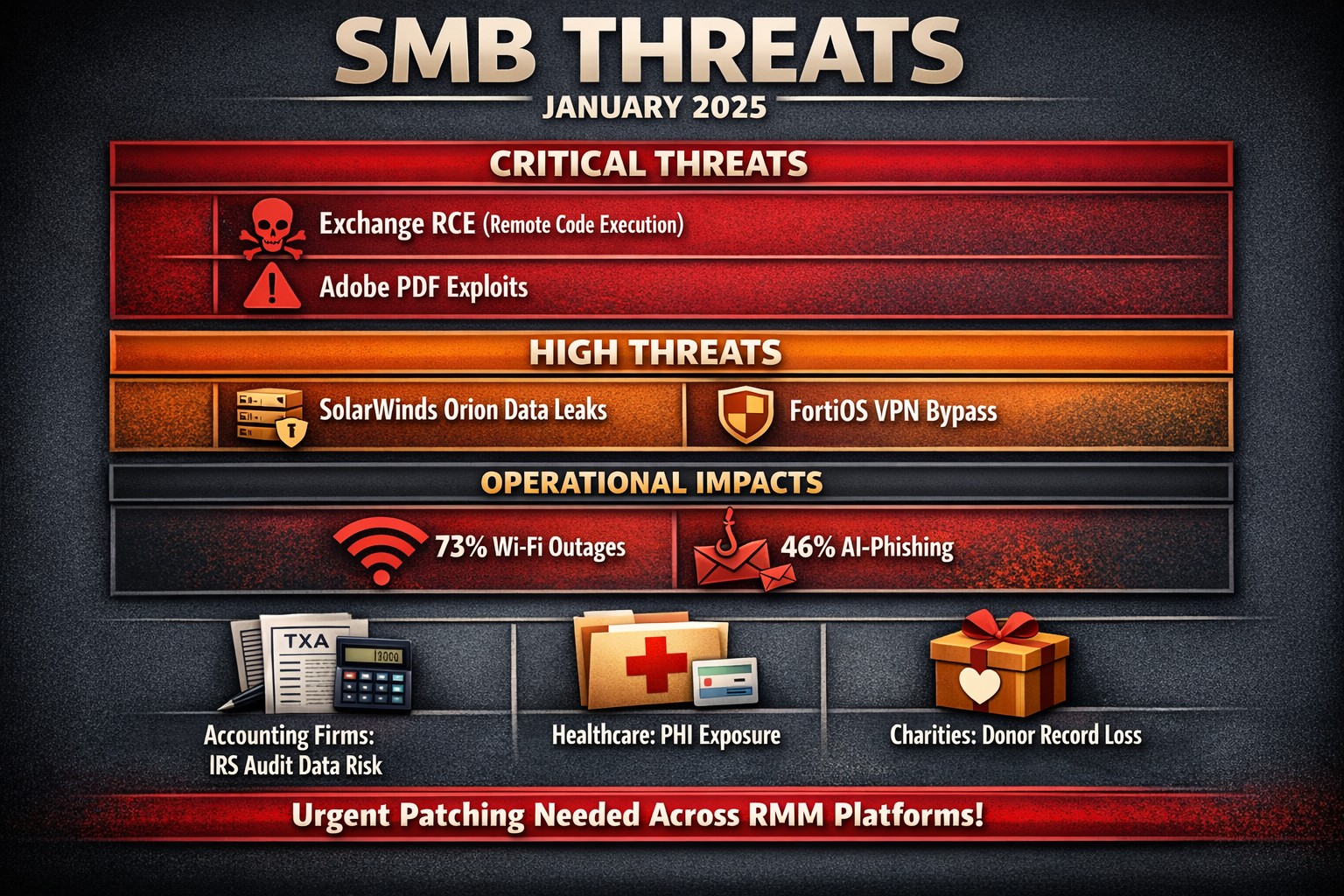
The past month has seen several significant vulnerabilities disclosed that pose serious risks to SMBs. Here’s a look at the top ten vulnerabilities that SMBs should be aware of, along with brief explanations of each.
Microsoft Exchange Server Vulnerabilities (CVE-2024-12345)
A critical vulnerability in Microsoft Exchange Server allows attackers to execute arbitrary code remotely. This flaw can lead to unauthorized access to sensitive emails and data. SMBs using outdated versions of Exchange are particularly at risk, as attackers can exploit this vulnerability without user interaction.
WordPress Plugin Vulnerability (CVE-2024-23456)
A popular WordPress plugin was found to have a cross-site scripting (XSS) vulnerability that could allow attackers to inject malicious scripts into web pages viewed by users. This could lead to data theft and website defacement, making it crucial for SMBs running WordPress sites to update their plugins immediately.
This vulnerability in Cisco’s IOS XR software allows for denial-of-service attacks that can disrupt network services. Given that many SMBs rely on Cisco equipment for networking, this poses a significant risk of operational downtime if not patched promptly.
Apache Log4j Vulnerability (CVE-2024-45678)
The infamous Log4j vulnerability continues to be a concern, with new exploits emerging. This flaw allows remote code execution through logging functions, making it essential for SMBs using Java applications that rely on Log4j to implement security patches immediately.
A critical vulnerability was discovered in Adobe Acrobat Reader that could allow attackers to execute arbitrary code via malicious PDF files. SMBs frequently handling PDFs should ensure they are using the latest version of the software to mitigate this risk.
Linux Kernel Vulnerability (CVE-2024-67890)
A flaw in the Linux kernel could allow local users to escalate privileges and gain unauthorized access to sensitive information. Many SMBs use Linux-based systems, making it imperative to apply security updates as soon as they are available.
VMware vSphere Vulnerability (CVE-2024-78901)
This vulnerability in VMware’s vSphere could allow an attacker with network access to execute commands on the host operating system. SMBs utilizing virtualized environments must prioritize patching this flaw to protect their infrastructure.
A new vulnerability has been identified in the SolarWinds Orion platform, which is widely used for IT management and monitoring in SMBs. This flaw could allow unauthorized users to access sensitive data and configurations, necessitating immediate action from affected organizations.
Fortinet FortiOS Vulnerability (CVE-2024-90123)
A critical vulnerability in FortiOS can lead to unauthorized access through improperly configured VPN settings. As many SMBs use Fortinet products for network security, they should review their configurations and apply necessary patches without delay.
Google Chrome Browser Vulnerability (CVE-2024-01234)
A high-severity vulnerability in Google Chrome could allow attackers to execute arbitrary code via crafted web content. Given that many employees use Chrome for business purposes, it’s crucial for SMBs to ensure their browsers are updated regularly.
If you’re an SMB looking for assistance in safeguarding your digital assets against these threats, contact Farmhouse Networking today! Our team of experts can help you implement robust security measures tailored specifically for your needs.
Visualizing cloud IT strategies that drive success in government subcontracting competitiveness
Smaller manufacturers often face significant challenges when bidding for contracts. However, by strategically leveraging information technology (IT) solutions, these businesses can enhance their competitiveness and stand out in the bidding process. This article explores various IT strategies that can help small manufacturers gain an edge when pursuing government subcontracts.
Understanding the Competitive Landscape
The government contracting market is vast and complex, characterized by stringent regulations and a diverse pool of competitors. For smaller manufacturers, distinguishing themselves from larger firms requires innovative approaches. The integration of advanced IT solutions can provide the necessary tools to improve efficiency, compliance, and overall competitiveness.
Key IT Solutions for Competitive Advantage
Proposal Management Software: Crafting compelling proposals is critical in government contracting. Utilizing proposal management software can streamline the creation process by providing templates and analytics to track success rates. This allows manufacturers to present well-structured, persuasive bids that highlight their unique capabilities and innovations.
Project Management Tools: Effective project management is essential for meeting government requirements and deadlines. Implementing robust project management software helps small manufacturers keep track of milestones, manage resources efficiently, and ensure compliance with government standards. These tools facilitate collaboration among team members and provide transparency in progress reporting.
Cloud Computing: Cloud-based solutions offer scalability and flexibility that are particularly beneficial for smaller firms. By adopting cloud computing, manufacturers can reduce upfront IT costs while enhancing collaboration through real-time data sharing and communication. This adaptability allows them to respond quickly to changing project requirements or new opportunities.
Customer Relationship Management (CRM) Systems: A strong CRM system enables small manufacturers to manage relationships with government agencies effectively. By tracking interactions and understanding client needs, companies can tailor their proposals and communications to better align with government expectations.
Compliance Management Software: Compliance with regulations such as FAR (Federal Acquisition Regulation) is crucial for government contractors. Investing in compliance management software helps ensure adherence to legal requirements while simplifying documentation processes. This reduces the risk of non-compliance penalties and enhances the company’s reputation.
Data Analytics Tools: Leveraging data analytics can provide insights into market trends, competitor strategies, and customer preferences. Small manufacturers can use these insights to refine their bidding strategies and identify areas for improvement in their offerings.
Emphasizing Innovation
Innovation is a key differentiator in government contracting. Smaller manufacturers should focus on integrating cutting-edge technologies such as artificial intelligence (AI) and automation into their operations:
AI-Driven Solutions: AI can enhance decision-making processes by analyzing large datasets to predict project outcomes or identify potential risks. This capability allows manufacturers to make informed decisions quickly, improving their responsiveness in competitive bids.
Process Automation: Automating routine tasks not only increases efficiency but also minimizes errors. By streamlining operations through automation, small manufacturers can allocate more resources toward strategic activities that enhance their competitive positioning.
Building Strategic Partnerships
Forming partnerships with technology providers or consulting firms can further bolster a small manufacturer’s capabilities. These collaborations can offer access to expertise in implementing IT solutions tailored for government contracting needs, ensuring that smaller firms remain competitive against larger players.
If you’re ready to take your government subcontracting efforts to the next level, don’t navigate this complex landscape alone. At Farmhouse Networking, we specialize in helping small manufacturers leverage IT solutions to enhance their competitiveness and streamline their operations.
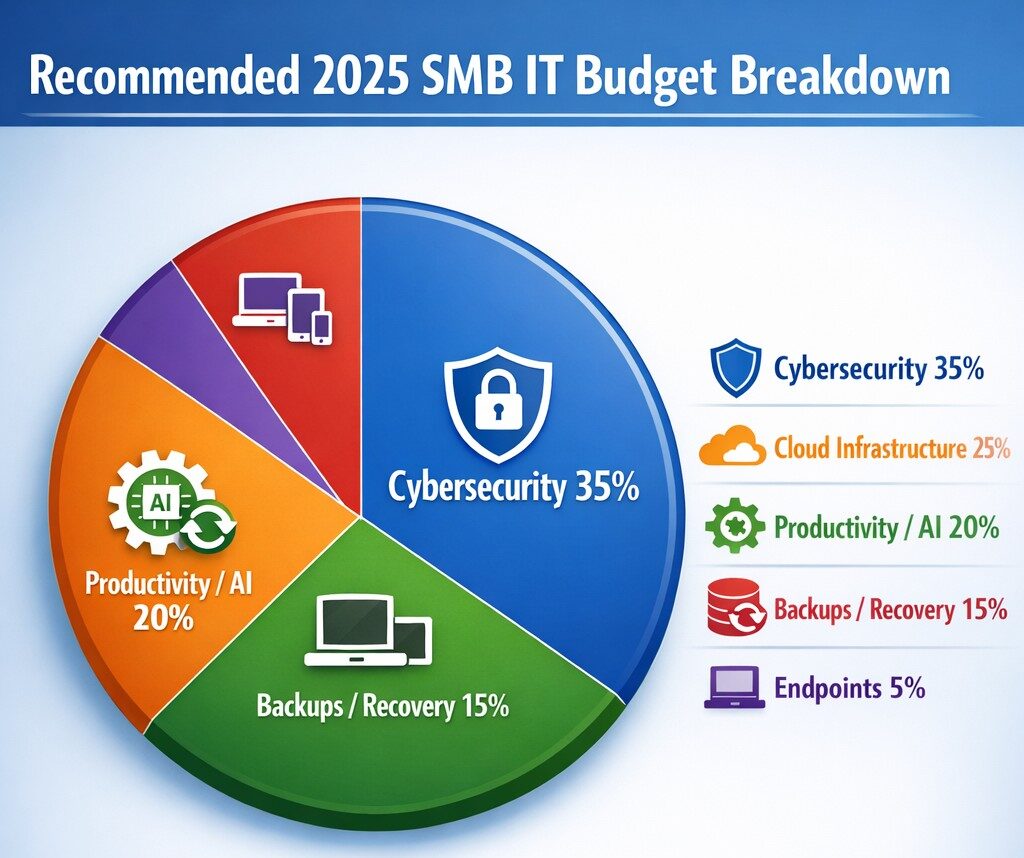
Allocate 30%+ of 2025 IT budget to cybersecurity per industry benchmarks.
Small and medium-sized businesses (SMBs) must strategically plan their IT budgets to stay competitive and efficient. It’s crucial to allocate resources wisely to support both day-to-day operations and long-term growth. Let’s explore the key areas SMBs should focus on when budgeting for tech in 2025.
Cybersecurity Investments
With no end to cyber threats in site, cybersecurity should be a top priority in your 2025 IT budget. Consider allocating funds for:
– Advanced firewalls and intrusion detection systems – Multi-factor authentication (MFA) implementation – Regular security audits and penetration testing
Remember, the cost of preventing a cyber attack is far less than the potential losses from a successful breach.
Artificial Intelligence and Automation
AI is no longer a luxury reserved for large enterprises. In 2025, SMBs should budget for AI-powered tools to enhance efficiency and decision-making. Consider investments in:
– Chatbots for customer support – AI-driven analytics for business insights – Automated workflow tools to streamline operations
These technologies can help SMBs do more with less, improving productivity and customer satisfaction.
Hardware and Device Upgrades
SMBs still need to budget for essential hardware. This includes:
– Laptops and desktops for employees – Mobile devices for remote work – Networking equipment for reliable connectivity
Plan for a hardware refresh cycle to ensure your team has up-to-date tools to work efficiently. (Remember we meet with our clients twice a year in the Spring and Fall to discuss budget and replacement scheduling.)
Software Licenses and Subscriptions
Software is the backbone of modern business operations. Your 2025 IT budget should account for:
– Operating system licenses (Windows 10 is no longer supported as of October 2025) – Productivity suite subscriptions (e.g., Microsoft 365, Google Workspace) – Industry-specific software licenses – Collaboration and communication tools
Regularly review your software subscriptions to ensure you’re only paying for what you need and use.
IT Support and Managed Services
Consider outsourcing some or all of your IT support to a managed service provider (MSP) like Farmhouse Networking to reduce in-house IT costs and gain access to specialized expertise. Budget for:
– Help desk support – Compliance assistance – Network monitoring and management – Backup and disaster recovery services
Employee Cybersecurity Training
Hackers keep getting better at their crimes, so should it is mandatory to invest in your team’s cybersecurity skills. Allocate budget for:
– Yearly assessments of baseline knowledge – Weekly trainings with quizzes to make sure they are paying attention – Interactive or gamified content to keep people interested
Investing in your team’s skills can lead to better technology adoption and improved productivity.
Ready to optimize your IT budget for 2025? Don’t navigate this complex landscape alone. Contact Farmhouse Networking today to help you create a tailored IT budget that aligns with your business goals and maximizes your technology investments. Our experts can guide you through the process, ensuring you’re prepared for the technological challenges and opportunities that lie ahead. Let’s work together to future-proof your business and drive success.
Resolve to strengthen cyber defenses in 2025 with zero trust and employee training.
Stepping into 2025, SMBs face an scary and complex cybersecurity field of battle. With hackers evolving cyber threats at a rapid pace, it’s crucial to make strengthening your digital defenses a top priority. Let’s explore some essential tips to boost your cybersecurity posture in the coming year.
Embrace a Zero Trust Mindset
Start the new year by adopting a Zero Trust approach to cybersecurity. This means verifying every user, device, and application attempting to access your network, regardless of their location. Implement Zero Trust Network Access protocols and use Application Allow/Deny lists to control which software can run on your systems.
Strengthen Your Network Defenses
Secure Your Wi-Fi: Ensure your Wi-Fi network is encrypted and properly configured. Use strong passwords and consider implementing network segmentation to isolate guest networks from your internal systems.
Implement Firewalls and Intrusion Prevention Systems: Deploy robust firewalls to filter incoming and outgoing traffic. Couple this with intrusion prevention systems that actively seek out and block known threats.
Protect Your Data
Encrypt Sensitive Information: Apply encryption to both data at rest and in transit. This includes emails, file transfers, and stored documents.
Implement Data Loss Prevention (DLP) Tools: Use DLP tools to track critical data and prevent unauthorized exfiltration attempts.
Enhance Authentication Measures
Multi-Factor Authentication (MFA): Implement MFA across all your systems, applications, and websites. This additional layer of security significantly reduces the risk of unauthorized access.
Use Password Managers: Encourage the use of password managers to generate and store complex, unique passwords for each account.
Educate Your Employees
Regular Security Awareness Training: Conduct ongoing cybersecurity training for all employees. Focus on recognizing phishing attempts, proper handling of sensitive data, and best practices for remote work.
Prepare for the Worst
Develop an Incident Response Plan: Create a comprehensive plan that outlines procedures for responding to various cybersecurity incidents. Regularly test and update this plan.
Implement Robust Backup Solutions: Establish a regular backup schedule for all critical data and systems. Store backups securely, preferably in multiple locations, including off-site.
Stay Updated and Vigilant
Keep Software and Systems Current: Regularly update all software, applications, and operating systems. Automate updates where possible and conduct periodic audits to ensure nothing is missed.
Implement Real-Time Monitoring: Deploy solutions that provide continuous, real-time monitoring of your network and systems. This allows for immediate detection and response to potential threats.
Secure Your Remote Workforce
With hybrid work models likely to persist, ensure your remote workers are equipped with secure tools:
– Provide Zero Trust VPN access for secure connections – Implement endpoint security measures even on employee’s own laptops – Educate on the risks of using public Wi-Fi
Address IoT Security
As the Internet of Things (IoT) expands, so do the associated risks. Inventory your IoT devices, regularly update their firmware, and implement network segmentation to isolate these devices.
Ready to make cybersecurity your New Year’s resolution? Contact Farmhouse Networking today. Our team of experts is ready to guide you through every step of enhancing your cybersecurity posture, ensuring that your business stays protected throughout 2025 and beyond. Let’s work together to create a robust, tailored cybersecurity strategy that meets your unique needs and keeps your business safe in the digital age.
For those that missed us this week, our CEO Scott Carr was one of the guest speaking panel and the event pictured above. During our discussion, the question was asked – “What is the one thing business owners can do to protect themselves from ransomware?” Scott’s answer was – “If you do nothing else, at the very least have a backup of your data. If anything goes wrong you will be able to go back to your previous data and skip paying the ransom.”
Why Backup?
Ransomware attacks have become an increasingly prevalent threat to businesses of all sizes. As cybercriminals continue to evolve their tactics, it’s crucial for organizations to implement robust defense strategies. One of the most effective ways to protect your business from the devastating effects of ransomware is through a comprehensive backup strategy.
The Rising Threat of Ransomware
Ransomware attacks have surged dramatically in recent years, with 2024 seeing unprecedented levels of both frequency and sophistication. In the first half of 2024 alone, the average extortion demand per ransomware attack exceeded $5.2 million, with a record-breaking payment of $75 million in March. These staggering figures underscore the critical need for businesses to fortify their defenses against such attacks.
The Role of Backups in Ransomware Protection
Data backups serve as a crucial line of defense against ransomware threats. They provide a safety net that can help your company prevent irreparable damage in the event of an attack. Here’s why backups are so important:
Added Data Security: By maintaining backups of your critical data, you remove one of the primary vectors for ransomware attacks. If you can still access your data from a backup, hackers lose their leverage in demanding a ransom
Recovery Options: Reliable and well-tested backups give ransomware victims more options. Without backups, organizations have limited choices for recovery. However, with confidence in their ability to restore from backups, businesses can make more nuanced decisions during ransomware recovery and negotiations.
Best Practices for Ransomware-Resilient Backups
To ensure your backups provide effective protection against ransomware, consider implementing these best practices:
Implement the 3-2-1 Backup Strategy: This strategy involves maintaining at least three copies of your data on two different storage types, with one copy kept offsite. This approach significantly reduces the risk of losing all your data in a single attack
Use Immutable Storage: Immutable backups cannot be modified, altered, or deleted for a specified period. This ensures that your backup data remains intact and tamper-proof, protecting against both accidental and malicious changes
Maintain Offline Backups: Keep a secondary offline backup copy that ransomware cannot reach. Network attached storage devices can be an effective method for this purpose.
Increase Backup Frequency: Consider backing up mission-critical data at least once per hour. This reduces the amount of data that could potentially be lost in a ransomware attack.
Employ Endpoint Protection: Use modern endpoint protection platforms that can detect ransomware processes as they begin, even if the type of ransomware is new and unknown.
The Business Impact of Ransomware
The consequences of a ransomware attack extend far beyond the immediate financial loss. Businesses may experience:
Extensive downtime, leading to significant revenue loss
Damaged reputation among customers and partners
Delayed project timelines
Potential loss of sensitive customer data
These impacts underscore the importance of a robust backup strategy as part of your overall cybersecurity plan.
Don’t wait until it’s too late to protect your business from the devastating effects of ransomware. Contact Farmhouse Networking today to develop a comprehensive backup and cybersecurity strategy tailored to your organization’s needs. Our expert team can help you implement robust protection measures, ensuring your business remains resilient in the face of evolving cyber threats. Secure your data, protect your reputation, and safeguard your bottom line—reach out to Farmhouse Networking now.
TaaS delivers scalable cloud infrastructure for future-ready accounting firms.
The accounting industry is on the cusp of a technological revolution, with emerging trends set to reshape how firms operate and deliver value to their clients. As we look ahead to 2025 and beyond, it’s crucial for accounting practices to stay ahead of the curve and embrace these innovations. Let’s explore the key technologies that are poised to transform the accounting landscape and discuss how firms can prepare for this exciting future.
Artificial Intelligence and Machine Learning
Artificial Intelligence (AI) and Machine Learning (ML) are at the forefront of the accounting technology revolution. The AI in accounting market is expected to reach $4.791 billion by 2024, growing at an impressive compounded annual growth (CAGR) of 48.4%. This rapid growth is driven by AI’s ability to automate repetitive tasks, streamline workflows, and provide valuable insights.
Key applications of AI in accounting include:
Automated data entry and reconciliation
Intelligent fraud detection
Advanced financial forecasting
Natural language processing for document analysis
To prepare for this AI-driven future, firms should invest in AI-powered accounting software and prioritize training programs to help staff leverage these new tools effectively.
Cloud-Based Accounting Solutions
Cloud technology has already transformed the accounting industry, and its importance will only grow in the coming years. The global Cloud Accounting Software market is projected to reach $7567.54 million by 2028, expanding at a CAGR of 10.56%.
Benefits of cloud-based accounting include:
Real-time collaboration and data access
Enhanced data security and backup
Scalability and cost-efficiency
Seamless integration with other business systems
Accounting firms should consider migrating their operations to cloud-based platforms to improve efficiency and provide better service to clients.
Blockchain Technology
While often associated with cryptocurrencies, blockchain technology has far-reaching implications for the accounting industry. The accounting blockchain market is expected to reach $868 million by 2025.
Potential applications of blockchain in accounting:
Enhanced transaction transparency and security
Streamlined auditing processes
Improved record-keeping and data integrity
Simplified reconciliations
Firms should start exploring blockchain technology and its potential applications to stay ahead of this emerging trend.
Data Analytics and Forecasting Tools
As businesses generate more data than ever before, the ability to analyze and derive insights from this information is becoming crucial. Advanced data analytics tools are enabling accountants to provide more strategic advice to their clients.
Key areas where data analytics can add value:
Predictive financial modeling
Risk assessment and management
Performance benchmarking
Identifying cost-saving opportunities
Accounting practices should invest in robust data analytics tools and develop their team’s skills in data interpretation and visualization.
Cybersecurity and Data Protection
With the increasing digitization of financial data, cybersecurity has become a top priority for accounting firms. Protecting sensitive client information is not just a legal requirement but also a crucial aspect of maintaining trust and credibility.
Essential cybersecurity measures:
Implementing multi-factor authentication
Regular security audits and penetration testing
Employee training on cybersecurity best practices
Adoption of managed detection and response technologies
Firms must prioritize cybersecurity investments and stay updated on the latest threats and protection measures.
Robotic Process Automation (RPA)
RPA is set to revolutionize routine accounting tasks by automating repetitive processes. This technology can significantly improve efficiency and reduce errors in areas such as accounts payable, receivable, and financial close processes.
Benefits of RPA in accounting:
Increased accuracy in data entry and processing
Faster completion of routine tasks
Reduced operational costs
Improved compliance and audit trails
Accounting practices should identify processes that can be automated using RPA and implement these solutions to boost productivity.
The Evolving Role of Accountants
As technology automates many traditional accounting tasks, the role of accountants is evolving. Future-focused firms will need to shift their focus from number-crunching to providing high-value advisory services.
Skills for the future accountant:
Strategic financial planning
Data analysis and interpretation
Technology proficiency
Soft skills such as communication and problem-solving
Firms should invest in continuous learning and development programs to help their staff adapt to these changing roles.
Preparing for the Future
To future-proof your accounting practice, consider the following steps:
Conduct a technology audit to identify areas for improvement
Develop a digital transformation strategy aligned with your firm’s goals
Invest in staff training and development to build necessary skills
Stay informed about emerging technologies and industry trends
Collaborate with technology partners to implement new solutions
The accounting industry is on the brink of a technological revolution, and firms that embrace these emerging technologies will be well-positioned for success in the years to come.
Ready to navigate the complex world of accounting technology and future-proof your practice? Contact Farmhouse Networking today. Our expert team can help you assess your current technology stack, identify areas for improvement, and implement cutting-edge solutions tailored to your firm’s unique needs. Don’t let your practice fall behind – take the first step towards a technologically advanced future by reaching out to Farmhouse Networking now.
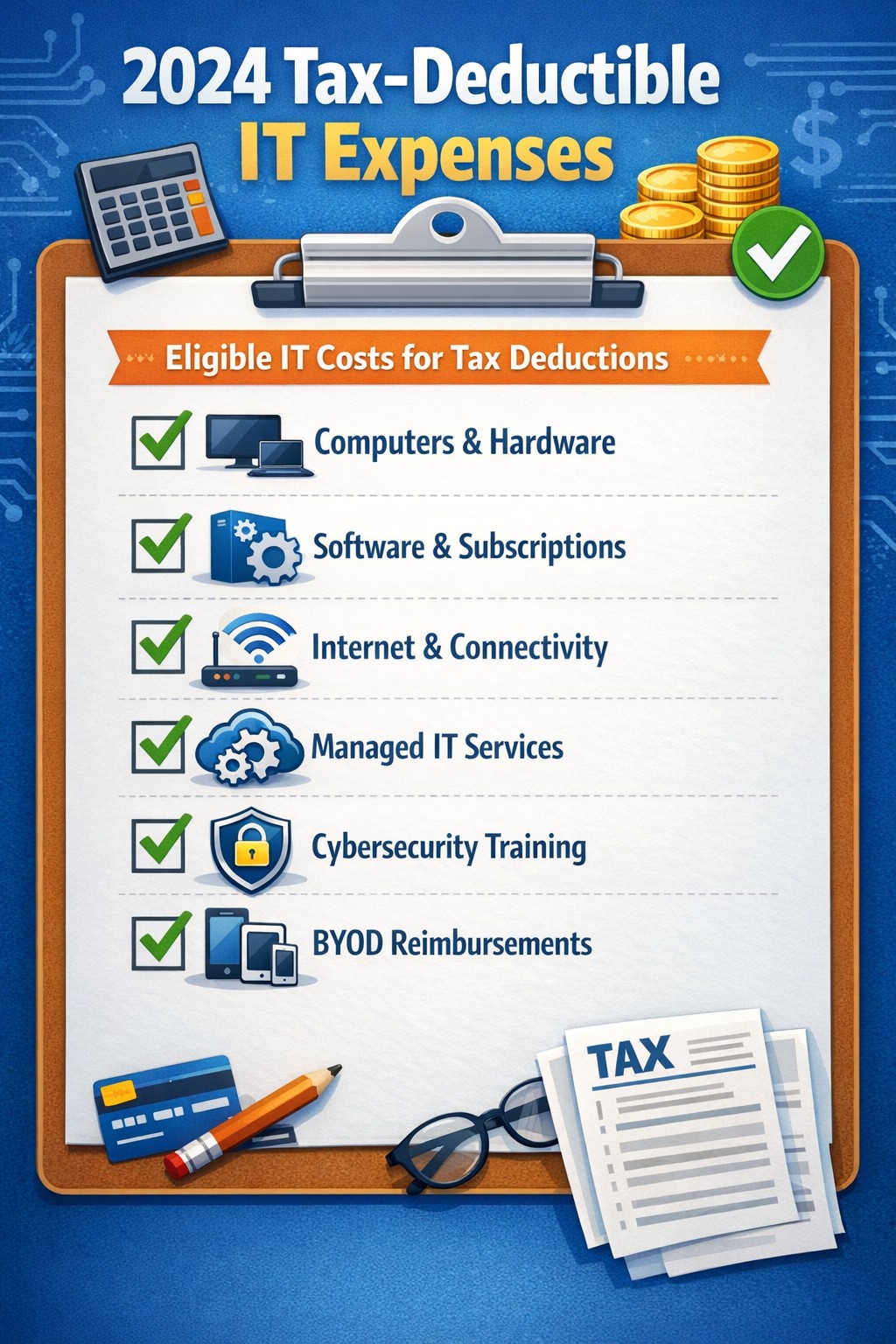
Claim Section 179, cloud subscriptions, cybersecurity as business tax deductions.
As we approach the end of the year, it’s crucial for businesses to understand the tax deductions available for their IT expenses. Maximizing these deductions can significantly reduce your tax burden and free up capital for further investment in your company’s technology infrastructure. Let’s explore the top tax-deductible IT expenses for 2024 that every business should be aware of.
Hardware and Equipment
Computers and Devices
Investing in new computers, tablets, or smartphones for your business can provide substantial tax benefits. The entire cost of these devices can be deducted from your taxable income. However, if the equipment is used partially for personal purposes, you may only be able to deduct a portion of the cost.
Office Equipment
Printers, scanners, and other office equipment are 100% tax-deductible in the year of purchase. This includes any IT-related furniture, such as ergonomic chairs or standing desks for your tech team.
Software and Services
Business Software
Software used for business purposes is eligible for tax deductions. This includes:
The deductible amount will depend on whether the software is purchased outright or subscribed to on a monthly basis.
Cloud Services
As more businesses move their operations to the cloud, it’s important to note that cloud service subscriptions are tax-deductible. This includes services like:
– Data storage – Backup solutions – Cloud-based productivity suites
Telecommunications
Internet Expenses
Internet services are crucial for most businesses today. You can deduct the full cost of your business internet connection[. If you work from home, you may be able to deduct a portion of your home internet expenses based on the percentage used for business purposes.
Phone Systems
All telecommunications fees within a commercial space can be deducted[1]. This includes:
– Business phone lines – VoIP systems – Cell phone contracts used for business
IT Services and Support
Managed IT Services
Fees paid for managed IT services, including network management, cybersecurity monitoring, and help desk support, are fully deductible as a business expense.
IT Consulting and Training
Any costs associated with IT consulting or training for your staff to use new technologies are tax-deductible. This can include workshops, online courses, or one-on-one training sessions.
Cybersecurity Measures
With the increasing importance of data protection, investments in cybersecurity are not only wise but also tax-deductible. This includes:
– Firewalls and antivirus software – Security audits – Employee cybersecurity training programs
Website Expenses
Development and Maintenance
Costs related to developing, hosting, and maintaining your business website are tax-deductible. This includes domain registration fees, hosting costs, and payments to web developers or designers.
E-commerce Solutions
If your business sells products online, the expenses for e-commerce platforms and payment processing systems are also deductible.
Home Office Technology
For those running businesses from home or with remote workers, the home office deduction can apply to technology expenses. You can deduct a portion of your home internet, personal computer use, and other tech equipment based on the percentage of your home used exclusively for business.
Ready to optimize your IT infrastructure while maximizing your tax benefits? Contact Farmhouse Networking today. Our expert team can help you implement cutting-edge IT solutions that not only boost your productivity but also provide substantial tax advantages. Don’t leave money on the table – let us help you navigate the complex world of IT expenses and tax deductions. Reach out now to schedule a consultation and start saving!
B2B leaders embracing Industry 4.0: Connect for smart manufacturing and automation opportunities
Small manufacturers are discovering the transformative power of Industry 4.0 technologies. By leveraging smart technologies like the Internet of Things (IoT), Artificial Intelligence (AI), and machine learning, these businesses are not only staying competitive but also revolutionizing their manufacturing processes. Let’s explore how these cutting-edge tools can benefit small manufacturers and propel them into the future of production.
The Power of Real-Time Data
One of the most significant advantages of smart manufacturing technologies is the ability to harness real-time data. By integrating IoT sensors into production lines, small manufacturers can gain unprecedented visibility into their operations. This continuous stream of information allows for:
Improved Cost Control: Real-time monitoring helps identify inefficiencies, reduce waste, and optimize resource allocation, leading to significant cost savings.
Enhanced Supply Chain Management: With up-to-the-minute data on inventory levels and production rates, manufacturers can make informed decisions to keep their supply chains running smoothly.
Proactive Maintenance: IoT sensors can detect early signs of equipment wear, allowing for predictive maintenance that prevents costly downtime and extends machinery lifespan.
AI-Powered Decision Making
Artificial Intelligence is revolutionizing how small manufacturers approach decision-making and problem-solving. By leveraging AI technologies, businesses can:
Optimize Production Schedules: AI algorithms can analyze complex data sets to create efficient production schedules that maximize resource utilization and meet customer demands.
Enhance Quality Control: Machine learning models can identify subtle patterns in production data, helping to detect and prevent quality issues before they escalate.
Personalize Customer Experiences: AI-powered recommendation engines can offer tailored product suggestions, improving customer satisfaction and driving sales.
Machine Learning for Process Optimization
Machine learning is proving to be a game-changer for small manufacturers looking to streamline their operations. This technology offers several key benefits:
Predictive Analytics: By analyzing historical data, machine learning algorithms can forecast future trends, helping manufacturers make proactive decisions about production, inventory, and maintenance.
Automated Quality Assurance: Machine learning models can be trained to detect defects or anomalies in products with high accuracy, reducing the need for manual inspections.
Process Optimization: Through continuous analysis of production data, machine learning can identify opportunities for process improvements, leading to increased efficiency and reduced costs.
Overcoming Implementation Challenges
While the benefits of Industry 4.0 technologies are clear, small manufacturers may face challenges in adoption. These can include:
Data Security Concerns: As more devices become connected, ensuring the security of sensitive manufacturing data becomes crucial.
Investment Costs: Implementing new technologies often requires upfront investment, which can be daunting for smaller businesses.
Skills Gap: Adopting advanced technologies may require upskilling existing staff or hiring new talent with specialized expertise.
The Path Forward
Despite these challenges, the potential rewards of embracing Industry 4.0 technologies far outweigh the risks. Small manufacturers who invest in smart technologies position themselves for:
– Increased competitiveness in the global market – Improved operational efficiency and cost savings – Enhanced product quality and customer satisfaction – Greater agility in responding to market changes
As we move further into the digital age, the adoption of smart manufacturing technologies is no longer a luxury—it’s a necessity for small manufacturers who want to thrive in an increasingly competitive landscape.
Ready to take your manufacturing operations to the next level? Don’t let the complexities of Industry 4.0 technologies hold you back. Contact Farmhouse Networking today to learn how we can help you implement smart manufacturing solutions tailored to your unique needs. Let’s work together to unlock the full potential of your manufacturing business and pave the way for a smarter, more efficient future.
Cybersecurity Skills Through Innovative Funding Program
Innovative funding accelerates cybersecurity training for stronger team defenses.
Farmhouse Networking, a leading provider of managed IT services, today announced a groundbreaking initiative to enhance its cybersecurity capabilities by leveraging the Rogue Business Elevate program to fund comprehensive cybersecurity training for all employees through TryHackMe. Farmhouse Networking is taking proactive steps to fortify its clients’ defenses and cultivate a culture of cybersecurity awareness across all the organization it supports. By partnering with Rogue Business Elevate and TryHackMe, the company is demonstrating its commitment to staying ahead of potential security risks while investing in the professional development of its workforce.
Empowering Employees with Cutting-Edge Skills The TryHackMe platform offers an innovative, gamified approach to cybersecurity education, making the learning process both engaging and effective .Employees will have access to:
Interactive lessons that bridge theory and practice
Simulated network environments for hands-on experience
Real-world challenges based on actual cybersecurity scenarios
This comprehensive training program will equip Farmhouse Networking’s staff with the skills to identify, prevent, and respond to a wide range of cyber threats.
Investing in the Future of Cybersecurity “At Farmhouse Networking, we recognize that our employees are our first line of defense against cyber attacks for many businesses throughout Oregon,” said Scott G. Carr II, CEO of Farmhouse Networking. “By investing in their skills through this innovative funding program and partnering with TryHackMe, we’re not just enhancing our clients’ security posture; we’re also providing our team with valuable, career-advancing knowledge.” The initiative aligns with Farmhouse Networking’s long-term strategy to build a resilient and knowledgeable workforce capable of addressing the complex cybersecurity challenges faced by businesses today.
Community and Collaboration Beyond individual skill development, this program will foster a sense of community among Farmhouse Networking’s employees. TryHackMe’s platform encourages collaboration, allowing team members to connect with like-minded professionals, share knowledge, and learn from each other’s experiences. Farmhouse Networking’s innovative approach to employee development and cybersecurity preparedness sets a new standard in the industry. By leveraging the Rogue Business Elevate program to fund this initiative, the company is maximizing its investment in both its people and its technological defenses.
Cybersecurity isn’t just an option—it’s a necessity. At Farmhouse Networking, we’re not only enhancing our own security measures but we’re also ready to help you fortify your defenses. Don’t wait for a breach to happen. Take proactive steps to protect your business today. Contact Farmhouse Networking today for a free consultation. Let’s work together to create a robust security strategy that safeguards your business, your data, and your peace of mind.
Businesses of all sizes face unprecedented cybersecurity challenges. Blackpoint Cyber emerges as a leader in providing comprehensive, cutting-edge solutions to protect organizations from cyber threats. Let’s explore why Blackpoint Cyber stands out as the premier choice for business cybersecurity.
Comprehensive Ecosystem of Security Solutions
Blackpoint Cyber offers a fully managed, integrated ecosystem of services centered around their powerful nation-state-grade Managed Detection and Response (MDR) technology. This ecosystem is designed to keep businesses ahead of potential threats by proactively understanding the threat landscape and actively neutralizing adversaries before they can cause harm.
Managed Detection & Response (MDR)
At the core of Blackpoint’s offerings is their purpose-built MDR technology. This solution combines network oversite, malicious activity detection, and endpoint security to rapidly identify and neutralize hacker and virus activities in their earliest stages. By harnessing data around suspicious events, hacker tradecraft, and endpoint activity, Blackpoint’s MDR can stop advanced attacks faster than any other solution on the market.
Cloud Response
With the shift to hybrid and cloud environments, Blackpoint’s Cloud Response extends the power of their MDR service to these critical areas. Their 24/7 Security Operations Center (SOC) actively monitors cloud environments and provides fast responses to threats on platforms like Office 365.
LogIC
LogIC enhances the value of security logs and data collected from networks, turning them into real-time threat hunting and response capabilities. With push-button setup, LogIC allows for quick addition of log sources, generation of compliance reports, and automatic mapping against hundreds of compliance requirements.
Unmatched Threat Awareness and Response Times
Blackpoint Cyber’s proprietary security operations and incident response platform, SNAP-Defense, enables continuous monitoring and response to modern threats. Their SOC, established by former US government cybersecurity operators, leverages deep knowledge of hacker tradecraft to provide 24/7 unified detection and response services.
The company boasts impressive response times, with an average of 7 minutes for cloud incidents and an overall average of 27 minutes. This rapid response capability is crucial in minimizing potential damage from cyber attacks.
Tailored Solutions for Businesses of All Sizes
While Blackpoint Cyber’s technology is enterprise-grade, they specialize in bringing these advanced solutions to small and medium-sized businesses through partnerships with Managed Service Providers (MSPs) like Farmhouse Networking. This approach allows businesses of all sizes to benefit from top-tier cybersecurity protection.
Continuous Innovation and Growth
Blackpoint Cyber continues to invest in growth and innovation. With a recent $190 million investment round and the appointment of industry veteran Manoj Srivastava as Chief Technology and Product Officer, the company is poised for further advancements in their product strategy and technology.
Blackpoint Cyber’s suite of solutions offers businesses a robust, proactive approach to cybersecurity. Their technology, combined with human expertise, provides a level of protection that’s essential in today’s threat landscape.
Ready to elevate your business’s cybersecurity with Blackpoint Cyber’s cutting-edge solutions? Contact Farmhouse Networking today to manage your cyber security needs and implement these powerful tools. Don’t wait for a breach to happen – take proactive steps to protect your business now.
Enhanced DNS filtering protects networks from phishing, malware, and non-compliant content.
This is a quick note to all current and future customers, we have made a business decision to move from our old DNS filter / web filter software (called DNSFilter) to a new provider called DefensX.
Why Does This Even Matter?
We recently performed network inventory for all our Monthly Managed IT Services clients and found that many of them had an issue where the filtering software was in an error state and needed to be re-installed. This started our search for a more reliable partner. We found that DefensX provided all the needed functionality and gave our clients the added benefit of reports to see who is looking at what on the internet – something we think that business owners will find extremely valuable.
What Happens Now?
We are automatically removing the old software and deploying the new software to those who have already signed up for service. If you are Monthly Managed IT Services client and do not currently use our DNS filtering service, then reach out to get started at No Additional Cost!
This new service has many new categories to choose from as well, so if there are any sites being blocked or not blocked that you see in your new reports, then just let us know and we can quickly make those changes.
Don’t wait for a cyber attack to compromise your business. Take proactive steps to safeguard your network today! Contact Farmhouse Networking now to implement our advanced DNS filtering solution. Our experts will tailor a protection plan that fits your unique business needs.
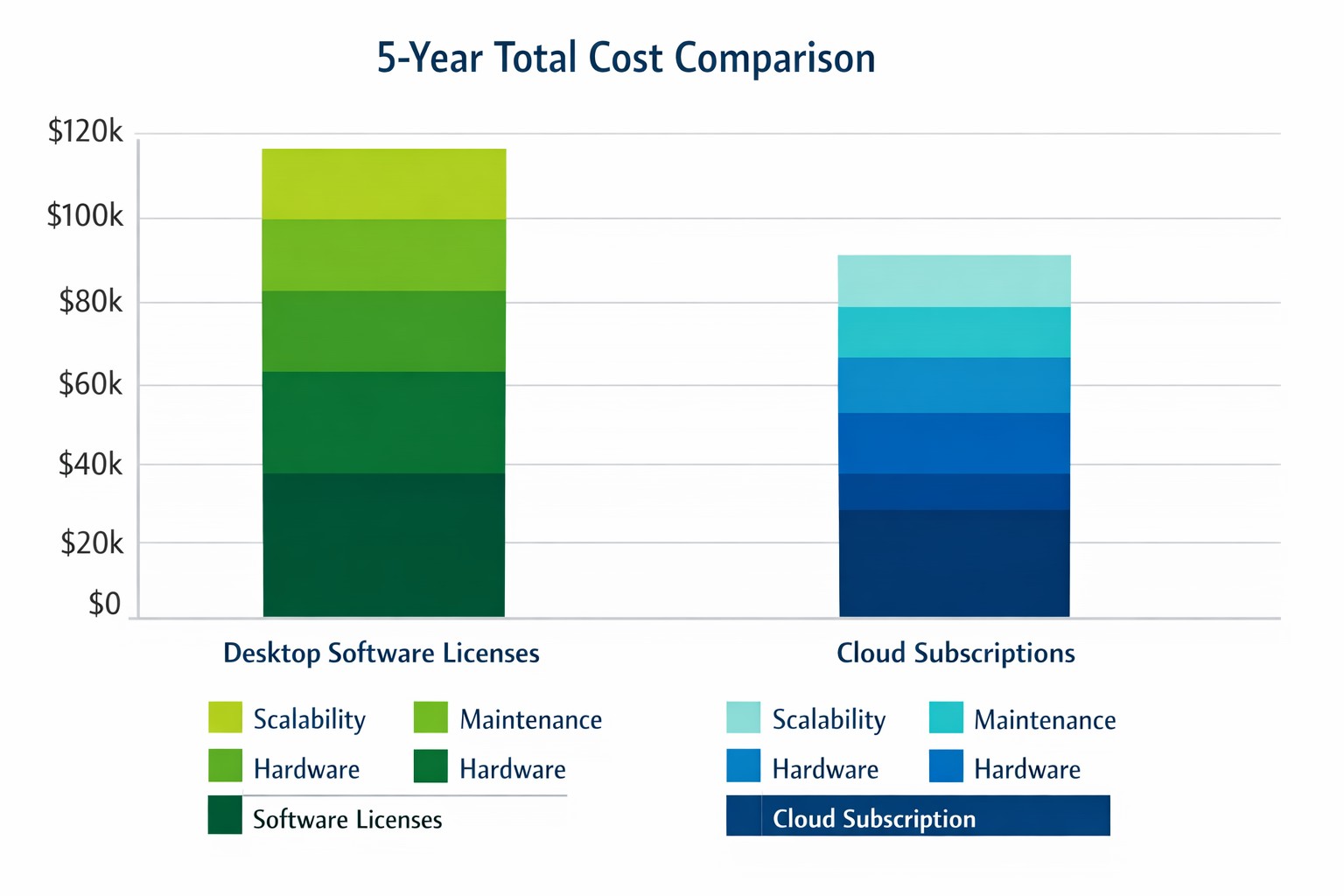
Cloud subscriptions often beat desktop software on long-term TCO and scalability.
Choosing the right productivity software for your company is a critical decision that can impact your bottom line and operational efficiency. The debate between traditional desktop software and cloud-based subscription models is particularly relevant when considering Microsoft Office, a staple in most business environments. Let’s examine the cost implications and benefits of both options to help you make an informed decision for your organization.
Microsoft Office 2024: One-Time Purchase for Business
Microsoft Office 2024 offers a perpetual license option that may appeal to businesses looking to have a single capital expenditure (CAPEX) and value ownership of a product.
Office Home & Business 2024
Price: $249.99 per license
Includes: Word, Excel, PowerPoint, OneNote, and Outlook
End of Life: 5 years from date of publication (October 1st, 2024)
This option provides access to core Office applications without the need for annual renewals. However, it’s important to note that this version lacks some features available in the subscription-based Microsoft 365, such as advanced collaboration tools and continuous updates.
Microsoft 365: Subscription Model for Businesses
Microsoft 365 offers a subscription-based model with more frequent updates and additional features tailored for business needs. This is an option that may appeal to businesses looking to have a gradual operating expenditure (OPEX).
Microsoft 365 Business Standard
Price: $12.50 per user/month (annual commitment)
Includes: All features of Business Basic plus desktop versions of Office apps
Microsoft 365 Business Premium
Price: $22.00 per user/month (annual commitment)
Includes: All features of Business Standard plus advanced security and device management
The subscription model provides more flexibility, allowing users to access Office apps on multiple devices and platforms. It also includes additional services like advanced threat protection and device management tools.
Cost Comparison for Businesses
To illustrate the cost implications, let’s consider a small business with 10 employees over a five-year period:
Office Home & Business 2024: $2,499.90 (10 licenses at $249.99 each)
Microsoft 365 Business Standard: $7,500 (10 users for 5 years at $12.50/user/month)
While the one-time purchase appears more economical initially, it’s crucial to consider the added value of the subscription model, including:
Regular feature updates and security patches
Cloud storage and collaboration tools
Multi-device access
Advanced security features
Scalability as your business grows
Factors to Consider for Business Owners
When making your decision, consider the following:
Growth projections: If you anticipate hiring more employees, the subscription model offers easier scalability.
Collaboration needs: Cloud-based solutions provide better tools for team collaboration and remote work.
IT resources: Subscription models often require less in-house IT management.
Cash flow: While subscriptions are more expensive long-term, they require less upfront investment.
Feature requirements: Evaluate if your business needs the advanced features offered in Microsoft 365.
Making the Right Choice for Your Business
The best option depends on your specific business needs:
If your company requires the latest features, values cloud integration, and needs robust collaboration tools, Microsoft 365 might be the better choice.
If you prefer a one-time purchase, have limited need for updates or cloud services, and have a stable workforce size, Office 2024 could be more cost effective.
Call to Action
Navigating the complexities of software licensing and cloud services can be challenging for business owners. At Farmhouse Networking, we specialize in helping businesses optimize their IT infrastructure and software solutions. Whether you’re considering a switch to cloud-based services or looking to streamline your current setup, our experts can guide you through the process. Contact Farmhouse Networking today to discuss your options and find the best solution for your business needs. Let us help you configure your network for maximum efficiency and cost-effectiveness, ensuring that your software choices align with your business goals and budget.
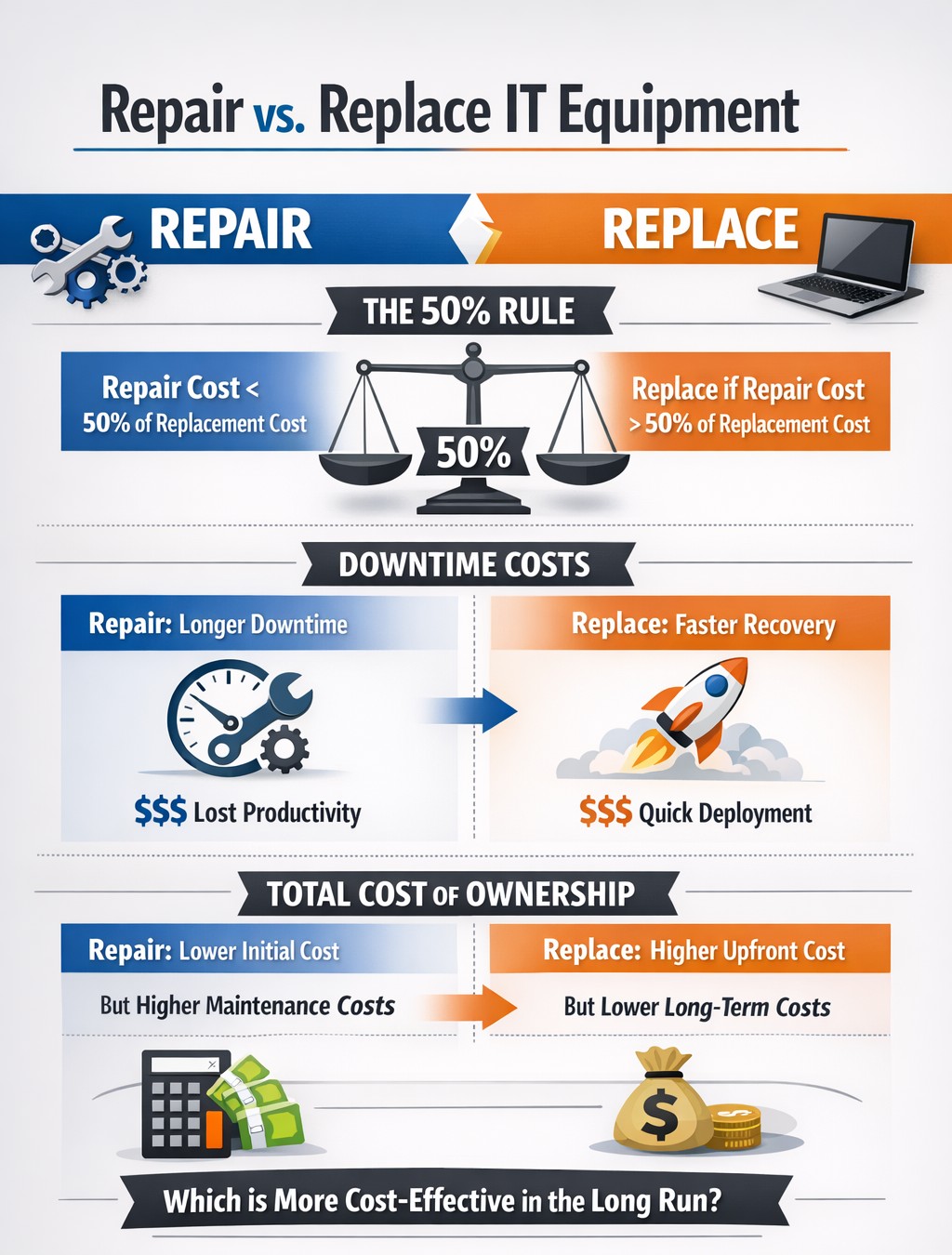
TCO chart reveals when repair beats replacement for network hardware.
With the end of the year approaching, we are continuing our Budget Talk series our newsletter. This time we are diving into the cost of repairing a computer verses the cost of replacing it. Here are the considerations
Why Repair a Computer?
For those who are looking to save money and extend the value of the assets they already have should consider either repairing or upgrading their current computers. There are some repairs or upgrades that are worth considering:
Network Adapter: This is usually simple and cheap to repair in the majority of desktops and some laptops.
Memory: This is a good way to breath new life and performance into a computer. Depending on the age of the memory technology this is another simple and cheap repair or upgrade on all systems.
Hard Drive: Especially for older computers still using the spinning disk type of hard drive, a repair or upgrade is worth the money for the easy boost in performance.
Laptop Keyboard: This item could go either way, the price from the manufacturer is sometimes high but the repair time is fairly low.
These will often allow computers to continue being used for an additional 1-2 years, but it is our experience that if internal components have started to fail then it is best to start budgeting for replacement.
Why Replace a Computer?
There are repairs and upgrades that are not worth the cost. These items should definitely make you consider replacement:
CPU: The main processor of the computer is usually not easily upgraded and every year they come out with significant improvements in them. If your CPU is more than 3 years old then there is enough of an increase in speed that replacement it best.
Motherboard: If the motherboard of the computer is failing, especially for computers that from major manufacturers, the cost of repair is usually too high (over half the cost of new computer). Best to replace the computer if not under warranty.
Laptop Screen: This item, especially if it is a touch screen, is absolutely not worth replacing. The cost of the part is usually around half the cost of the laptop and the labor involved can be prohibitive. If your screen is broken best to get a replacement.
Please remember that all new computers are able to be depreciated for up to four years based on industry standards and that repairs do not qualify.
Don’t wait until system failures disrupt your operations. Contact Farmhouse Networking now to schedule a comprehensive IT lifecycle assessment. Let’s work together to optimize your technology investments and keep your business running smoothly into the new year and beyond.
Araknis delivers enterprise-grade performance and remote monitoring for business networks.
A reliable and robust network infrastructure is crucial for success. Araknis, a leading provider of networking solutions, offers a range of multi-gig VPN routers that are specifically designed to meet the diverse needs of modern businesses. Let’s explore why Araknis stands out as the top choice for business networks.
Unparalleled Performance
Araknis routers and switches are built to handle the demands of high-speed internet connections, supporting up to multi-gigabit 2.5Gbps throughput from your internet provider and up to 10Gbps throughout the network. This impressive capability ensures that your business network can handle large data transfers, video conferencing, and other bandwidth-intensive applications with ease.
Versatility and Flexibility
One of the key strengths of Araknis is its versatility. Whether you need a wireless solution, a wired setup, or a combination of both, Araknis has you covered. Their product line includes:
Wireless access points with built-in Wi-Fi 6 technology
Wired routers and switches for more traditional ethernet or modern fiber setups
PoE+ enabled ports to power all the phones, cameras, and other network devices
1U rack-mountable options for server rooms
This variety ensures that regardless of your business’s physical environment or networking requirements, there’s an Araknis network that fits perfectly.
Advanced Security Features
Araknis doesn’t compromise on protection. Their routers come with:
OpenVPN support: allowing for secure remote worker connections.
IPsec VPN support: allowing for secure office-to-office or office-to-cloud connection
Embedded firewall: Stateful Packet Inspection (SPI), Denial of Service (DoS) prevention, and WAN Request Blocking
VLAN routing: segment your network for added security
WiFi guest network: keep guest online and separated from business data
Cloud Management
Perhaps one of the most compelling reasons to choose Araknis is cloud management. This powerful management platform offers:
Faster setup and configuration
Robust remote management capabilities including printers and other network devices
Enhanced visibility and access to all network devices
Advanced troubleshooting tools
Real-time system health and diagnostic data
These features significantly reduce the need for on-site visits, saving time and resources while ensuring your network runs smoothly.
Future-Proof Investment
By choosing Araknis, businesses are making a future-proof investment. The routers, switches, and access points are designed to support the increasing internet speeds available today and are ready for the demands of tomorrow. This forward-thinking approach means your network infrastructure can grow and adapt as your business evolves.
Araknis routers offer a compelling combination of performance, versatility, security, and management capabilities that make them an excellent choice for business networks of all sizes. From small offices to medium enterprises, Araknis provides the reliable foundation needed to keep your business connected and productive.
Ready to elevate your business network with Araknis? Don’t wait to experience the difference. Contact Farmhouse Networking today to discuss how we can configure an Araknis-powered network tailored to your specific business needs. Let us help you build a network that drives your business forward.
Zero trust enables secure, high-performance networks across distributed business sites.
Multi-location companies face unique challenges when it comes to maintaining consistent and efficient network performance across all their sites. A robust and optimized network is crucial for seamless operations, effective communication, and maintaining a competitive edge. Let’s explore how businesses can optimize their network performance across multiple locations.
The Importance of Network Optimization
For multi-location businesses, network optimization is not just about speed—it’s about creating a cohesive, secure, and efficient digital environment that supports productivity and growth. A well-optimized network ensures:
Consistent performance across all locations
Improved collaboration and communication
Enhanced security and data protection
Increased operational efficiency
Better customer experience
Key Strategies for Network Optimization
Network Monitoring and Analysis: Implementing comprehensive network monitoring tools allows businesses to gain real-time insights into their network performance across all locations. This proactive approach helps identify potential issues before they impact operations.
Traffic Prioritization: Utilizing Quality of Service (QoS) protocols to prioritize critical business applications ensures that essential services receive the necessary bandwidth, regardless of location.
Load Balancing: Distributing network traffic evenly across multiple servers or network links prevents any single point from becoming overwhelmed, ensuring smooth operations across all sites. This also avoids single points of failure.
Network Segmentation: Dividing the network into smaller, manageable segments can significantly reduce congestion and improve overall performance, especially for businesses with multiple locations.
Regular Hardware and Software Updates: Keeping network infrastructure up-to-date across all locations is crucial for maintaining optimal performance and security.
Secure Remote Connections: Satellite offices will need to connect back to the main office for specific resources like authentication, computer policies, and industry specific applications. Making sure these remote connections remain online and secure is essential to make sure remote offices stay productive.
Implementing Network Optimization Strategies
To effectively optimize your multi-location network:
Conduct a comprehensive network audit across all locations to identify performance bottlenecks and security vulnerabilities.
Implement unified network monitoring tools to gain visibility into performance across all sites.
Standardize network infrastructure and policies across locations to ensure consistency and ease of management.
Utilize cloud-based solutions for improved accessibility and scalability across multiple sites.
Regularly review and update your network optimization strategy to adapt to changing business needs and technological advancements.
The Role of Managed IT Services in Network Optimization
A Managed IT services provider can be instrumental in implementing and maintaining these optimization strategies:
Centralized Management: They provide a single point of contact for all network-related issues across locations.
Customized Solutions: Tailoring optimization strategies to meet the specific needs of each business location.
Continuous Improvement: Regularly assessing and upgrading network performance based on the latest technologies and best practices.
Disaster Recovery and Business Continuity: Implementing robust backup and recovery solutions to ensure business continuity across all locations.
Optimizing network performance for multi-location businesses is a complex but crucial task. By leveraging the expertise of a Managed IT services provider, businesses can ensure that their network infrastructure is not just a utility, but a strategic asset that drives growth and innovation.
Ready to take your multi-location network performance to the next level? Contact Farmhouse Networking today to get started on your network optimization journey. Our team of experts is ready to help you create a seamless, efficient, and secure network environment across all your business locations.
MDM centralizes BYOD security, remote wipe, and app control for enterprise protection.
Mobile devices, like smart phones and tablets, have become integral to business operations. However, with the convenience of mobility comes the challenge of securing sensitive corporate data. This is where Mobile Device Management (MDM) steps in as a crucial strategy for businesses of all sizes.
Understanding Mobile Device Management
Mobile Device Management refers to the administration and oversight of mobile devices like smartphones, tablets, and laptops that connect to your company’s network. The primary goal is to enable employees to conduct business from convenient devices while maintaining robust data security.
Key Strategies for Secure Mobile Device Management
Implement Comprehensive Policies: Developing clear and enforceable mobile device policies is the foundation of effective MDM. These policies should cover:
Acceptable use guidelines
Password requirements
App installation restrictions
Data access protocols
Utilize Encryption: Encryption is a powerful tool in your MDM arsenal. By encrypting data both in transit and at rest, you significantly reduce the risk of unauthorized access if a device is lost or stolen.
Enable Remote Wiping Capabilities: In the event of device loss or theft, the ability to remotely wipe corporate data is invaluable. This feature ensures that sensitive information doesn’t fall into the wrong hands.
Implement App Management: Control which apps can be installed on devices and manage app updates centrally. This helps prevent security vulnerabilities and ensures all devices have the latest, most secure versions of approved apps.
Regular Security Updates: Ensure all devices receive timely security updates and patches. This helps protect against newly discovered vulnerabilities and threats.
The Role of a Managed IT Services Provider
Implementing and maintaining an effective MDM strategy can be complex and time-consuming. This is where a Managed IT Services Provider (MSP) can be invaluable. An MSP can:
Assess your specific MDM needs
Implement the right MDM solution for your business
Manage device enrollment and configuration
Monitor devices for security threats
Provide ongoing support and maintenance
By partnering with an MSP, you can ensure your MDM strategy is robust, up-to-date, and aligned with your business needs.
Benefits of Effective Mobile Device Management
When implemented correctly, MDM offers numerous benefits:
Enhanced data security
Improved employee productivity
Reduced IT administration overhead
Better compliance with data protection regulations
Simplified device lifecycle management
Mobile Device Management is no longer a luxury—it’s a necessity for businesses operating in our mobile-first world. By implementing strong MDM strategies and partnering with a trusted Managed IT Services Provider, you can harness the power of mobile technology while keeping your business data secure.
Ready to take control of your mobile device security? Contact Farmhouse Networking today to get started with a comprehensive Mobile Device Management solution tailored to your business needs. Don’t wait for a security breach to happen—secure your mobile future now.
As our business continues to grow our focus is on providing white labeled Tier 3 IT support services, RMM as a service, and co-managed IT services. This blog will be highlighting tips for using PowerShell to deploy Synology Active Backup for Business.
Research
Found a support page from Synology that details how to edit the MSI file and deploy it via a Group Policy Object. We are using a similar method to edit the MSI package and deploy it from a local share to all computers via the RMM. You will need to configure a Synology Active Backup for Business template for PCs and download the MSI installer. We use a software called InstEd to edit the MSI installer as follows:
Click Property in the Tables list on the left. Enter the values for the following properties3:
USERNAME: Enter the username for accessing the Synology NAS.
NO_SHORTCUT: Enter “1” if you want to hide the Active Backup for Business Agent’s icon from the main menu of the end user’s device.
ADDRESS: Enter the IP address of the Synology NAS.
PASSWORD: Enter the password for accessing the Synology NAS.
ALLOW_UNTRUST: Enter “1” if you want to connect to the Synology NAS using an IP address instead of a domain or DDNS.
PROXY_ADDR, PROXY_PORT, PROXY_USERNAME, PROXY_PASSWORD: Enter these values only when users have to access your Synology NAS via proxy.
Click File > Save
Once done, upload to the local network share and take note of the share path – i.e. \\192.168.20.10\Support
Variables
$MSIArguments = This will include full file name of the Synology Active Backup for Business MSI installer – i.e. ‘Synology Active Backup for Business Agent-2.7.0-3221-x64.msi’
Script Snippet
Push-Location -Path '\\192.168.20.10\Support' -StackName 'Backup'
Set-Location -StackName 'Backup'

$MSIArguments = "/i Synology Active Backup for Business Agent-2.7.0-3221-x64.msi"

Start-Process "msiexec.exe" -ArgumentList $MSIArguments -Wait -NoNewWindow
The script will take several seconds to minutes to run based on the speed of the computer. The computers will start populating on their own into the Synology Active Backup for Business app.
If your company is a MSP or wants to become one and automation just seems out of reach, then contact usto run your RMM for you.
And God will generously provide all you need. Then you will always have everything you need and plenty left over to share with others. As the Scriptures say, “They share freely and give generously to the poor. Their good deeds will be remembered forever.” For God is the one who provides seed for the farmer and then bread to eat. In the same way, he will provide and increase your resources and then produce a great harvest of generosity in you. - 2 Corinthians 9:8-10
We use cookies to ensure that we give you the best experience on our website. If you continue to use this site we will assume that you are happy with it.